

Every year, Indian enterprises lose thousands of productive hours to IT failures nobody saw coming. A server drops mid-shift. A security patch gets missed. A laptop dies on the morning of a board presentation. The break-fix cycle, wait for something to break and then scramble, has quietly become one of the most expensive habits in corporate India.
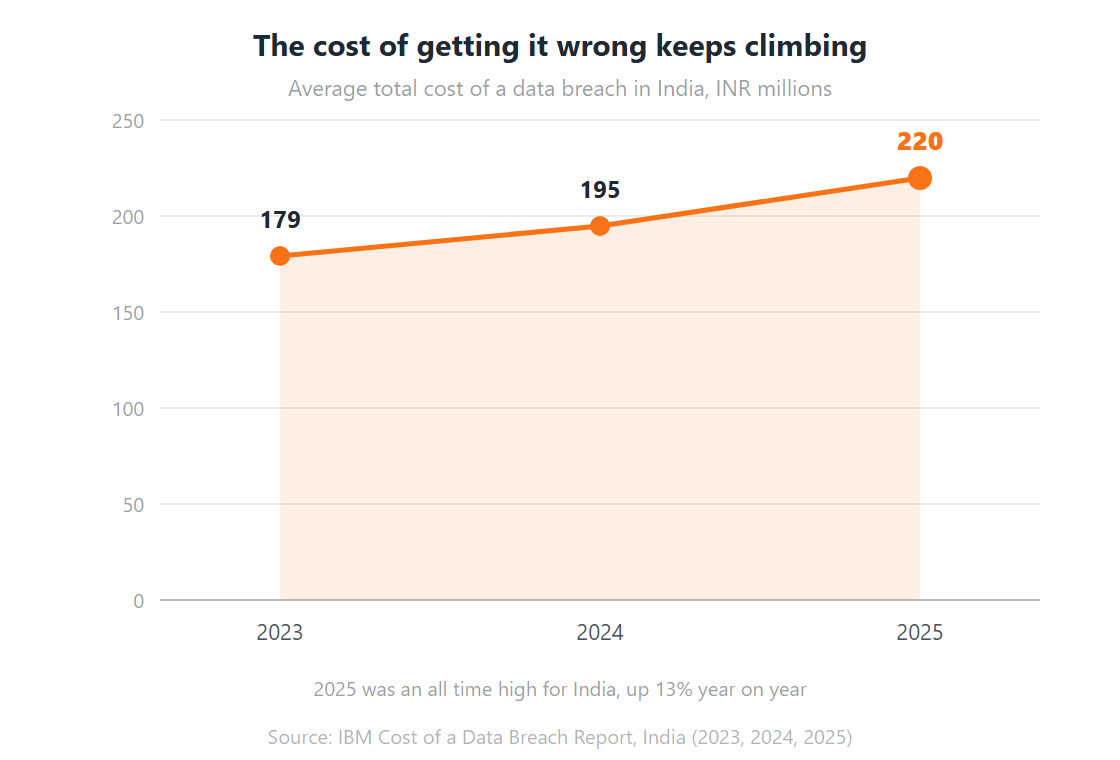
The numbers back that up. IBM found the average data breach in India cost INR 220 million in 2025, an all time high and 13% up on the year before (IBM, 2025). Separately, ITIC’s downtime research puts a single hour of unplanned downtime above USD 300,000 for 91% of mid-sized and large enterprises (ITIC, 2022). Reactive IT is not cheap. It just hides its cost in places the IT budget does not show.
Managed services exist to break that cycle. Not by adding IT headcount, but by changing how IT gets delivered in the first place, which is why the model has become the backbone of enterprise IT strategy rather than a line item under support.
This guide covers what managed services are, how they work, what types exist, what they cost, and how they compare to running IT in house. It’s written for IT managers, CIOs, and business leaders who want a straight answer rather than a brochure.
Key Takeaways
Managed services means a provider runs a defined slice of your IT under an SLA, continuously, rather than fixing things after they break.
The business case is risk, not just cost: the average Indian data breach hit INR 220 million in 2025.
Talent is the other driver. Only 34% of security teams say they’re appropriately staffed.
Four pricing models dominate: per user, per device, all inclusive flat fee, and tiered. The cheapest headline rate is rarely the lowest total cost.
Managed services and in-house IT are not either/or. Most mature setups run both, split by a clear RACI.
What Are Managed Services?
Managed services is a delivery model where a third party provider, a Managed Service Provider or MSP, takes ownership of a defined set of IT functions under a subscription-based Service Level Agreement. Gartner sizes the wider category that contains it at more than USD 1.87 trillion in 2026, the largest single slice of a USD 6.31 trillion global IT spend (Gartner, April 2026). Instead of reacting to problems after they surface, the MSP monitors, maintains, and tunes your environment continuously.
The term gets used loosely. People swap it with “IT outsourcing” and “IT support” as though the three are interchangeable. They’re related. They are not the same, and the difference matters once you start comparing quotes.
Traditional IT outsourcing usually means handing over a whole function, sometimes including the staff who run it, to an external vendor. Managed IT services for modern enterprises is more modular. You pick the scope: network security only, cloud infrastructure only, or the full stack. The MSP operates inside that boundary against agreed metrics that define what “good” actually means.
The second difference is temporal. A traditional support contract means somebody fixes things when they break. A managed services contract means the environment is watched around the clock, so most failures get intercepted before they land. That single shift, reactive to proactive, is where the value sits.
Worth naming the adjacent roles too, because buyers confuse them. A managed service provider (MSP) handles general IT operations. An MSSP is the security specialist variant, running a SOC and threat response. Some vendors do both under one contract. Many do not, and finding that out after signing is an expensive way to learn.
How Do Managed Services Work?
The mechanics vary by provider, but nearly every engagement moves through the same six stages, and the whole model rests on shortening detection time. IBM’s 2025 research found the global mean time to identify and contain a breach fell to 241 days, a nine year low, with faster detection doing most of the work (IBM, 2025). Continuous monitoring is how an MSP attacks that number on your behalf.
Step 1: Environment Assessment and Onboarding
Before anything goes live, the MSP audits your current environment: infrastructure, software and licensing, security posture, and any SLAs or vendor contracts already in place. The purpose is to establish what exists, what’s exposed, and what falls inside scope.
This stage matters more than most buyers realise. An MSP that skips a proper assessment, or rushes one, is setting itself up to miss things. Ask for the written output before you sign anything.
Step 2: SLA Definition
Once scope is agreed, you negotiate the Service Level Agreement. It defines what the MSP owns, what response and resolution times apply per incident class, what uptime is guaranteed, and what happens when a target is missed.
The terms worth arguing over: incident classification (P1/P2/P3), response commitments per priority, escalation paths, reporting cadence, and the credits or penalties that apply on breach.
Step 3: Continuous Monitoring
Monitoring tools go across the environment and run 24/7, collecting data on performance, security events, network traffic, and user activity. Anomalies raise alerts. Scripts handle routine responses. Engineers handle anything needing judgement.
The design goal is shift left: move detection as early in the cycle as possible, before users are affected. In practice that means an MSP’s value shows up as incidents that never happened, which is uncomfortable to put on a dashboard but real all the same.
Also read: Remote Infrastructure Management for Modern Enterprises
Step 4: Proactive Maintenance
Monitoring catches problems. Maintenance prevents them. Patch cycles, firmware updates, capacity planning, performance tuning, scheduled health checks. This is the unglamorous work that keeps an environment stable across years, and it’s the first thing in-house teams drop when they’re busy firefighting.
Step 5: Incident Response and Resolution
When something does break, and eventually something always does, the MSP responds against the agreed SLA. P1 incidents such as full outages and security breaches get immediate attention. Lower priorities queue and clear inside agreed windows. Every incident is logged, tracked, and reported.
Step 6: Reporting and Review
Good providers send performance reports monthly, covering SLA adherence, incident volume and trend, availability, and any risks coming down the road. Quarterly business reviews give both sides a structured chance to reset scope as the business changes.
If your MSP isn’t proactively sharing performance data, that’s a red flag. You should never have to chase for a status update on your own infrastructure.
Also read: AIOps in Managed Services: Transforming IT Operations
Types of Managed Services: What You Can Actually Buy
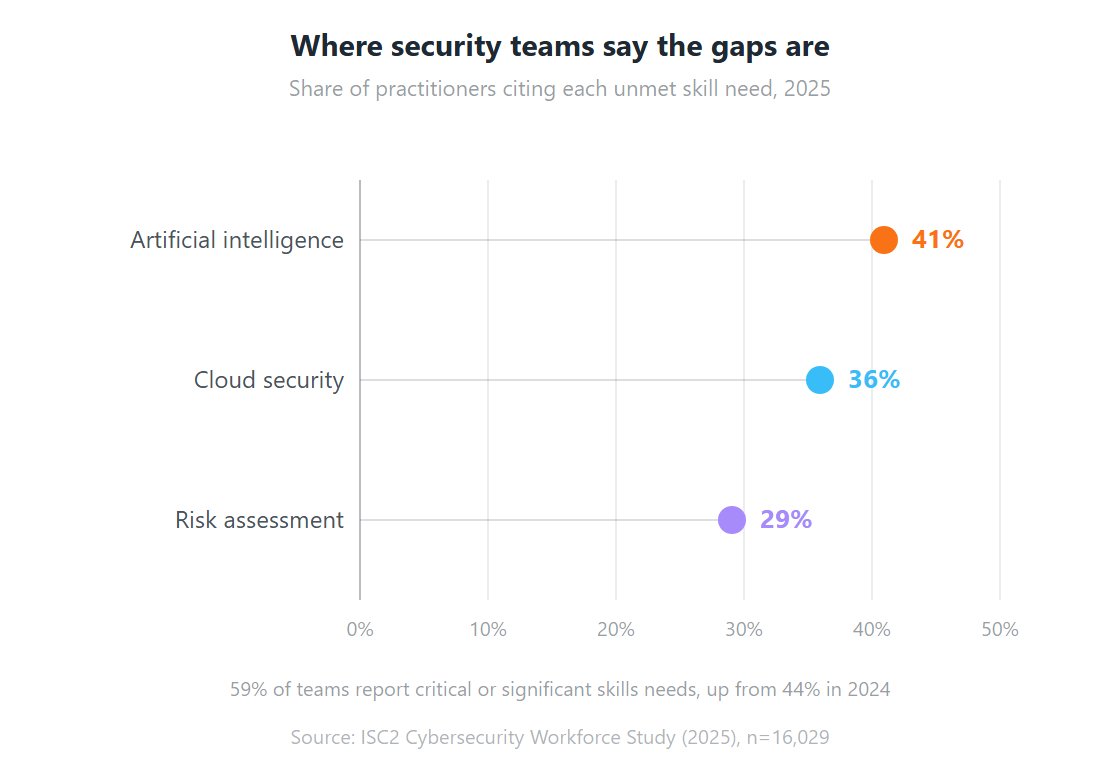
Managed services is not one product. It’s a delivery model that can wrap almost any area of IT, and the fastest growing slice of it is security, driven by a talent gap that shows no sign of closing. ISC2’s 2025 study of 16,029 practitioners found 59% reporting critical or significant skills needs, up sharply from 44% a year earlier (ISC2, December 2025). The categories below cover what most Indian enterprises actually buy.
| Service Type | What It Covers | Typical Reason for Buying |
| Managed IT Infrastructure | Servers, storage, data centre equipment, hardware lifecycle, performance monitoring | Ageing hardware; no internal depth in infrastructure management |
| Managed Network and Security | Firewall management, VPN, network monitoring, endpoint protection, DDoS mitigation | Complex multi-site networks; growing threat surface |
| Managed Cloud Services | AWS, Azure and GCP management; migration; hybrid cloud operations; cost optimisation | Cloud sprawl, uncontrolled spend, no cloud-native expertise in house |
| Managed Digital Workplace | End-user computing, device management (MDM/UEM), M365 and Google Workspace, VDI | Large distributed workforces; BYOD complexity; hybrid work support |
| Managed Application Services | ERP support, application monitoring, performance tuning, release management | Business-critical apps needing specialist support beyond internal capability |
| Managed Cybersecurity (MSSP) | SOC-as-a-service, SIEM, threat detection and response (MDR), vulnerability management | ISO 27001, DPDP Act and GDPR obligations; attacks getting more sophisticated |
| Managed Help Desk / Service Desk | L1/L2/L3 user support, ticket management, ITSM tooling, knowledge base | High request volume; 24/7 coverage without building a round-the-clock team |
| Managed Data Centre Operations | Co-location management, power and cooling, physical infrastructure, DR readiness | You own a data centre but lack the headcount to run it efficiently |
Most enterprises don’t buy all eight at once. The common entry point is managed help desk plus infrastructure monitoring, because that’s where reactive support costs are highest and most visible to finance. Scope expands from there as trust builds.
Managed Services vs In-House IT vs Break-Fix: Which Model Fits?
Break-fix is the model that quietly costs the most, because its price tag lands as downtime rather than invoices, and ITIC found a single hour of downtime exceeds USD 300,000 for 91% of mid-sized and large enterprises, with 44% saying one hour can cost over USD 1 million (ITIC, 2022). Each of the three models works. Each suits a different situation.
| Factor | Managed Services | In-House IT Team | Break-Fix Support |
| Cost model | Fixed monthly subscription, predictable | Salaries, benefits, tools, training. Predictable but high | Pay per incident. Low baseline, high variance |
| Coverage hours | 24/7 monitoring and support as standard | Business hours unless you staff shifts | Business hours, or emergency rates |
| Depth of expertise | Specialist teams across security, cloud, networking in one contract | Broad generalists. Deep expertise needs expensive hires | Whoever is available, often a single generalist |
| Scalability | Add or remove services via contractual change | Hiring and offboarding is slow and costly | No scaling. Same model regardless of growth |
| Proactive vs reactive | Proactive. Issues detected before users notice | Varies with team discipline and tooling investment | Entirely reactive. Nothing happens until something breaks |
| Risk and accountability | SLA defines accountability, with credits or penalties | Internal accountability only, culture dependent | No accountability structure |
| Technology currency | Provider continuously invests in tooling and certifications | Requires ongoing training budget and internal initiative | No incentive for technology investment |
| Best suited for | Businesses wanting predictable IT cost and proactive management without large internal teams | Large enterprises with complex proprietary systems needing deep internal ownership | Very small businesses with minimal IT and low risk exposure |
One correction to a common assumption: managed services and in-house IT are not mutually exclusive. Plenty of organisations run both, using an MSP to extend coverage into areas where building internal capability costs more than it’s worth. Treat it as a resource allocation decision, not a binary one.
What Are the Real Benefits of Managed Services?
The case is usually made on cost, and the cost argument is real. But the sharper argument in 2026 is exposure. IBM’s data shows Indian organisations making extensive use of AI and security automation paid substantially less per breach than those with none, and that automation depth is exactly what an MSP contract buys you without a hiring cycle (IBM, 2025).
1. Cost Predictability
Budgets built around break-fix are structurally unpredictable. One hardware failure, one ransomware incident, or one unplanned scaling event can each generate a six figure month. A managed services contract replaces that variance with a fixed fee, converting a lumpy capital expense into an operating cost finance can actually plan against.
Also read: Why Businesses Need IT Managed Services in 2026
2. Access to Specialist Expertise
Hiring a cloud architect, a security engineer, a network specialist, and a service desk lead is slow and expensive. It’s also getting harder: only 34% of security teams report appropriate staffing levels, while 62% report significant or slight shortages (ISC2, 2025). An MSP contract gives you those skills without carrying the headcount.
This matters most in security and cloud. The technology moves fast, certifications carry weight, and a knowledge gap gets expensive quickly. Few mid-sized businesses can justify certified experts in every domain. An MSP spreads that expertise across its client base, which is the only reason the economics work.
3. Proactive Problem Prevention
This benefit takes the longest to appreciate and usually ends up the most valued. Under continuous monitoring, most problems get intercepted before they cause visible disruption. A storage array nearing capacity gets flagged. A server showing early failure signatures gets replaced. A suspicious authentication pattern gets investigated before it becomes an incident.
The absence of incidents is hard to celebrate. But organisations that move off break-fix consistently report spending far less time in crisis mode.
4. Scalability Without Hiring
Growing businesses hit the same wall repeatedly: they need more support, hiring takes a quarter, and the need is immediate. Managed services absorbs growth through scope change instead of recruitment. A new office, 200 new joiners, or a cloud migration all get handled inside the existing relationship with an amended SLA rather than a three month hiring cycle.
5. Compliance and Security Assurance
Regulatory pressure on Indian enterprises keeps building. ISO 27001, the DPDP Act, GDPR obligations for anyone touching EU data, RBI guidelines for financial institutions, and sector rules in healthcare and government all demand ongoing operational discipline rather than an annual audit sprint.
A capable MSP builds compliance into its standard operating model. Patch cycles documented. Access controls maintained. Incident logs kept audit ready. For regulated businesses, that alone can carry the cost case.
6. Freeing Internal Teams to Focus on Strategy
In-house teams at growing companies burn most of their week on tickets, device provisioning, and maintenance. That’s time not spent on internal tooling, product support, or transformation work.
When an MSP owns the operational layer, internal talent moves up the value chain. This is especially relevant for GCCs, where internal teams are typically doing high value engineering that shouldn’t be interrupted by L1 tickets.
Also read: How Managed IT Services Keep Your Business Up to Date
7. 24/7 Coverage Without 24/7 Staffing
Running follow-the-sun support internally means multiple shifts, real staffing cost, and constant roster management. Most businesses can’t justify it. Managed services ships 24/7 monitoring and response as a baseline feature, so the environment stays watched when the office is dark.
How Much Do Managed Services Cost?
Pricing depends on scope, scale, and SLA terms, so no honest guide quotes a single number. What you can pin down is the shape of the four models, and which one aligns the provider’s incentives with yours. For context on the scale of spend involved, IT services including managed services is forecast to pass USD 1.87 trillion globally in 2026 (Gartner, April 2026).
Per-User Pricing
The most straightforward model. A monthly fee per user covers that person’s devices, support, and any in-scope services. It fits best when end-user support and digital workplace management are your primary need. Easy to budget, and it scales cleanly with headcount.
Per-Device Pricing
A fee per managed device: server, workstation, or network device. This suits businesses whose complexity comes from infrastructure rather than user count. A manufacturer with a large plant floor and few office users will usually find per-device pricing more rational than per-user.
All-Inclusive Flat Fee
One monthly fee covers everything in scope regardless of incident volume, user count, or device count. It gives maximum budget predictability, and it’s the only model that structurally aligns the provider with you: the fewer incidents they resolve, the better their margin. That’s a genuine incentive for proactive management rather than a promise of one.
Tiered or A La Carte Pricing
You take a baseline package and add components as separate line items: 24/7 SOC, cloud management, dedicated helpdesk. Flexible, but it needs active scope governance. Cost creeps when nobody is tracking what got added over eighteen months.
A lower monthly fee is not automatically cheaper. A provider with a low headline rate and thin monitoring will cost you more in incident resolution, downtime, and lost productivity. Given ITIC’s finding that 44% of enterprises put a single downtime hour above USD 1 million, the invoice line is rarely where the real money is decided.
Which Industries Need Managed Services Most?
Managed services is not sector specific. It applies anywhere IT is business critical and failure is expensive, which is now most places. What changes by sector is the primary driver, and financial services carries the sharpest version of it: IBM found financial services recorded the highest average breach cost in India of any sector (IBM, 2025).
Banking and Financial Services (BFSI)
BFSI faces three pressures at once: strict regulation under RBI, SEBI and IRDAI, near zero tolerance for downtime, and an attack surface that widens with every new digital channel. Fifteen minutes of core banking unavailability carries both customer and compliance consequences.
For BFSI, managed security and managed infrastructure are the usual entry points. 24/7 SOC coverage, incident response, and audit-ready compliance documentation are what resonate with CIOs here.
Healthcare
Healthcare IT sits between two non-negotiables. Systems must be available, because clinical decisions depend on them. Patient data must be protected to a standard equivalent to HIPAA. The cost of a breach, reputational and regulatory as much as operational, is severe.
Healthcare engagements typically cover endpoint management, since the volume of clinical devices is difficult to manage internally, plus network security and application support for hospital management systems and EMRs.
Manufacturing
Manufacturers are managing the convergence of operational technology and IT networks. Factory floor systems connecting to enterprise networks creates a security exposure most plant managers are not equipped to handle. At the same time, ERP systems running production planning and inventory are business critical and need specialist support.
Managed OT/IT security and managed ERP support are the highest priority categories for this sector.
Retail and E-Commerce
Retail has a peak problem. Infrastructure sized for average load falls over during Diwali sales, Big Billion Days, or end of season promotions. Building internal capacity for peaks means paying for headroom that sits idle for ten months of the year.
Managed cloud with elastic scaling, plus intensified monitoring during peak windows, is the standard entry point for retail and e-commerce.
Global Capability Centres (GCCs) and MNCs in India
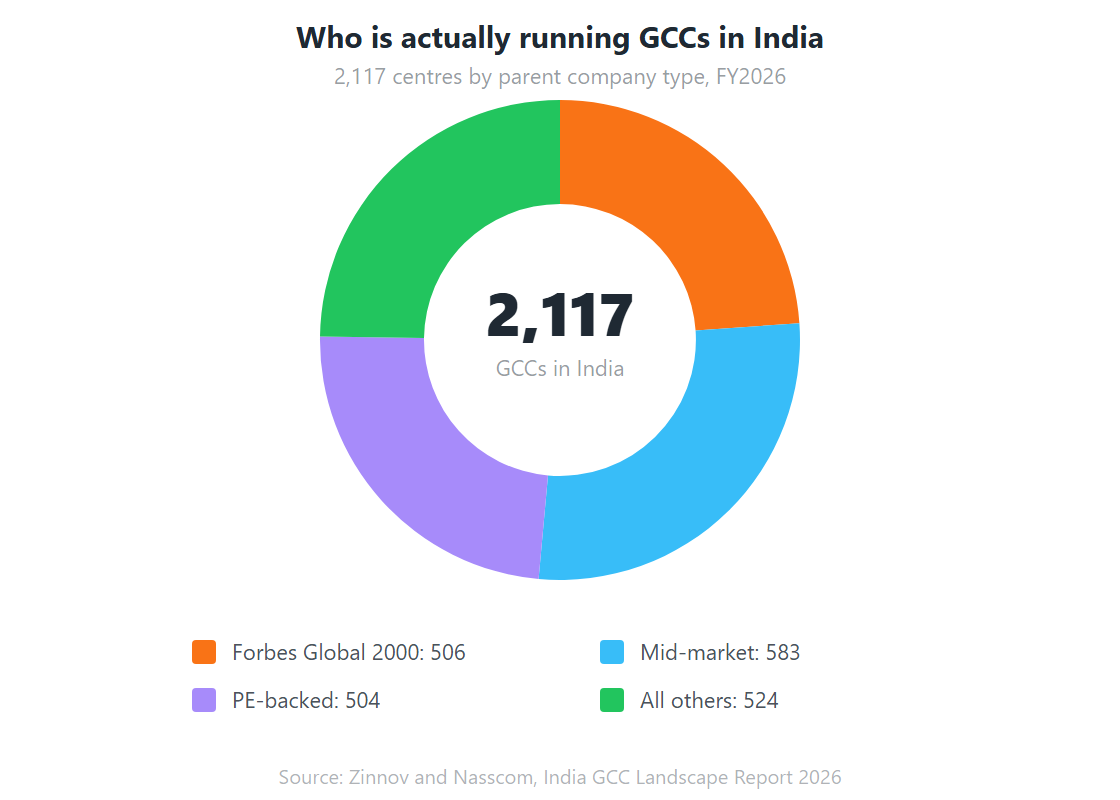
India now hosts 2,117 GCCs operating across 3,728 individual units, employing 2.36 million people and generating USD 98.4 billion in revenue in FY2026 (Zinnov and Nasscom, 2026). These organisations scale fast, from 50 to 500 people inside a year is not unusual, and they need enterprise grade IT from day one without the lead time to build an internal team.
For GCCs, managed services usually starts with infrastructure setup and end-user computing, then expands into IT staffing augmentation and managed security as the centre matures.
How Do You Choose the Right Managed Service Provider?
The market is large and unevenly mature. There’s a wide gap between a provider watching dashboards and one anticipating problems, investing in automation, and treating the engagement as a partnership. Automation depth is the clearest separator: IBM’s India data shows organisations with extensive AI and security automation paid roughly a third less per breach than those with none (IBM, 2025). The seven checks below sort one type of provider from the other.
Related: How to choose the best IT managed service provider
1. Define Your Own Requirements First
Before evaluating anyone, know what you need. Which functions are in scope? What does “good” mean numerically: what uptime, what response times, what reporting? Walk into an evaluation without a defined scope and you’ll buy whatever the sales team sells best, which is rarely what you needed.
2. Scrutinise the SLA Terms
An SLA is only as good as its enforcement mechanism. Ask what the priority classifications are and the commitments attached to each. Ask what credits or penalties apply on a miss. Ask who adjudicates whether a target was met, the provider’s own reporting or an independent measure. A provider reluctant to commit to measurable terms has told you something useful.
3. Check Certifications and Compliance Posture
ISO 27001 is the baseline for most enterprise buyers in India. Depending on sector, add GDPR readiness, SOC 2 attestation, NIST alignment, DPDP Act readiness, or RBI and SEBI experience. Certifications don’t guarantee quality. Their absence is still meaningful.
4. Ask About Monitoring and Automation Depth
Which monitoring tools are deployed? Are incidents detected by systems or reported by users? What share of standard incidents resolve through automation with no human touch? Given the breach cost differential IBM records between automated and non-automated security operations, this is not a technical curiosity. It’s a pricing question in disguise.
5. Verify Global Delivery Capability
If you operate across time zones, ask precisely how 24/7 coverage is delivered. A single delivery centre will have blind spots at certain hours. Ask for the BCP and DR strategy covering the provider’s own operations, not just yours. Continuity risk inside your MSP is continuity risk inside your business.
6. Request References and Case Studies
Any credible provider can produce references. Ask for ones in your industry and at your scale. Case studies describing problem, solution, and measurable outcome beat testimonials every time. A provider who can’t point to documented outcomes in comparable engagements should be asked why.
7. Confirm Pricing Transparency
Ask what’s included and what triggers additional charges. The usual gotchas: per-incident fees above a monthly threshold, after-hours escalation charges, and costs for users or devices beyond base scope. An itemised structure signals a provider planning a long relationship rather than one hiding margin in the small print.
The Bottom Line on Managed Services
Managed services is not a product you buy once and forget. It’s a working relationship that has to evolve as the business does. Scope should change when needs change. The SLA should tighten as the provider learns your environment. Reporting should give you real visibility rather than a monthly PDF nobody opens.
Organisations that get the most from the model treat it as a strategic decision rather than a cost reduction exercise. The cost savings are real. But the more durable return is what internal teams do with the hours they stop spending on reactive support, in a market where the average Indian breach now costs INR 220 million and 62% of security teams are already short staffed.
If you’re evaluating whether the model fits, start with an honest audit of where your current IT setup costs you most, in time, money, or risk. That answer usually determines the scope, and the scope determines everything else.
Team Computers runs managed services engagements across infrastructure, cloud, digital workplace, and security for enterprises and GCCs in India. If you want that audit conversation, start there.
Frequently Asked Questions About Managed Services
Outsourcing typically transfers an entire business function, including staff and processes, to a third party. Managed services is more targeted: you define a specific scope of IT functions, the MSP delivers them under an SLA, and you retain governance. Managed services also leans harder on monitoring tools and automation, whereas traditional outsourcing is mostly labour based. The models overlap. They are not interchangeable.
Yes, with narrower scope. Businesses with 20 to 100 employees usually start with managed helpdesk and endpoint management, covering end-user support without hiring a full-time IT person. Per-user pricing scales down effectively. The real question is whether the provider has packages built for your size, or whether their minimum engagement is designed for enterprises. Ask about their smallest active client to calibrate.
Break-fix is reactive: something breaks, you call, they fix, you pay per incident or hour. No ongoing monitoring, no proactive maintenance, no SLA governing response. Managed services is continuous: the environment is monitored around the clock, issues are often resolved before users notice, and the agreement defines exactly what you get and how fast. With ITIC putting an hour of downtime above USD 300,000 for 91% of mid-sized and large enterprises, the gap in outcomes is measurable.
Most engagements run 4 to 12 weeks from signature to steady state, and the range is driven almost entirely by scope and environment complexity. A managed helpdesk for a single site can go live in 2 to 4 weeks. Full infrastructure and security coverage across multiple locations typically needs 8 to 12 weeks, because discovery, tooling deployment, documentation, and knowledge transfer all have to complete before the SLA can start. Ask any prospective provider for a written onboarding plan with named milestones. A provider promising full coverage in under two weeks is either skipping the assessment or has not read your environment properly.
ISO 27001 is the baseline, demonstrating a formal information security management system. SOC 2 Type II attestation increasingly matters for anyone handling sensitive data. Sector specifics count too: healthcare buyers should probe HIPAA-equivalent controls, financial services buyers should ask about RBI circular compliance, and every Indian buyer should now ask about DPDP Act readiness. Beyond certificates, ask about the provider's own security posture. An MSP with weak internal practices is a supply chain risk you inherit.
This is one of the most common deployment models and it works well when boundaries are explicit. In-house teams usually keep strategic decisions, internal development, and vendor relationships. The MSP takes operational functions: monitoring, helpdesk, infrastructure management, security operations. The thing that makes or breaks it is a clear RACI matrix agreed at the outset. Ambiguous ownership produces gaps and conflicts, reliably.
They reduce it when the contract is written correctly, and transfer nothing legally. Regulatory accountability under frameworks like the DPDP Act stays with you as the data fiduciary regardless of who operates the systems. What a good MSP changes is detection speed and remediation discipline. IBM's 2025 data shows the global mean time to identify and contain a breach fell to 241 days, driven mainly by faster detection, and continuous monitoring is the mechanism behind that. Read the liability clauses carefully: an SLA credit is not indemnity. What is the difference between managed services and outsourcing?
Are managed services suitable for small businesses?
What is the difference between managed services and break-fix IT support?
How long does it take to onboard with a managed service provider?
What security certifications should an MSP hold?
Can managed services work alongside an existing in-house IT team?
Do managed services reduce cyber risk or just transfer it?