

Open a random employee laptop at any Indian company and you won’t just find spreadsheets and slide decks. You’ll find salary slips, health insurance forms, saved passwords, a half-finished tax return, client contact lists, and a browser that auto-fills three different personal email accounts. A recent OnePoll survey for Samsung found that 70% of employees use their work laptop for personal things, and 39% said the device holds a detailed picture of both their professional and personal lives. That mix of company data and personal data is exactly what India’s Digital Personal Data Protection (DPDP) Act now regulates — and it changes what “securing a laptop” is supposed to mean for every employer in the country.
Key Takeaways
- The DPDP Act treats employees as “Data Principals” and employers as “Data Fiduciaries” — employee laptops are now a regulated data environment, not just IT hardware.
- Rule 6 of the DPDP Rules, 2025 sets seven minimum security controls, including encryption and access control, that apply directly to endpoint devices.
- Penalties for DPDP violations in India reach up to ₹250 crore for failing to implement reasonable security safeguards — with no exemption based on company size.
- Full enforcement lands May 13, 2027, but 2026 is the “build year” employers are expected to use to get endpoints, consent, and offboarding in order.
What Counts as “Employee Data” Under the DPDP Act?
The DPDP Act, 2023, and the DPDP Rules, 2025 — notified by MeitY on November 13, 2025 — define personal data broadly as any digital information that can identify a person, and that definition covers far more of an employee’s file system than most IT teams assume. Identification details, government IDs like Aadhaar and PAN, biometric attendance data, salary and bank information, health and insurance records, performance reviews, and background-verification reports all qualify as employee personal data under the law.
Almost every category on that list lives, at some point, on a laptop — in HR portal downloads, in email attachments, in local spreadsheets, or in offline backups synced before a client visit. That’s the core shift: employee data privacy in India is no longer a policy statement in the HR handbook. It’s a technical requirement that follows the data onto whatever device it happens to sit on, including the one an employee carries home every evening.
Why Every Employee Laptop Is Now a Compliance Surface
An answer-first way to put it: in 2025, India recorded its highest-ever average cost of a data breach — around ₹22 crore per incident, according to IBM’s Cost of a Data Breach Report — and endpoints are consistently where those incidents start. Laptops are portable, frequently used for both work and personal browsing, and often the last line of defence before sensitive data leaves the organisation entirely.
This matters because the DPDP Act doesn’t distinguish between a breach that happens on a server and one that happens because someone left a laptop in a cab. Under Section 2(u) of the Act, a “personal data breach” includes any unauthorised access, disclosure, alteration, or loss of access to personal data — a definition wide enough to cover a stolen device, a misconfigured backup, or an employee copying client files onto a personal USB drive on the way out the door. Every laptop that touches employee or customer data is, from a regulatory standpoint, a breach surface the employer is accountable for.
Employer Obligations: Rule 6 and the Laptop Fleet
Under Section 8(5) of the DPDP Act, every Data Fiduciary must implement “reasonable security safeguards” to prevent a personal data breach, and Rule 6 of the DPDP Rules, 2025 turns that into seven concrete, minimum controls: encryption of data at rest and in transit, access controls restricted to authorised personnel, masking or tokenisation where appropriate, continuous monitoring and logging, retention of those logs for at least one year, a documented incident-response process, and contractual security obligations for any data processor involved.
Read that list as an endpoint checklist and the implications for a laptop fleet are immediate. Encryption means whole-disk or file-level encryption on every device, not just the ones IT remembers to configure. Access control means role-based permissions and multi-factor authentication, not shared local admin accounts. Monitoring means logs that can actually reconstruct what happened if a device goes missing — a capability regulators increasingly expect employers to be able to produce on demand.
Consent, “Legitimate Use,” and What Employers Can Skip
Employers get real breathing room here: the DPDP Act recognises processing for “purposes of employment” as a legitimate use, meaning payroll, onboarding, benefits administration, and protecting the business from loss — such as guarding trade secrets or preventing corporate espionage — don’t require separate employee consent. This is one of the more employer-friendly provisions in the Act, and it’s narrower than it sounds; it only covers processing that’s reasonably tied to the employment relationship itself.
Step outside that boundary and consent rules apply in full. Publishing an employee’s photo externally, running employee data through a marketing tool, or extending device monitoring into personal browsing, personal accounts, or off-hours activity all require specific, informed, and separately documented consent — particularly on BYOD devices, where monitoring must be limited to work applications only and employees must be able to opt out without penalty.
The 72-Hour Clock: What Happens When a Laptop Goes Missing
Rule 7 of the DPDP Rules sets a two-stage breach notification duty: affected employees must be informed without delay through a registered communication channel, and a detailed report must reach the Data Protection Board of India within 72 hours of the breach being discovered. For a lost or stolen laptop, that clock starts the moment the incident is known — not once IT has finished investigating what was actually on the device.
This runs in parallel with, not instead of, CERT-In’s existing six-hour reporting mandate for specified cyber incidents, so the same missing laptop can trigger two separate notification obligations on two separate timelines. Meeting either deadline depends entirely on log fidelity: if a security team can’t reconstruct which files were accessible on that device and whether they were encrypted, there’s no way to file a defensible report to either regulator inside the window.
DPDP Penalties in India: What Non-Compliance Actually Costs
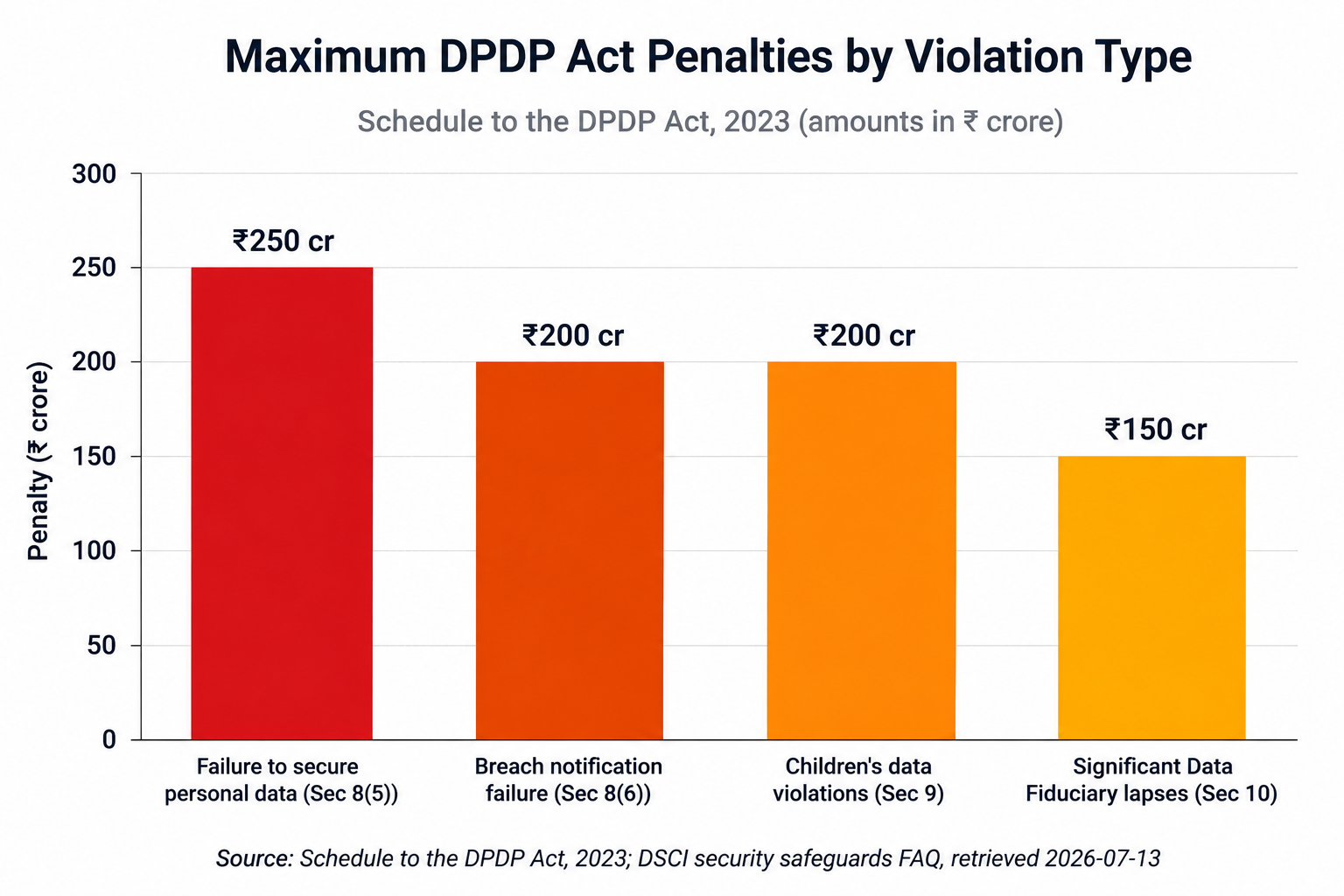
The Schedule to the DPDP Act sets some of the steepest data-protection penalties of any Asian jurisdiction, and they apply per breach, not per company size. A failure to implement reasonable security safeguards — the provision most directly tied to endpoint protection — carries a penalty of up to ₹250 crore. Failing to notify the Board or affected individuals of a breach, or mishandling data belonging to a minor, can each draw fines up to ₹200 crore, and lapses in additional obligations placed on Significant Data Fiduciaries can reach ₹150 crore.
Two details matter for planning purposes. First, the Data Protection Board weighs factors like the nature of the breach, the number of people affected, and the organisation’s compliance history when it sets the actual fine — the figures above are ceilings, not fixed amounts. Second, and more important for smaller organisations hoping the rules don’t apply to them: the Act does not scale penalties by company size or revenue. A 50-person firm and a 5,000-person enterprise face the identical penalty schedule for the identical failure.
BYOD, Offboarding, and the Data That Walks Out the Door
Two moments create the most exposure on employee devices, and both sit outside the daily IT routine. The first is bring-your-own-device use, where personal laptops and phones carry corporate email, client files, and saved credentials with none of the controls a company-issued machine would have — and where DPDP-aligned monitoring has to be scoped tightly to work applications, with personal photos, messages, and browsing history left untouched.
The second is offboarding. Access revocation without device and account cleanup leaves a gap: former employees’ experience letters, salary records, and verification documents remain personal data under the Act long after they’ve left, and reusing that data for future background checks now requires fresh, purpose-specific consent rather than a quiet email between HR teams. A documented exit process — device return, selective remote wipe, access de-provisioning, and retained audit logs — is what turns offboarding from a courtesy into a compliance control.
A Practical Endpoint Readiness Checklist
Mapping Rule 6’s seven controls onto an actual laptop fleet usually comes down to five areas of investment:
- Endpoint encryption and patching — full-disk encryption, next-gen antivirus, and disciplined patch management close the most common gap regulators flag first.
- Identity and access management — MFA, single sign-on, and privileged access controls ensure only the right people can reach personal data, satisfying Rule 6’s access-control requirement directly.
- Data-centric security — DLP and document rights management stop sensitive files from leaving a device unencrypted, whether through email, USB, or a personal cloud account.
- Network visibility — SIEM logging, zero-trust network access, and proxy controls give security teams the audit trail a 72-hour breach report actually depends on.
- Cloud and SaaS controls — CASB and posture management extend the same safeguards to the apps employee laptops connect to every day.
None of this needs to be built from scratch. Team Computers’ cybersecurity solutions are structured around exactly these five areas — endpoint security, identity and access management, data security, network security, and cloud security — giving Indian businesses a direct path from Rule 6’s requirements to a working, auditable endpoint estate.
Frequently Asked Questions
When does the DPDP Act become fully enforceable in India?
The DPDP Rules were notified on November 13, 2025. Provisions for the Data Protection Board took effect immediately, consent-manager provisions activate November 13, 2026, and full compliance obligations — including Rule 6 security safeguards — become enforceable on May 13, 2027.
Does the DPDP Act apply to employee data, or only customer data?
Yes. Employees are classed as Data Principals under the Act, and employers are Data Fiduciaries for any digital personal data they hold — payroll, biometric, health, or performance records included — with the same obligations that apply to customer data.
Can employers monitor what employees do on a work laptop?
Generally yes, provided monitoring is disclosed in a written policy, limited to business purposes, and confined to company-owned devices during work hours. Monitoring a personal (BYOD) device requires separate, explicit consent scoped to work applications only.
What are the DPDP penalties in India for a breach caused by a lost or unencrypted laptop?
A failure to implement reasonable security safeguards under Section 8(5) — which covers device encryption and access control — can draw a penalty of up to ₹250 crore, with the exact amount set by the Data Protection Board based on the breach's scale and impact.
Do small and mid-sized businesses need to comply with the DPDP Act?
Yes. The Act applies to any organisation processing digital personal data in India regardless of size, and the penalty schedule does not offer reduced fines for smaller employers.
Getting Ahead of May 2027
The DPDP Act’s full-compliance deadline may be almost a year away, but the direction of travel is already clear: employee devices are now inside the regulatory perimeter, not outside it. Encryption, access control, monitoring, and a documented offboarding process aren’t just good IT hygiene anymore — they’re the specific controls Rule 6 expects an employer to be able to demonstrate. Getting the endpoint fleet right now is considerably cheaper than explaining a gap in it to the Data Protection Board later.
Team Computers works with businesses across BFSI, IT/ITES, manufacturing, healthcare, and GCCs to close exactly this gap. Talk to our cybersecurity team about mapping DPDP Rule 6 controls onto your employee device fleet.