
Key Takeaways
- Managed print services (MPS) is an outsourced program that assesses, monitors, and maintains a company’s entire print fleet — hardware, supplies, and support.
- The global MPS market hit $49.80 billion in 2025 and is projected to grow at an 8.40% CAGR through 2035 (Precedence Research, 2026).
- Businesses typically save 20-30% on print-related costs after adopting MPS, according to figures reported across independent providers.
- Unsecured printers are a real risk: 56% of IT decision-makers reported a print-related data loss incident in the past year (Quocirca, 2025).
- Choosing a provider comes down to transparent pricing, proactive monitoring, and verifiable security practices.
What Is Managed Print Services?
Managed print services is an outsourced program in which a third-party provider assesses, monitors, and maintains an organization’s entire print environment. That includes printers, copiers, scanners, toner and paper supplies, and the software that tracks how all of it gets used. Instead of your IT team fielding “the printer’s jammed again” calls, the MPS provider handles it.
Think of it the way you’d think of a managed IT service or a fleet-management contract for company vehicles. You don’t own every truck outright and staff a full-time mechanic — you pay a provider to keep the fleet running, and you pay based on usage. MPS applies that same logic to the devices sitting in your break room and copy room.
Here’s what most beginner explanations skip: MPS isn’t really a printer contract. It’s a data contract. The provider’s software quietly counts every page, tracks every toner cartridge, and flags every device nearing failure — turning a black box of hardware into a line item you can actually forecast. That shift from “unpredictable expense” to “measured service” is the real product being sold.
For a deeper breakdown of the Benefits of Managed Print Services you can this article: Top 8 Benefits of Manged Print Services for Business
Managed Print Services vs. Traditional Printer Leasing
A printer lease is a hardware-only financing arrangement: you pay a monthly fee to use a machine, and the leasing company owns the equipment. It tells you what one device costs to rent. Managed print services is a different animal entirely — it bundles hardware, supplies, monitoring, security, and support into one ongoing service that tells you what your entire print operation costs to run.
Businesses that lease printers still handle their own toner ordering, still call a break/fix technician when something jams, and still have zero visibility into which department is driving costs. MPS replaces all of that guesswork with a single, monitored system. Some MPS contracts include leased hardware as one component; the two aren’t mutually exclusive, but they solve different problems.
The practical difference shows up at renewal time. A printer lease renews based on hardware age and usage terms alone. An MPS contract renews based on measured print volume, device performance data, and cost-per-page trends the provider has been tracking the entire time — which gives you real negotiating leverage instead of a guess.
See a detailed comparison on Managed Print services Vs Traditional In house Printing
How Does Managed Print Services Work?
MPS typically starts with a print assessment. In 2026, providers usually spend the first two to four weeks auditing every device in your office, counting print volume, and mapping which departments print the most (industry standard practice, multiple MPS providers, 2025). That baseline drives everything that follows: pricing, device placement, and consolidation recommendations.
After the assessment, the provider deploys or reconfigures your fleet — sometimes replacing a dozen mismatched desktop printers with a smaller number of networked multifunction devices. Remote monitoring software then reports toner levels and device health automatically, so supplies show up before you run out and technicians get dispatched before a breakdown stops your team from working.
Billing usually follows a cost-per-page model or a flat monthly fee that bundles hardware, supplies, and support. You’re not buying printers anymore — you’re buying uptime and predictability. Isn’t that what most IT budgeting is actually trying to achieve?
Contract terms matter here. Most MPS agreements run three to five years, which is long enough for the provider to recoup the cost of new hardware but also long enough that you should scrutinize the exit clauses before signing. Ask what happens to the devices at the end of the term, whether pricing is locked or subject to annual increases, and how quickly the provider is contractually required to respond to a service ticket. A response-time guarantee — often called a service-level agreement, or SLA — is what actually protects you when a device goes down during a deadline crunch.
Why Is the MPS Market Growing So Fast?
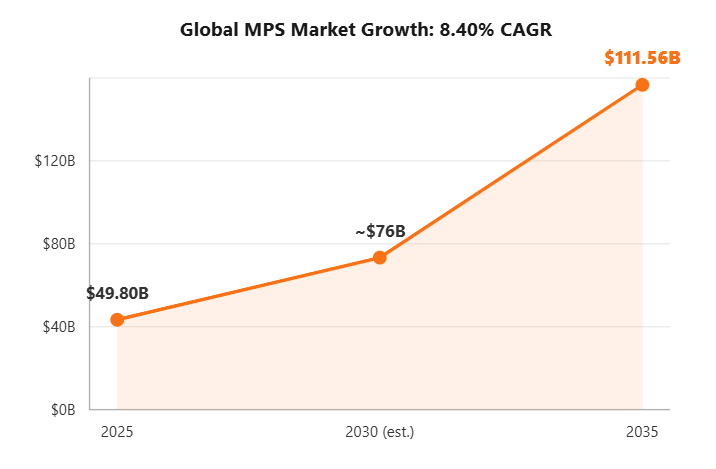
The global MPS market climbed from $46.73 billion in 2023 (Grand View Research, 2024) to $49.80 billion in 2025, and independent analysts now project it will reach $111.56 billion by 2035 — an 8.40% compound annual growth rate (Precedence Research, 2026). North America alone held roughly 38% of the market in 2023, driven largely by hybrid-work IT consolidation.
Two forces are pushing that growth. Distributed teams mean print fleets are now scattered across home offices and satellite locations, which makes manual management nearly impossible. And IT leaders are under constant pressure to convert unpredictable costs into predictable ones — print is one of the last major line items that hadn’t been “managed” the way cloud spend or SaaS licenses have.
A third factor is regulatory pressure. Industries handling sensitive records — healthcare, legal, financial services — increasingly require documented print-security controls to satisfy compliance frameworks like HIPAA or SOC 2. Self-managing that documentation across dozens of unmonitored devices is a losing proposition, which is part of why regulated industries adopt MPS at a higher rate than the market average.
How Much Money Can Managed Print Services Save?
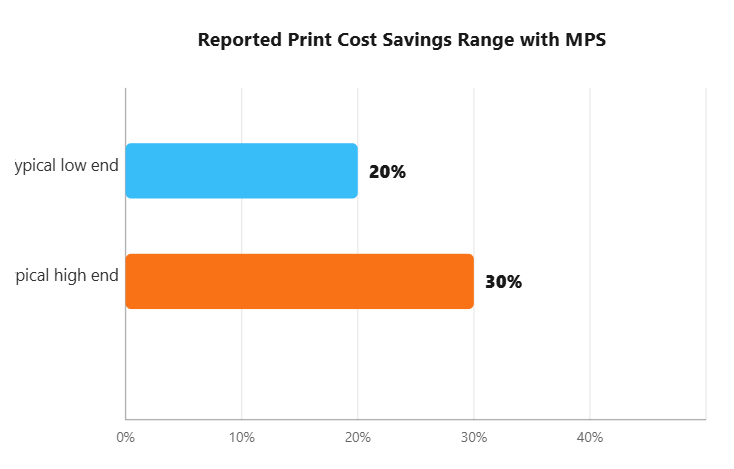
Businesses typically save 20-30% on print-related costs after implementing managed print services, based on figures reported consistently across independent MPS providers in 2025. That range holds up because it’s not one vendor’s marketing claim — it shows up across at least four separate providers with different customer bases.
Where do the savings actually come from? Mostly device consolidation — replacing ten single-function desktop printers with three networked multifunction devices cuts both hardware cost and toner waste. Add in bulk supply purchasing and fewer emergency IT tickets, and the math adds up fast for a mid-sized office.
Anecdotally, the biggest surprise for first-time MPS buyers isn’t the discount on toner — it’s discovering how many devices they were actually running. Print assessments routinely uncover “ghost printers” that finance didn’t know existed, still under a maintenance contract nobody remembers signing.
Savings also compound over the life of a contract. A device that would have failed and been replaced under a break/fix model instead gets flagged early by monitoring software and serviced before it stops working — avoiding both the emergency repair bill and the lost productivity while staff wait on a replacement. Over a three-year contract, that avoided downtime often matters more to a business than the toner discount alone.
What Security Risks Does Managed Print Solve?
In 2025, 56% of IT decision-makers reported at least one print-related data loss incident in the past year (Quocirca, Global Print Security Landscape 2025). Printers are networked computers with hard drives, and most organizations patch them far less often than laptops or servers — which makes them a quiet, overlooked entry point.
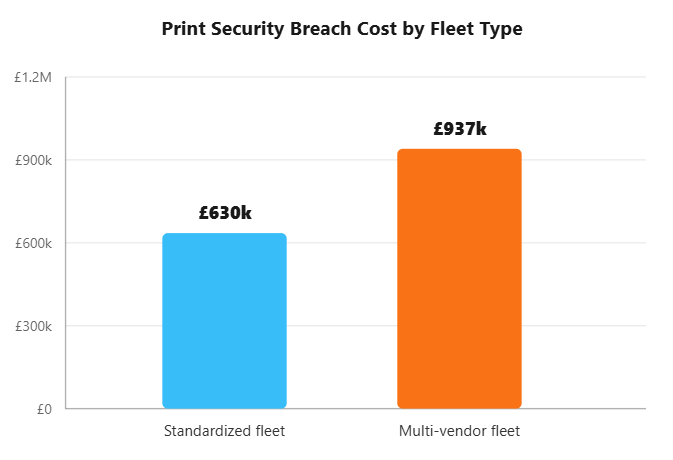
The fleet-standardization angle is worth noting: organizations running standardized, single-vendor print fleets reported an average breach cost of £630,000, compared with £937,000 for multi-vendor fleets (Quocirca, 2025). MPS providers push standardization by design, which is part of why security is bundled into most MPS contracts rather than sold separately.
A good MPS provider applies firmware patches automatically, enforces pull-printing (where documents only print once a user authenticates at the device), and encrypts data in transit between the printer and the network. None of that happens by default on an unmanaged fleet.
How Does MPS Support Sustainability?
An estimated 17% of all pages printed in offices are considered waste, out of roughly 10,000 sheets of paper used per office worker each year (Formstack, Paper Statistics compilation, 2025-2026). That’s not a rounding error — for a 200-person office, it works out to hundreds of thousands of wasted pages annually.
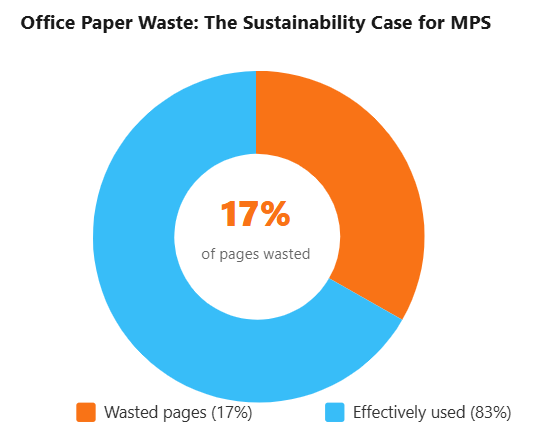
Recycling one ton of paper saves about 17 trees, 7,000 gallons of water, and enough energy to power an average home for six months (StopWaste.org). MPS providers reduce waste at the source — through print-rule enforcement like default duplex printing, usage dashboards that flag over-printing departments, and device consolidation that simply removes the temptation of a printer at every desk.
Ready to see what an unmanaged print environment is really costing you? Most MPS providers offer a free print assessment that maps your device count, print volume, and current spend in about two weeks — with no obligation to sign anything.
How Do You Choose a Managed Print Services Provider?
Start with a free print assessment. Any reputable provider will audit your current fleet before quoting a price — if a vendor skips straight to a contract, that’s a red flag worth taking seriously.
- Transparent cost-per-page pricing — you should see exactly what you pay per color and black-and-white page, with no hidden minimums.
- Remote monitoring software — the provider should track toner levels and device health automatically, not rely on you calling in.
- Security certifications — ask specifically about firmware patching cadence, encryption, and pull-printing support.
- Sustainability reporting — a provider that measures paper and energy savings gives you data for your own ESG reporting.
- References from similarly sized businesses — a provider optimized for enterprise fleets may over-engineer (and overcharge) a 20-person office.
Also ask how the provider handles scaling. A business that opens a second location or doubles headcount needs an MPS contract flexible enough to add devices without renegotiating from scratch. Providers that price rigidly per device, rather than per measured print volume, tend to be harder to scale with over time — worth raising directly in the sales conversation before you sign.
For a full comparison of MPS pricing models, see: Managed Print Services Cost: What to Expect in 2026 → dedicated pricing guide
Frequently Asked Questions
What is a managed print service?
A managed print service (MPS) is an outsourced program where a provider assesses, monitors, and maintains an organization’s entire print environment, including printers, copiers, and supplies. In 2025, the global MPS market was valued at $49.80 billion (Precedence Research, 2026), reflecting how widely businesses now outsource this function.
How much does managed print services cost?
Most MPS contracts bill per printed page (cost-per-page) or a flat monthly fee covering hardware, toner, and support. Businesses typically report 20-30% savings on total print costs after switching to MPS, according to figures reported across multiple independent MPS providers in 2025.
Is managed print services only for large enterprises?
No. MPS providers serve businesses of every size, from five-person offices to global enterprises. Small and mid-sized businesses often benefit the most, since unmanaged print environments can consume a disproportionate share of a small IT budget.
How does MPS improve print security?
MPS providers apply firmware updates, access controls, and encryption across every device in the fleet. This matters because 56% of IT decision-makers reported at least one print-related data loss incident in the past year
Is managed print services the same as printer leasing?
No. A printer lease is a hardware-only financing arrangement, while managed print services bundles hardware, supplies, monitoring, security, and support into one ongoing service. Leasing tells you what a device costs to rent; MPS tells you what your entire print operation costs to run.
Conclusion
Managed print services turns one of the most overlooked corners of a company’s IT spend into something measured, secured, and predictable. To recap: MPS is an outsourced print-management program, the market is growing at 8.40% a year, savings typically land in the 20-30% range, and unmanaged printers carry real security and sustainability costs.