
Most MPS Providers Won’t Give You a Price. This Article Will.
Search “managed print services cost” and you’ll find page after page of providers telling you to “contact us for a quote.” That’s not an answer, it’s a delay tactic designed to get you on a call before you’ve had a chance to think.
Unmanaged print environments quietly consume 1–3% of annual revenue, yet most businesses cannot even state what they spend on printing each month. MPS replaces that invisible, unpredictable cost with a structured, manageable model — but only if you understand how the pricing works before you sign anything.
By the end of this article, you’ll know the three main MPS pricing models, what typical per-page rates look like in India, what’s included versus what costs extra, and how to get a quote that reflects your actual environment, not a provider’s best-case estimate.
Key Takeaways
- MPS pricing follows three models: Cost Per Page (most common), Fixed Monthly Fee, and Cost Per Device/User
- Market average CPP rates for 2025 are ₹0.42–₹1.67 per B&W page and ₹5.85–₹12.55 per colour page
- Colour printing is the single biggest cost variable — even 10% colour volume can significantly increase your total monthly bill
- Most unmanaged offices spend ₹3.35–₹10 per page once all hidden costs are counted — an MPS bid should come in 25–40% below this figure
- Paper, hardware, and out-of-SLA callouts are almost always excluded from MPS contracts — read the fine print
Why Is MPS Pricing Hard to Pin Down?
MPS pricing isn’t arbitrary — but it genuinely isn’t one-size-fits-all. Before you can get a meaningful quote, a provider needs to understand several variables specific to your environment.
Core factors that influence MPS cost include print volume, pricing model type, service level agreements, and device efficiency. A business printing 5,000 pages a month across three newer multifunction devices in one Mumbai office is a fundamentally different proposition from a business printing 50,000 pages a month across a mixed fleet of ageing printers spread across Chennai, Bengaluru, and Delhi.
The biggest single variable? Colour printing. Colour pages can cost 6–8 times more per page than black-and-white — which means a fleet where 20% of output is colour will have a very different monthly cost from one that’s 95% mono, even at identical total page volumes.
This section’s job isn’t to frustrate you. It’s to help you walk into a provider conversation with a clear picture of your own environment — so you can evaluate a quote intelligently rather than taking it on faith.
Understand what MPS includes end-to-end
The 3 MPS Pricing Models Explained
Model 1 — Cost Per Page (CPP) / Click Rate
This is the most common MPS pricing structure in India and globally. You pay a flat rate for every page printed. Black-and-white pages cost less than colour. Toner, parts, labour, and preventive maintenance are bundled into the per-page rate. This model scales directly with your usage.
Typical CPP rates in India (2026 benchmarks):
| Page Type | Market Average (INR) | Unmanaged Cost (INR) |
|---|---|---|
| Black & White (A4) | ₹0.42 – ₹1.67 | ₹1.50 – ₹3.50 |
| Colour (A4) | ₹5.85 – ₹10.05 | ₹8.00 – ₹15.00 |
| B&W (MFD / Copier) | ₹0.42 – ₹0.84 | ₹1.50 – ₹2.50 |
| Colour (MFD / Copier) | ₹5.00 – ₹8.35 | ₹8.00 – ₹12.00 |
CPP rates converted from global market benchmarks (CDS/Parmetech 2025–2026) at ₹83.5/$. Actual rates vary by volume tier, device type, and provider.
Best for: Businesses with variable or seasonal print volumes — legal firms during filing periods, accounting teams at quarter-end, event companies with campaign surges.
Watch out for: Overage charges if you exceed your base volume tier. Some providers charge a blended rate for mixed device fleets, which could mean you’re paying more per page than you should. Always ask for a device-level CPP breakdown.
Model 2 — Fixed Monthly Fee
MPS under a fixed fee model consolidates expenses into a single monthly invoice, eliminating hidden fees and surprise costs — making budgeting straightforward regardless of actual print volume.
Your finance team knows exactly what print will cost each month, every month. No surprises at quarter-end. No usage spikes disrupting the budget.
Best for: Businesses with consistent, predictable monthly print volumes — back-office operations, government departments, educational institutions with steady term-time output.
Watch out for: Providers typically build a safety margin into fixed fee contracts. If your actual usage consistently runs well below the included volume, you may be paying for pages you’re not printing. Negotiate a usage review clause at the 6-month mark.
Model 3 — Cost Per Device / Cost Per User
Cost per user averages print costs across your team, making it easier to manage expenses — particularly effective if print usage is stable across your organisation and you want billing that aligns with headcount rather than output.
Cost per device works similarly — a flat monthly fee per managed printer, copier, or MFD in the fleet, regardless of volume.
Best for: Larger organisations with multiple locations, departments with different usage patterns, or hybrid workforces where users print from several devices and locations.
Useful context for India: Multi-city businesses with offices in metros and tier-2 cities often find cost-per-device contracts easier to reconcile across branch P&Ls than variable CPP billing.
What’s Typically Included in an MPS Contract and What Isn’t
This is the section most providers skip. Don’t let them.
When comparing quotes from multiple providers, you’re often not comparing the same thing. A lower per-page rate can easily mask a contract that excludes several cost items a competitor bundles in. Here’s what a well-structured MPS contract from a reputable Indian provider should include — and what you should expect to pay for separately.
Standard inclusions:
- Remote device monitoring and proactive fleet management
- Toner and consumables, auto-replenished before depletion (no manual ordering)
- All parts and labour for break/fix repairs
- Preventive maintenance on a scheduled cadence
- On-site service within the agreed SLA response window
- Monthly usage reporting with cost and volume analytics
- Print policy setup and enforcement (duplex defaults, colour restrictions by user role)
- Help desk support — typically phone and remote triage
Typically NOT included — clarify these before signing:
- Paper (almost universally excluded; you supply your own)
- Hardware purchase or lease (usually a separate line item, though some providers bundle it)
- Network infrastructure, cabling, or Wi-Fi changes
- Out-of-SLA emergency callouts (faster response = surcharge in many contracts)
- Software integration work for scan-to-cloud or workflow automation
One of the most common complaints from Indian businesses switching MPS providers is discovering that their previous contract excluded OEM supplies. Third-party toner cartridges void device warranties, cause more service calls, and often produce lower-quality output — leading to a higher total cost despite the lower CPP rate. Always ask specifically: “Are you quoting with OEM or third-party supplies?”
Not all MPS agreements are equal. Read the fine print on overage charges, minimum volume commitments, contract length and early termination penalties, whether the provider uses genuine OEM supplies or third-party alternatives, and whether service response times are guaranteed or aspirational.
Explore all MPS features in detail
What Factors Push Your MPS Cost Up or Down?
Understanding these levers lets you optimise your environment before requesting quotes, and evaluate proposals more critically when they arrive.
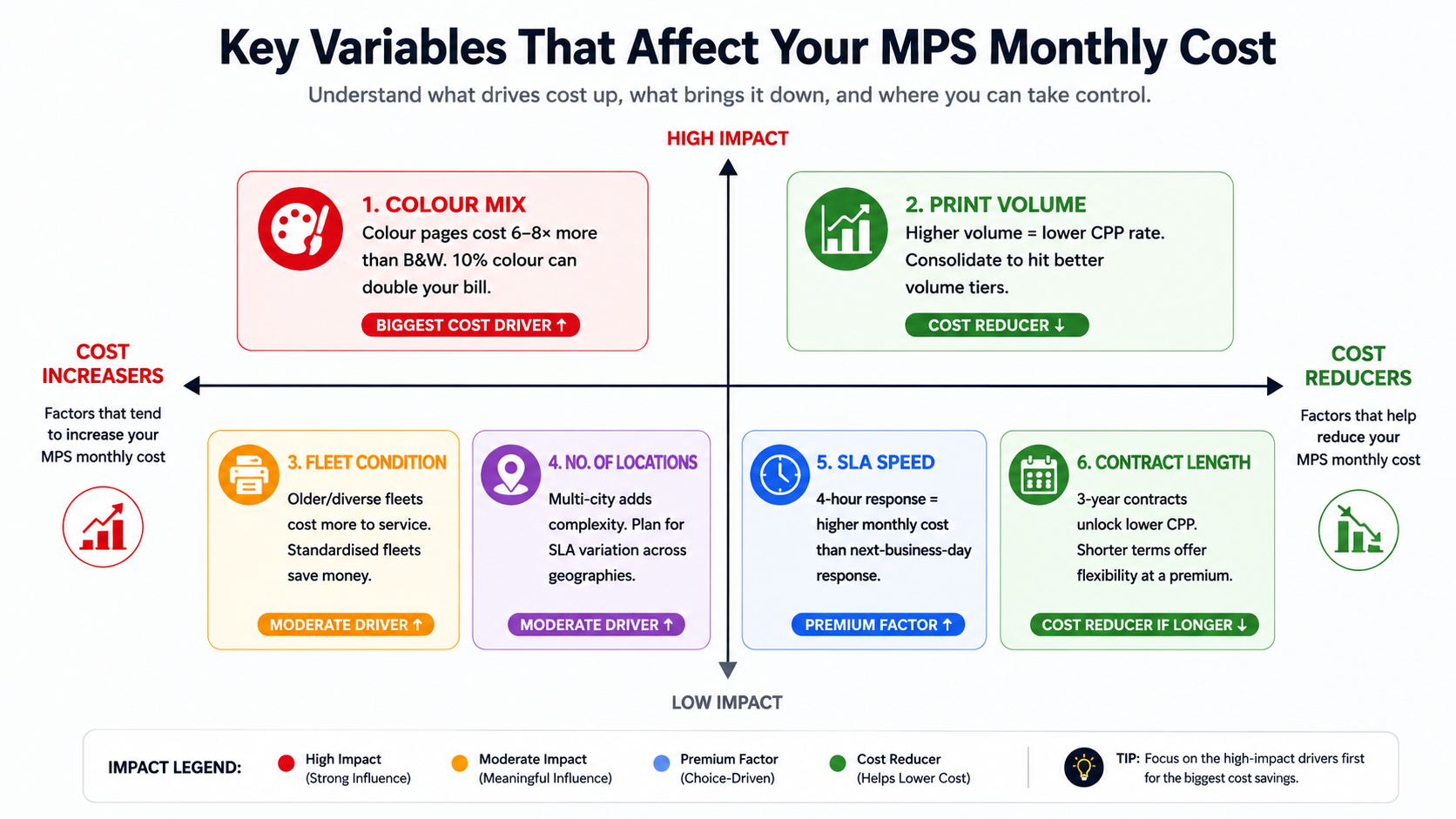
Colour mix is the variable to address first. Even small reductions in colour output — through role-based colour restrictions and pull-printing defaults — routinely cut print volume by 15–20%. Address colour usage before you get your first quote, and the quote will be meaningfully lower.
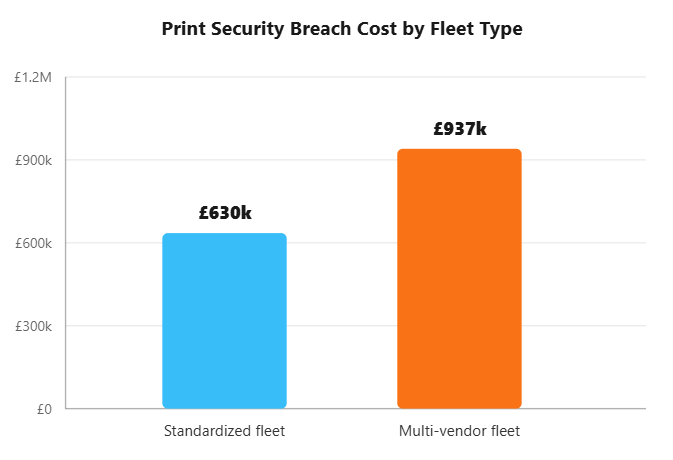
Fleet standardisation matters more than most businesses realise. A fleet of five identical MFDs from one vendor is dramatically cheaper to service than five different devices from four different brands. If you have the flexibility to standardise during the MPS transition, it’s worth doing.
How Does MPS Cost Compare to What You’re Already Spending?
Here’s the honest comparison most providers are reluctant to make.
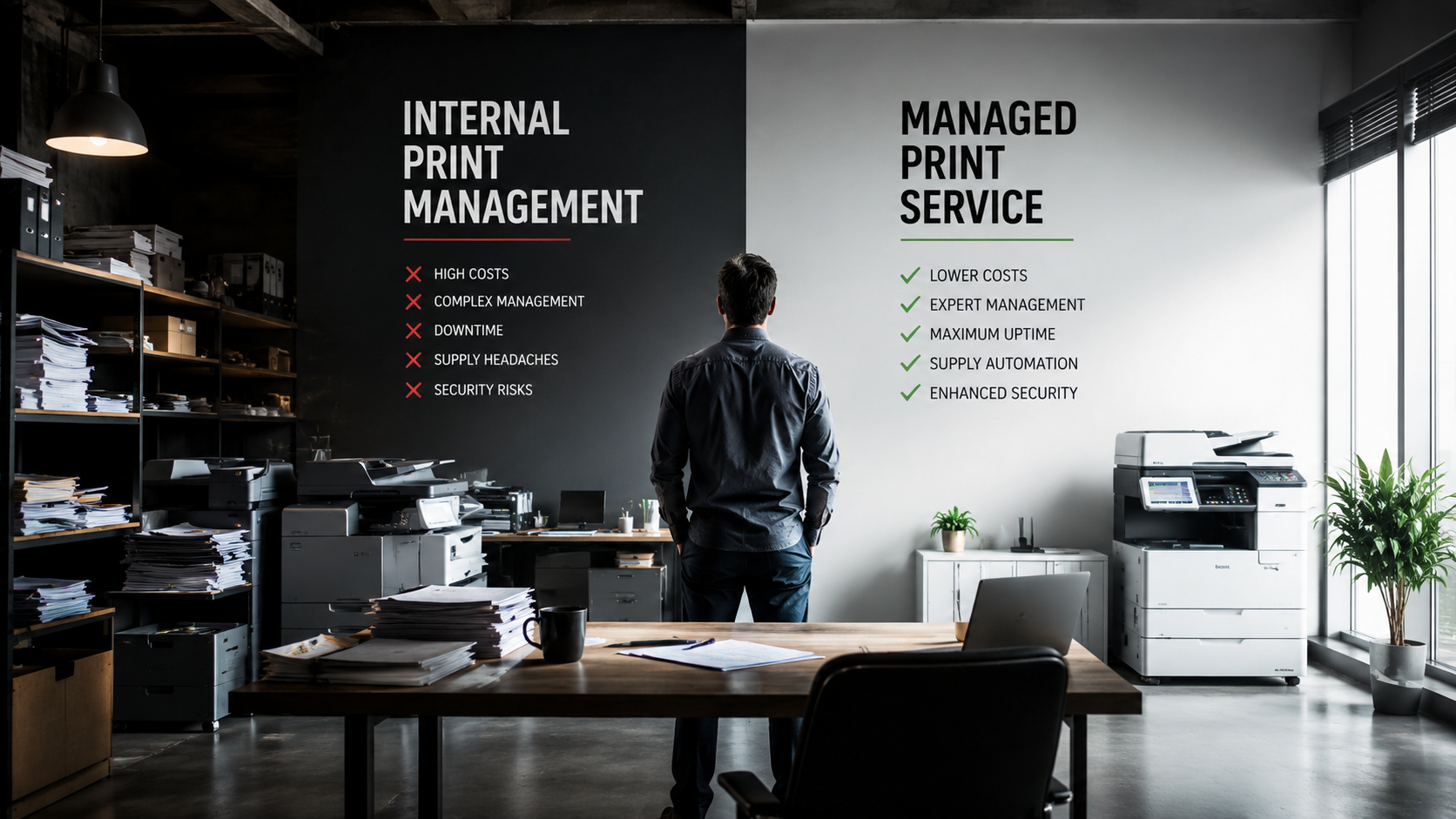
Unmanaged print environments quietly consume 1–3% of annual revenue — a figure that translates to ₹5–₹15 lakhs annually for a business with ₹5 crore in turnover, or ₹50–₹150 lakhs for a ₹50-crore business. None of it appears as a single line item, which is why it stays invisible.
Where does the hidden spend come from?
- Panic toner purchases at retail markup (30% above contract pricing)
- IT time spent on printer tickets — at ₹1,850+ per help desk call, and up to 40% of IT tickets being print-related, this compounds fast
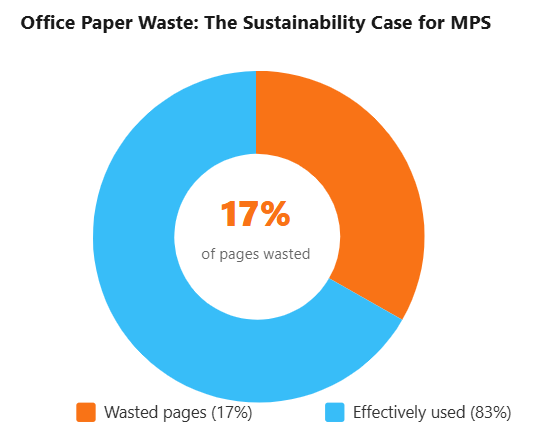
- Ghost prints — jobs printed, never collected, shredded at day’s end
- Standby power from oversized or underutilised devices running all day
- Emergency maintenance call-outs billed at out-of-contract rates
Most unmanaged offices land somewhere between ₹3.35 and ₹10 per page once everything is counted. A reasonable MPS bid should come in 25–40% below this figure.
MPS isn’t an added cost. It’s a structured replacement for spending that’s already happening — you’re just not tracking it.
“Research consistently puts unmanaged print spend at 1–3% of annual revenue (Gartner). For Indian businesses running ₹10 crore in annual revenue, that’s ₹10–₹30 lakhs flowing through ink, toner, paper, and service calls — with no single person accountable for the number.”
Full breakdown of savings by cost category
How to Get an Accurate MPS Quote — Step by Step
Most providers offer a free print assessment before quoting. Use it. But arrive prepared with the following information to get a quote that reflects your real environment rather than a generic estimate.
Step 1: Count your total devices. List every printer, copier, and MFD in your office — including personal desktop printers that rarely get counted. Check each device’s monthly usage counter (accessible in the device settings menu or web admin panel).
Step 2: Pull 3–6 months of supply invoices. Gather toner, drum, and paper purchase receipts. Total them by month. This gives you a consumables baseline before any provider conversations begin.
Step 3: Estimate your B&W vs. colour split. Even a rough figure — “roughly 80% mono, 20% colour” — dramatically narrows your quote range. Colour ratio is the single biggest pricing variable, so providers need this to quote accurately.
Step 4: Define your service expectations. What response time do you need for on-site support — same-day, 4-hour, next business day? Do you have a branch in another city that needs coverage? Are there compliance requirements that affect how data-at-rest on devices must be handled?
Step 5: Request a formal print assessment. A credible MPS provider will audit your actual environment — device usage data, fleet age, current cost-per-page — before providing a quote. This assessment should be free, with no obligation to proceed
If a provider quotes you a price without asking about your colour ratio, fleet composition, or current monthly volume — walk away. A generic quote is designed to look competitive on paper and adjust upward once you’re locked in.
The Bottom Line
MPS pricing is entirely predictable — once you understand the three models and the six variables that move the number up or down.
Companies implementing MPS often see dramatic improvements: significant cost reductions, fewer IT support calls, and consolidation down to a single trusted partner. For most Indian businesses, MPS doesn’t add a new cost — it replaces existing, invisible spending with a transparent, manageable contract.
The next step isn’t a guess. It’s a print assessment — a free, data-driven audit of your current environment that gives you an honest baseline and a real quote. Team Computers has been helping Indian businesses make this calculation for years.
Frequently Asked Questions
What is the average cost of managed print services in India?
There's no universal figure, but benchmarking from global data adapted for India: MPS contracts typically price B&W pages at ₹0.42–₹1.67 per page and colour pages at ₹5.85–₹10.05 per page under a CPP model. Most unmanaged Indian offices pay ₹3.35–₹10 per page once all real costs are counted — MPS bids should sit 25–40% below this.
What is cost per page in managed print services?
CPP is a flat rate charged for every page printed, with toner, parts, labour, and preventive maintenance bundled in. Black-and-white pages cost significantly less than colour. It's the most common MPS pricing model because it scales directly with usage. Typical B&W CPP rates run ₹0.42–₹1.67; colour runs ₹5.85–₹10.05.
Is managed print services cheaper than buying your own printers?
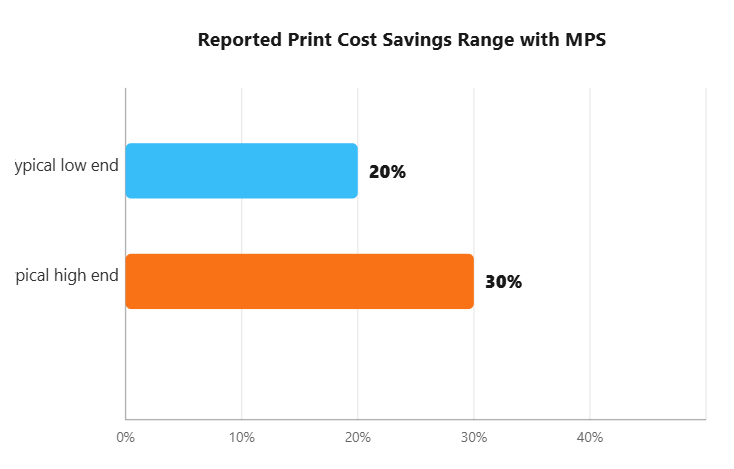
For most businesses, yes. When total costs are compared honestly. Industry data consistently shows that managed print environments save 30–50% compared to unmanaged environments, through elimination of emergency supply orders, fleet consolidation, proactive maintenance, and print policy enforcement. The upfront printer cost is only 5–10% of total ownership cost.
What is not included in a managed print services contract?
Paper is almost universally excluded — you supply your own. Hardware acquisition costs are typically a separate line item. Network infrastructure changes, out-of-SLA emergency callouts, and software integration work for document management systems are also usually excluded. Always confirm what's in scope before signing.
How long is a typical managed print services contract in India?
MPS contracts typically run 1–3 years. Longer contracts (3 years) usually unlock lower per-page rates. Shorter contracts offer flexibility but at a premium. Always review early termination penalties, minimum volume commitments, and overage charge structures before committing to a contract length — these terms vary significantly between providers.