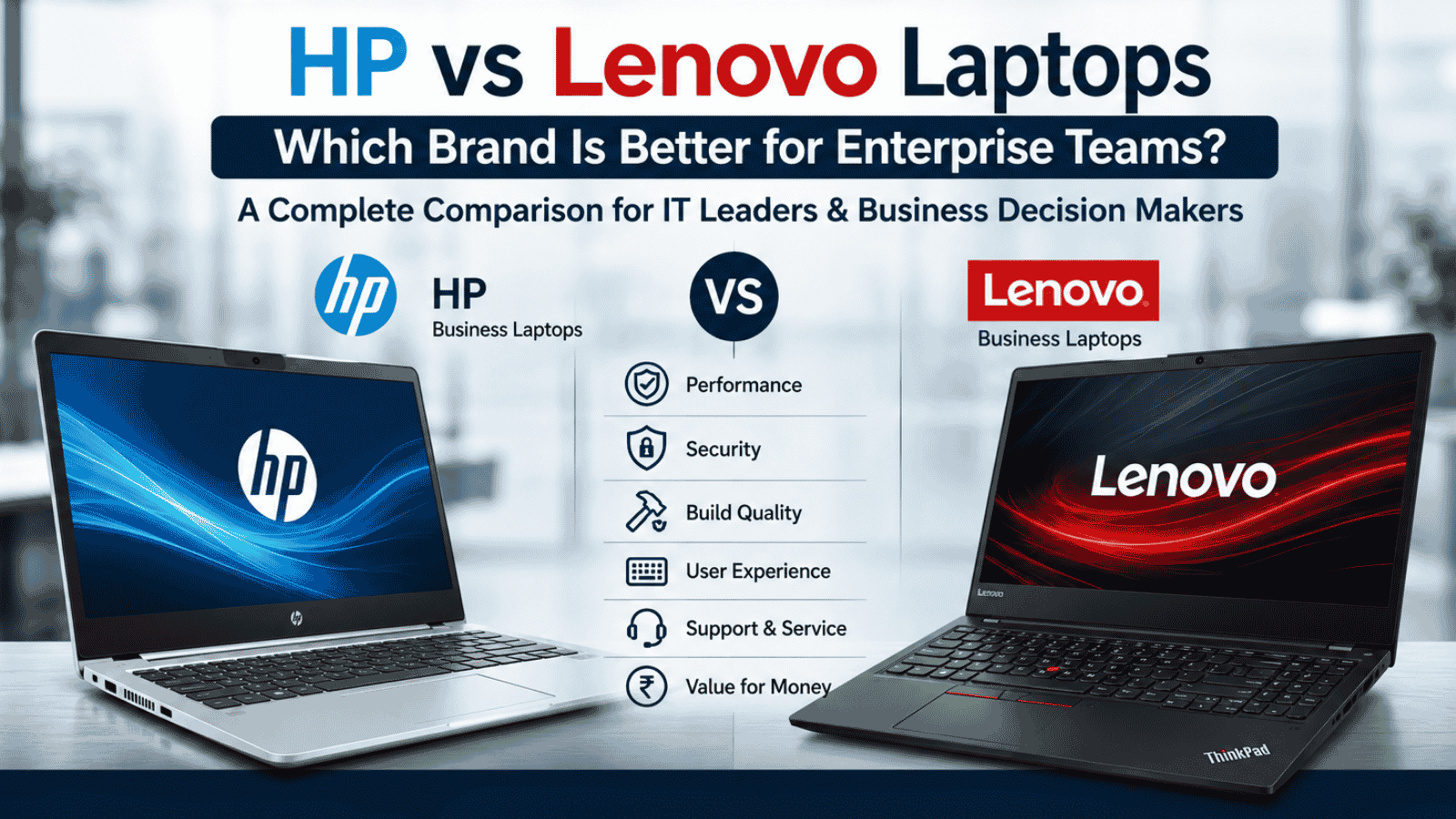
HP vs Lenovo Laptops: Which Brand Is Better for Enterprise Teams in 2026?

Choosing business laptops at scale is rarely just about specifications.

For IT heads and procurement teams, the real questions are:

  • Which brand performs better over time?
  • Which devices are easier to manage?
  • Which offers better reliability across large deployments?
  • Which creates fewer support tickets six months later?

Two brands dominate most enterprise discussions in India: HP and Lenovo.

Both offer strong enterprise portfolios, but they serve slightly different priorities depending on workforce needs, budgets, and deployment scale.

This comparison breaks down the key differences IT leaders should actually care about before making a bulk device decision.

Product Overview

HP Business Laptops

HP business laptops are widely used across enterprises, BFSI environments, consulting firms, and hybrid workplaces. The brand is known for sleek enterprise devices, strong security capabilities, and a broad service ecosystem in India.

Popular business series include:

  • HP EliteBook
  • HP ProBook
  • HP 240/250 Series

HP devices are often preferred by organizations looking for premium user experience and strong enterprise security features.

Lenovo Business Laptops

Lenovo has built a strong reputation for durability, keyboard quality, and large-scale enterprise deployment. Its ThinkPad lineup remains one of the most recognized business laptop series globally.

Popular business series include:

  • Lenovo ThinkPad
  • Lenovo ThinkBook
  • Lenovo V Series

Lenovo is commonly chosen for operational reliability, bulk deployment environments, and long-term enterprise usage.

Feature Comparison

1. Build Quality and Durability

HP

HP business laptops typically offer a more modern and premium appearance. EliteBook devices especially feel polished and executive-friendly.

Lenovo

Lenovo devices, particularly ThinkPads, are known for ruggedness and long-term durability. Many enterprises prefer them for heavy daily usage and operational environments.

Verdict

  • HP: Better premium design
  • Lenovo: Better rugged reliability

2. Keyboard and Employee Comfort

HP

HP keyboards are clean and comfortable for general business usage.

Lenovo

Lenovo ThinkPads are widely considered among the best laptop keyboards for long working hours.

Verdict

For employees working extensively on spreadsheets, reports, coding, or documentation, Lenovo often gets the edge.

3. Enterprise Security Features

HP

HP strongly focuses on endpoint security with features like:

  • HP Wolf Security
  • BIOS protection
  • Self-healing firmware

Lenovo

Lenovo also provides enterprise-grade security tools but tends to focus more on operational stability and device management.

Verdict

HP has a stronger perception in advanced enterprise security positioning.

4. Pricing and Bulk Procurement

HP

HP premium business devices can sometimes be priced slightly higher, especially in EliteBook ranges.

Lenovo

Lenovo generally offers aggressive enterprise pricing across large deployments.

Verdict

Lenovo often provides better value for large-scale procurement.

5. Service and Enterprise Support in India

HP

HP has a strong enterprise presence and wide service coverage across Tier 1 and Tier 2 cities.

Lenovo

Lenovo has significantly expanded enterprise support capabilities and performs strongly in large deployments.

Verdict

Both brands perform well, though support experience can vary depending on deployment partner and SLA structure.

6. Best Fit by Business Type

Business Need Better Choice
Premium executive workforce HP
Large operational deployments Lenovo
Security-focused environments HP
Budget-conscious enterprise rollouts Lenovo
Long-term heavy usage Lenovo
Modern premium experience HP

Final Recommendation

There is no universal winner between HP and Lenovo.

The right choice depends on your workforce, deployment scale, and operational priorities.

Choose HP if your organization prioritizes:

  • Premium employee experience
  • Advanced endpoint security
  • Executive and hybrid workforce deployments

Choose Lenovo if your focus is:

  • Large-scale deployments
  • Operational durability
  • Cost efficiency over long lifecycle usage

For most enterprises, the smarter approach is not just choosing the right laptop brand — but choosing the right deployment and lifecycle strategy around those devices.

Because even the best laptops perform poorly when deployment, management, and support are inconsistent.

CTA

Looking to compare HP and Lenovo devices for your organization?

Explore enterprise deployment, bulk procurement, lifecycle management, and end-user device solutions with Team Computers.

Get the right devices deployed faster, managed better, and optimized for long-term business use.

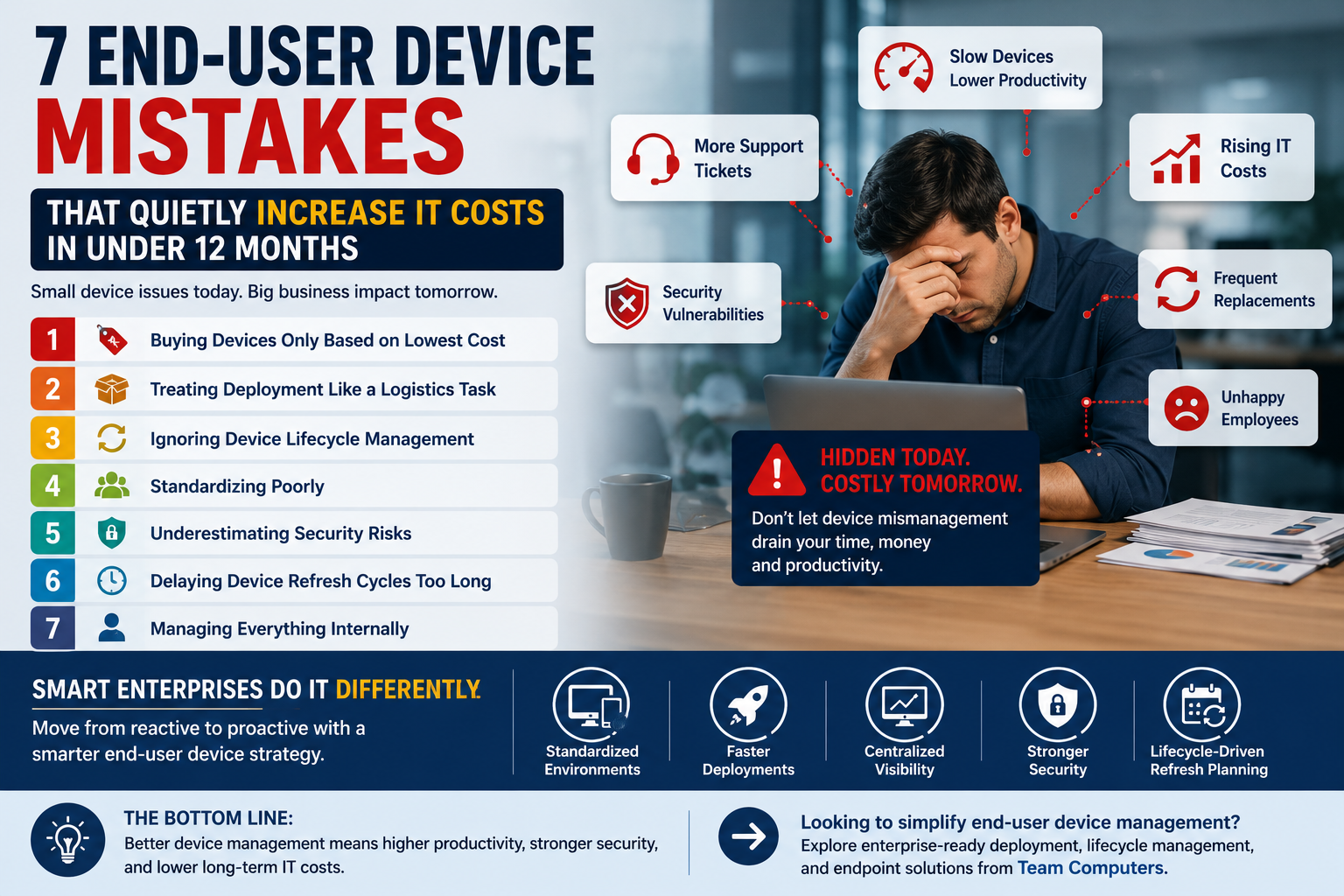
7 End-User Device Mistakes That Quietly Increase IT Costs in Under 12 Months

Most companies think the biggest cost in end-user devices is the purchase itself.
It’s not.

The real cost starts after deployment — when devices begin slowing down employees, increasing support tickets, creating security gaps, and consuming IT bandwidth every single day.

And the worst part?

Most of these problems build quietly in the background until productivity drops, employees get frustrated, and IT teams spend more time firefighting than innovating.

For organizations managing hundreds or thousands of laptops across locations, small device issues quickly become large operational problems.

Here are the biggest mistakes enterprises make with end-user devices — and how smart organizations avoid them.

7 End-User Device Mistakes


1. Buying Devices Only Based on Lowest Cost

A cheaper laptop may reduce upfront spending.

But if that device struggles with enterprise workloads, battery performance, or long-term reliability, the organization pays for it later through:

  • Higher downtime
  • Increased support tickets
  • Faster replacement cycles
  • Lower employee productivity

The smarter approach is balancing cost with lifecycle value.

Business-grade devices from brands like Dell Technologies, HP, and Lenovo are designed for enterprise environments where stability matters more than flashy specifications.

2. Treating Deployment Like a Logistics Task

Many companies assume deployment simply means handing over laptops to employees.

In reality, deployment involves:

  • Imaging and configuration
  • Security setup
  • Application installation
  • Asset tagging
  • User readiness

Without structured deployment, employees lose productive hours on setup issues and IT teams get buried under support requests.

Organizations using centralized deployment and staging processes reduce rollout delays significantly.

3. Ignoring Device Lifecycle Management

Most enterprises manage devices reactively.

A laptop slows down. Then IT gets involved.

A battery fails. Then replacement is approved.

This approach creates constant disruption.

Smart organizations track device health proactively through lifecycle management strategies that include:

  • Performance monitoring
  • Planned refresh cycles
  • Centralized visibility
  • Predictive replacements

This prevents downtime before it affects employees.

4. Standardizing Poorly

Different device models across teams create operational complexity.

Different chargers. Different drivers. Different configurations. Different support requirements.

The result?

IT teams spend more time troubleshooting compatibility issues instead of focusing on strategic work.

Standardized end-user device environments simplify:

  • Support
  • Security management
  • Software deployment
  • Procurement planning

5. Underestimating Security Risks

Every unmanaged laptop becomes a potential security risk.

Outdated operating systems, missing patches, and inconsistent endpoint protection create vulnerabilities across the organization.

For industries like BFSI, healthcare, manufacturing, and enterprise services, this risk becomes even more serious.

Strong endpoint device management ensures:

  • Security updates stay consistent
  • Compliance policies remain enforced
  • Devices remain visible across locations

6. Delaying Device Refresh Cycles Too Long

Many organizations try to extend laptop usage beyond practical performance limits.

The problem?

Employees lose time every day dealing with:

  • Slow boot times
  • Battery issues
  • Application lag
  • System crashes

Individually these delays look small.

Across hundreds of employees, they quietly become a major productivity cost.

Sometimes replacing devices earlier is cheaper than continuing to operate inefficient systems.

7. Managing Everything Internally

Internal IT teams already handle infrastructure, security, networking, and user support.

Large-scale end-user device management adds another layer of operational pressure.

This is why many enterprises now work with specialized IT partners for:

  • Device deployment
  • Lifecycle management
  • Endpoint monitoring
  • Warranty coordination
  • Device refresh planning

The result is smoother operations and reduced IT workload.

What Smart Enterprises Are Doing Differently

Leading organizations are shifting from simply buying devices to building structured end-user device ecosystems.

That includes:

  • Standardized device environments
  • Faster deployment processes
  • Centralized asset visibility
  • Better endpoint security
  • Lifecycle-driven refresh planning

The goal is no longer just procurement.

It’s long-term operational efficiency.

The Bottom Line

End-user devices directly affect productivity, employee experience, security, and IT efficiency.

When devices are poorly managed, organizations lose time and money quietly — every single day.

But with the right deployment strategy, lifecycle management approach, and enterprise-grade devices, businesses create environments where employees can work without interruption and IT teams can operate with far less stress.

Because in enterprise IT, the real cost of a laptop is rarely the invoice price.

It’s everything that happens after the device reaches the employee.

The Real Cost of the Cheapest B2B Laptops in India

When the procurement mailer goes out for a 500-unit refresh, the instruction from Finance is usually singular: find the lowest price. But for the IT Head sitting in Delhi or Bangalore, “cheap” is a terrifying word. We’ve seen enterprises save ₹2,000 per unit on the sticker price of Cheapest B2B Laptops in India for Bulk Deployment, only to lose ₹10,000 per unit in productivity when those machines spend three weeks in a service center.

In 2026, the Indian market is flooded with entry-level silicon that looks great on a spreadsheet but fails the moment it hits the dusty, high-heat reality of a logistics hub or a field sales office. Selecting a laptop for business requires a shift from “Price at Purchase” to “Cost at Retirement.” This guide breaks down how to squeeze every rupee of value without sacrificing your team’s sanity.

Why “Cheap” is harder than it looks in 2026

Most procurement teams treat a laptop for business like a commodity—no different from office chairs or stationery. This is the first mistake. A laptop is a live entry point into your network; if it’s poorly constructed, it’s a security risk and a support vacuum. In the Indian context, the challenge is compounded by geography. A cheap device might work fine in a climate-controlled HQ in Gurgaon, but how does it handle the humidity of Chennai or the power fluctuations in a Tier-3 town?

Furthermore, the “L1 bidding” culture often ignores the software ecosystem. Entry-level consumer laptops, often mistaken for business laptops, come bloated with trialware and lack the TPM 2.0 hardware security needed for modern enterprise encryption. When you deploy 1,000 units, the time your team spends “de-bloating” and manually imaging these machines costs more than the price gap between a consumer unit and a proper B2B model.

The 3 things most teams get wrong in bulk buying

Rarely does a bulk deployment fail because of the CPU speed. It fails because of the “unspoken” specs that don’t make it onto the primary comparison sheet.

  • The Build Quality Trap: Many budget-friendly b2b laptops use plastic chassis that lack internal reinforcement. After 12 months of being shoved into backpacks and opened 20 times a day, the hinges fail. 27% Percentage of hardware failures attributed to physical chassis/hinge damage in non-MIL-STD laptops.
  • Warranty Ghosting: Buying from a portal might give you the lowest price, but try getting a technician to a warehouse in Bhiwandi on a Tuesday afternoon. Most “cheap” warranties are “carry-in,” meaning your employee stops working while the laptop travels to a center.
  • The OS Mismatch: Procurement often flags “DOS” or “Linux” models as a way to save ₹4,000. But by the time you buy a volume license for Windows 11 Pro and spend man-hours installing it, you’ve spent more than if you’d bought the Pro-preloaded model from the start.

A step-by-step approach that actually works

If you want to secure the Cheapest B2B Laptops in India for Bulk Deployment without it blowing up in your face, you need a process that filters for durability as much as price.

  1. Demand a “Soak Test” Sample: Never buy 1,000 units based on a PDF. Get two samples, give them to your heaviest users for a week, and check for thermal throttling. If the fan sounds like a jet engine during a Zoom call, the motherboard won’t last three years.
  2. Verify Onsite Support Pin-codes: Before signing, ask the vendor for their direct service coverage map. If they don’t have an ASP (Authorized Service Provider) within 50km of your branch offices, that model is a “no-go.”
  3. Standardize the Ports: Ensure the “budget” model doesn’t skimp on essential connectivity. Having to buy ₹1,500 dongles for every employee because the laptop only has one USB-C port immediately erases your “savings.”
  4. Look for “E” and “V” Series: Brands like Lenovo and HP have specific lines (like the Lenovo V-series or HP 250 series) designed for the budget-conscious Indian SME. They strip away the carbon fiber and 4K screens but keep the enterprise-grade WiFi cards and keyboards.
  5. Check for Autopilot Compatibility: Ensure the BIOS supports cloud-based deployment. This allows you to ship a factory-sealed box to a remote hire; they login, and the laptop self-configures over the air.

What to look for in an external partner

Most vendors in India are simply “box-movers.” To succeed in a bulk rollout, you need a partner who understands the lifecycle, not just the transaction. A true partner should offer “Buffer Stock” management—keeping 2% of your fleet in their warehouse, ready to be dispatched the moment a user reports a critical failure.

They should also be able to handle “Green Disposal.” In 2026, E-waste regulations in India are stricter than ever. Your partner should provide a certified data-wiping and disposal path for your old fleet, potentially offering a buy-back credit that lowers the cost of your new bulk business desktops or laptops. Don’t just ask “how much is the laptop?” Ask “how much will you charge to keep it running for 1,000 days?”

How to know if it’s working

Metrics for a successful bulk purchase go beyond the initial invoice. You’ll know you’ve made the right choice when your “Out-of-Box Failure” (OOBF) rate stays below 0.5%. If you’re seeing 2% or 3% of new machines failing in the first month, your “cheap” choice was a mistake.

Monitor your “Ticket Density.” If the new laptops are generating a spike in “slow performance” or “WiFi dropping” calls, it’s a sign the internal components (like the SSD or network card) are sub-standard. A successful deployment is silent. When the IT desk isn’t hearing about the new hardware, you’ve won.

Practitioner’s Insight: The “Refurbished” Contingency

For non-critical roles or temporary project staff, many CIOs are now looking at “Enterprise-Grade Refurbished” units. A 2-year-old ThinkPad T-series often outperforms a brand-new “budget” consumer laptop in terms of keyboard feel, screen longevity, and port durability. If the goal is purely cost, a high-quality refurbished B2B unit is often a smarter play than the cheapest new retail unit.

B2B Laptop Purchase India: The Long View The goal of a B2B laptop purchase in India shouldn’t be to find the lowest number on a quote. It should be to find the most reliable tool for your workforce at a price point that doesn’t compromise your security posture. By focusing on serviceability, build quality, and modern deployment features, you can satisfy the Finance team’s budget while ensuring your infrastructure remains resilient.

  • Audit your “Hidden Costs”—include shipping, imaging, and downtime in your next procurement comparison.
  • Prioritize NBD (Next Business Day) Onsite Warranty as a non-negotiable line item in your RFPs.
  • Test the thermal performance of budget models specifically in non-AC environments to simulate real-world India usage.
  • Explore DaaS (Device as a Service) to convert a massive Capex burden into a manageable, per-user monthly fee.

Don’t let a low sticker price blind you to the operational risks of sub-par hardware.

Find Laptop for Your Business

We specialize in balancing tight budgets with enterprise-grade reliability. Let us help you navigate the bulk deployment landscape with devices that actually last.

Request a Bulk Pricing Quote

Why Your B2B Laptops Cost More After You Buy Them?

When a logistics giant in Mumbai recently refreshed their fleet of 1,200 devices, they chose the lowest bidder, thinking they’d saved ₹1.5 Crore. Within six months, the hidden costs of poor thermal management and lack of remote bios updates turned that “saving” into a nightmare of helpdesk tickets and lost productivity.

Most IT Heads face this exact tension: the Finance team wants the cheapest B2B laptops in India for bulk deployment, but you’re the one who has to manage the fallout when those machines fail in the field. Procurement often ignores that the sticker price is just the tip of the iceberg in a 2026 enterprise environment. This guide will show you how to navigate the current hardware landscape to ensure your next refresh actually lowers your long-term overhead.

Why device procurement is harder than it looks

Selecting hardware in 2026 isn’t just about comparing processor speeds or RAM anymore. The complexity has shifted from what’s inside the chassis to how the device lives within your ecosystem. Indian enterprises often struggle because our operating environments are uniquely harsh—high ambient temperatures, dust, and erratic power supply are hardware killers that standard consumer-grade laptops simply aren’t built to survive.

Furthermore, the “Work from Anywhere” shift has turned every employee’s home into a satellite office. When you’re deploying b2b laptops across 750+ locations, you aren’t just buying a screen and a keyboard; you’re buying a node that must be secured and managed remotely. If the device doesn’t support modern standards like Autopilot or advanced hardware-level security, your IT team will spend more time shipping units back and forth than actually innovating. The friction between cost-cutting and operational reality is where most IT strategies crumble.

The 4 things most teams get wrong

Rarely do IT departments fail because they lack technical knowledge; they fail because they overlook the “boring” logistics of scale. Here are the most common pitfalls we see across the Indian enterprise landscape:

  1. Prioritizing Capex over TCO: It’s easy to get lured by the cheapest B2B laptops in India for bulk deployment. However, these units often lack the build quality to last beyond 24 months. When you calculate the cost of mid-cycle replacements, the “cheap” option becomes the most expensive.
  2. Ignoring Battery Longevity: People often confuse “battery life” with “battery health.” A laptop might last 12 hours today, but if the battery chemistry degrades by 40% in a year, your field sales team will be tethered to wall outlets by 2027.
  3. Over-speccing for Average Users: We see CIOs buying high-end workstations for HR or Finance teams who spend 90% of their time in browser-based SaaS tools. You’re paying for horsepower that will never be used.
  4. Neglecting Modern Management: Buying a laptop without a Pro-certified chipset means your team can’t perform out-of-band management. If the OS hangs, someone has to physically touch that device. In a country as vast as India, that’s a logistical disaster.

A step-by-step approach that actually works

Implementing a hardware strategy that scales requires a departure from the “buy and forget” mindset. Follow these steps to ensure your fleet remains an asset rather than a liability.

  1. Segment Your Workforce Profiles: Before looking at catalogs, define your personas. An “Executive Traveler” needs Business Laptops with Long Battery Life and ultra-light chassis. A “Back-office Analyst” needs port variety and thermal stability. Stop buying a single “standard” model for everyone.
  2. Evaluate the “Serviceability Index”: In the Indian context, things break. Ask your vendor for the repairability score of the specific model. Can the SSD or RAM be swapped in the field, or is everything soldered to the motherboard?
  3. Test for the “Heat Factor”: India’s climate is a silent killer of electronics. Ensure your chosen models have undergone MIL-STD-810H testing. This isn’t just marketing fluff; it’s a guarantee that the hinges won’t snap and the fans won’t choke in 40°C heat.
  4. Audit the Warranty Terms: A “3-year warranty” is meaningless if the turnaround time is 10 days. Insist on NBD (Next Business Day) on-site support, especially for your critical locations.
  5. Standardize on Management Platforms: If you’re leaning toward Lenovo, understand the A 2026 Guide Lenovo Pro for Business Benefits. Using platforms like ThinkShield or vPro allows your team to patch vulnerabilities without the user even being logged in.

What to look for in an external partner

Here’s the truth: most partners just want to move boxes. They’ll show you a spreadsheet of specs and a low price, then disappear once the invoice is cleared. That’s not what a mid-to-large enterprise needs in 2026. A genuine partner should behave like an extension of your IT team.

They must have a footprint that matches yours. If you have offices in Tier-2 or Tier-3 cities like Coimbatore or Patna, your partner needs to prove they can get a technician there within 24 hours. They should also offer “Configuration Services”—meaning the laptops arrive at your employee’s doorstep already imaged, asset-tagged, and ready to login.

Most importantly, look for financial flexibility. In 2026, the best partners offer Device-as-a-Service (DaaS) models. This allows you to shift from heavy upfront Capex to a predictable Opex model, ensuring your hardware is always refreshed before it becomes a performance bottleneck.

How to know if it’s working

What gets measured gets managed. You’ll know your laptop strategy is successful when your “Mean Time to Resolution” (MTTR) for hardware issues drops by at least 30%. You should also see a measurable decrease in “Ticket Volume per 1000 Devices”—a clear sign that you’ve moved away from fragile, consumer-grade hardware.

Another key signal is employee NPS. When people don’t have to carry chargers to every meeting or wait ten minutes for a reboot, their satisfaction scores go up. Finally, check your “End-of-Life Residual Value.” High-quality b2b laptops retain significant buy-back value even after 3–4 years, whereas cheap bulk units are essentially e-waste.

Practitioner’s Insight: The “Hidden Port” Audit

When auditing bulk laptop samples, don’t just look at the USB ports. Check the internal expansion slots. We recently helped a retail chain save millions by realizing their “budget” laptops lacked a secondary M.2 slot. When they needed to upgrade storage for a new local database app, they had to replace the entire drive instead of just adding a cheap secondary one. Always check for future-proofing in the motherboard layout, not just the spec sheet.

How Long Do Business Laptops Last? Most enterprises expect 3 years, but with the right thermal management and chassis quality, a well-selected business machine should comfortably reach 48 to 60 months of peak performance. The key is avoiding the “cheap laptops” trap where the hinges fail long before the processor becomes obsolete. By investing in the right tier of hardware today, you’re effectively buying back hundreds of hours of your IT team’s time over the next four years.

  • Audit your current fleet’s failure rates by model to identify the “lemon” configurations before the next refresh cycle.
  • Transition to Zero-Touch Deployment to eliminate the need for your IT staff to unbox and image devices manually.
  • Prioritize battery health management software that caps charging at 80% for desk-bound users to double the battery’s lifespan.
  • Review your DaaS options to see if shifting to a monthly per-user cost makes more sense than a massive Capex hit this quarter.

Don’t let a “good deal” on b2b laptops become a multi-year drain on your department’s efficiency and reputation.

Find Laptop for Your Business

We’ll help you map your workforce personas to the right hardware and management framework. Ensure your next refresh delivers high performance and low TCO across every Indian location.

Get a Device Strategy Consultation

Why the Right IT Partner Matters for Large-Scale Device Deployment

Device rollouts are rarely simple in large organizations. A company may purchase hundreds or even thousands of laptops, desktops, or tablets in a single procurement cycle. The real challenge begins after the purchase—deploying these devices efficiently across teams, offices, and locations.

For IT heads managing multiple branches, device deployment is not just about distributing hardware. It involves configuration, security policies, software installation, asset tracking, and user readiness.

This is where the role of the right IT partner for device deployment becomes critical.

Organizations that attempt large-scale deployments without experienced partners often face delays, configuration issues, and operational disruptions. In contrast, enterprises that work with the right IT deployment partner can roll out devices faster, maintain security standards, and ensure employees are productive from day one.

The Complexity of Enterprise Device Deployment

At first glance, deploying devices may appear straightforward: procure the hardware and hand it over to employees.

In reality, enterprise deployments involve multiple technical and operational layers, such as:

  • Device imaging and configuration
  • Operating system installation and updates
  • Security and compliance policies
  • Application deployment
  • Network configuration
  • Asset tagging and tracking

For organizations with multiple offices across different cities, managing these steps internally can quickly become resource-intensive.

An experienced IT partner for device deployment brings structured processes and technical expertise that simplify these tasks.

Device Deployment Without the Right IT Partner

Many organizations initially attempt device deployment using internal IT teams. While this approach may work for small deployments, it often becomes difficult to manage at scale.

Several challenges typically emerge.

Deployment Delays

Internal IT teams already manage daily operations such as helpdesk support, system maintenance, and security monitoring. Large device rollouts add significant workload, often leading to delays in provisioning and distribution.

Employees may wait days or even weeks to receive fully functional devices.

Inconsistent Device Configuration

Without standardized deployment processes, devices may be configured differently across teams or locations. Some systems may lack required applications, while others may not meet security compliance standards.

This inconsistency creates long-term management challenges for IT teams.

Limited Visibility Across Locations

Organizations with multiple offices often struggle to maintain visibility over where devices are deployed, who is using them, and whether they are configured correctly.

This lack of visibility can lead to asset mismanagement and inefficient hardware utilization.

Higher Operational Burden

Internal IT teams may spend excessive time configuring devices manually, troubleshooting setup issues, or responding to deployment-related support tickets. Over time, this diverts attention from strategic initiatives.

Device Deployment with the Right IT Partner

Working with an experienced IT partner for device deployment changes the entire process. Instead of managing deployment manually, organizations benefit from structured workflows, automation, and scalable infrastructure.

Faster Device Rollouts

Deployment partners use preconfigured imaging, automated provisioning tools, and centralized deployment frameworks. This allows devices to be prepared in bulk and delivered ready for immediate use.

Employees receive devices that are fully configured and operational from day one.

Standardized Configuration

An IT deployment partner ensures that every device follows the same configuration standards. This includes operating systems, security settings, enterprise applications, and network policies.

Standardization simplifies device management and reduces long-term support issues.

Seamless Multi-Location Deployment

For enterprises with offices across Tier 1 cities and regional locations, logistics and coordination become critical.

The right partner manages device distribution, staging, and deployment across locations. Devices arrive pre-configured and ready to be used without requiring extensive on-site IT intervention.

Improved Security and Compliance

Deployment partners implement security policies during the configuration stage. This ensures devices meet enterprise security requirements before they are issued to employees.

From encryption policies to endpoint protection software, devices are secured from the beginning.

Reduced IT Workload

Perhaps the biggest benefit for enterprise IT teams is operational relief. When a trusted deployment partner manages large-scale rollouts, internal IT teams can focus on strategic initiatives rather than manual device setup.

Comparing Deployment Approaches

The difference between managing deployments internally and working with the right partner is often significant.

Without an IT Partner

With the Right IT Partner

Manual device configuration Automated bulk provisioning
Deployment delays Faster rollout timelines
Inconsistent system setups Standardized device configuration
Limited asset visibility Centralized tracking and reporting
Higher IT workload Reduced operational burden


For organizations managing hundreds or thousands of devices, this difference directly impacts productivity and operational efficiency.

Beyond Deployment: Long-Term Device Management

The right IT partner for device deployment often supports organizations beyond the initial rollout.

Many enterprises extend the partnership to include services such as:

  • Device lifecycle management
  • Remote device monitoring
  • Warranty and support coordination
  • Device refresh planning
  • Endpoint security management

This long-term approach ensures devices remain optimized throughout their lifecycle, rather than becoming operational challenges after deployment.

What IT Leaders Should Look for in a Deployment Partner

Choosing the right partner is critical for successful deployments. IT leaders typically evaluate partners based on several factors.

Experience with large-scale enterprise deployments is essential. The partner should have proven capabilities in managing rollouts across multiple offices and locations.

Strong vendor partnerships also matter. Deployment partners who work closely with device manufacturers can streamline procurement, imaging, and warranty support.

Finally, logistics and service capabilities are important. The partner must be able to manage device staging, configuration, delivery, and installation efficiently.

Conclusion

Device procurement is only the first step in building a productive IT environment. The real challenge lies in deploying those devices efficiently across teams, locations, and business units.

Organizations that attempt large-scale deployments without specialized support often encounter delays, inconsistent configurations, and increased operational pressure on internal IT teams.

Working with the right IT partner for device deployment simplifies this process. Through structured workflows, standardized configurations, and scalable deployment infrastructure, enterprises can roll out devices faster and more efficiently.

For IT leaders managing distributed workplaces, the right partner ensures that technology reaches employees ready to perform—securely, consistently, and without disruption.