
Why Most Data Centers Still Lack Real Visibility

According to the Uptime Institute, over 60% of data center outages cost more than $100,000, and a growing number exceed $1 million.

What’s more concerning isn’t the cost. It’s the cause.

Most failures aren’t due to catastrophic breakdowns. They’re due to hidden inefficiencies- power imbalance, cooling gaps, or capacity blind spots that go unnoticed until they escalate.

If you’re a CIO, this isn’t just an infrastructure issue. It’s a visibility problem.

Despite investments in monitoring tools, many enterprises still don’t have a unified understanding of what’s happening inside their data centers. And that’s where Data Center Infrastructure Management Services become critical not as a toolset, but as an operating model.

Because without real-time, connected visibility, scale becomes a risk.

The conventional wisdom (and why it’s wrong)

Most data center strategies still follow a legacy assumption:
“If systems are running, everything is fine.”

That assumption breaks in modern environments.

Hybrid infrastructure has introduced layers of complexity, on-prem systems interacting with cloud workloads, edge locations adding variability, and increasing compute density stressing power and cooling systems.

Yet, many organisations still rely on siloed monitoring. Facilities teams track power and cooling. IT teams track servers and applications. Rarely do these views converge.

What you get is partial visibility.

And partial visibility creates delayed decisions.

Most outages today are not sudden. They are predictable but only if you’re looking at the right signals together.

What the data is actually telling us

Analyst reports are pointing in one direction.

  • According to Gartner, through 2027, 75% of enterprise data center infrastructure will require real-time visibility tools to support hybrid environments
  • India’s data center capacity is projected to grow at over 20% CAGR, driven by cloud, AI, and data localisation requirements
  • Energy efficiency is becoming a board-level concern, with rising focus on PUE optimisation and sustainability metrics

Add to that regulatory pressure from the DPDP Act 2023, and the expectation is clear — infrastructure must be auditable, efficient, and predictable.

A BFSI organisation we engaged with had no major outages yet customer complaints about performance were rising.

The issue?

Thermal inconsistencies across racks were affecting latency-sensitive applications. Traditional monitoring didn’t flag it because systems were technically “up.”

That’s the gap between uptime and performance.

The approach forward-thinking CIOs are taking

What’s changing is how infrastructure is being governed from fragmented monitoring to integrated intelligence.

1. From isolated metrics to unified visibility

Forward-looking CIOs are implementing platforms that combine:

  • Power usage
  • Cooling efficiency
  • IT workload distribution

This creates a single operational view not multiple dashboards.

Because decisions made in silos create inefficiencies elsewhere.

2. From reactive alerts to predictive insights

Traditional systems notify you after thresholds are breached.

Modern Data Center Infrastructure Management Services analyse trends identifying anomalies before they become incidents.

That shift alone changes how downtime is managed from recovery to prevention.

3. From over-provisioning to intelligent capacity planning

IDC estimates that a significant portion of data center capacity remains underutilised due to lack of visibility

Instead of adding more infrastructure, CIOs are now:

  • Rebalancing workloads
  • Optimising rack density
  • Aligning power and cooling with actual usage

This delays capital expenditure while improving efficiency.

4. From infrastructure monitoring to operational integration

Infrastructure insights are now being integrated with broader IT operations including network management & monitoring and application performance tracking.

Because performance issues are rarely isolated.

They are systemic.

What this means for Indian enterprises specifically

India’s growth story is creating a unique infrastructure challenge.

GCCs are expanding rapidly, often with mandates to handle global workloads. At the same time, enterprises are building distributed infrastructure across multiple cities.

This introduces variability in power reliability, cooling efficiency, and operational consistency.

Add regulatory expectations from the Digital Personal Data Protection (DPDP) Act 2023, and the need for structured infrastructure management becomes even more critical.

A large manufacturing enterprise operating across regions faced inconsistent infrastructure performance across plants. Each location had different standards and visibility levels.

By implementing a centralised Data Center Infrastructure Management Services model, they standardised monitoring and control across all sites.

The outcome wasn’t just efficiency. It was governance.

The gap most organisations haven’t closed

Here’s where most enterprises fall short.

They invest in tools but not in operations.

Visibility without execution doesn’t deliver outcomes.

That’s why CIOs are increasingly aligning infrastructure management with managed IT services models that bring:

  • Continuous 24×7 NOC support
  • Skilled resources for proactive monitoring
  • Ongoing optimisation instead of one-time implementation

Because infrastructure doesn’t fail due to lack of data. It fails due to lack of action.

Where infrastructure management is heading next

The next evolution is already underway.

Data centers are moving towards:

  • AI-driven power and cooling optimisation
  • Automated incident detection and remediation
  • Integration with hybrid and multi-cloud ecosystems
  • Self-healing infrastructure environments

What this creates is a shift from managed infrastructure to autonomous infrastructure.

And that’s when infrastructure stops being a constraint and starts becoming a competitive advantage.

Conclusion

What’s ahead isn’t just more infrastructure it’s higher expectations from what that infrastructure must deliver.

If your current setup still relies on fragmented monitoring and reactive processes, it won’t scale with business demands.

To move forward:

  • Audit visibility across power, cooling, and IT systems not just individually, but collectively
  • Identify inefficiencies before planning capacity expansion
  • Shift towards predictive monitoring instead of threshold-based alerts
  • Evaluate whether your operating model supports continuous optimisation

The difference between stable operations and scalable infrastructure lies in how well you can see, understand, and act. And that’s exactly where Data Center Infrastructure Management Services make the difference.

The CIO Playbook for Managed IT Services in the AI Era

Monday morning, 9:12 AM. A CIO at a fast-growing GCC in Bengaluru is reviewing three dashboards, cloud costs spiking, a security alert flagged overnight, and a backlog of unresolved IT tickets.

None of this is new. That’s the problem.

You’re expected to drive AI-led transformation, but your foundation is still reactive. Teams are firefighting. Systems are fragmented. And despite investments, outcomes aren’t keeping pace. This is where managed IT services move from being operational support to becoming a strategic lever.

What’s changing isn’t just technology, it’s the role of IT itself. And unless the operating model evolves, even the best AI initiatives will stall.

The conventional wisdom (and why it’s wrong)

For years, managed services meant outsourcing routine IT operations, helpdesk, infrastructure monitoring, maybe some network support. The goal was simple: reduce cost and improve uptime.

That model no longer holds.

AI workloads are unpredictable. Hybrid environments are harder to manage. Security threats evolve faster than traditional monitoring systems can catch. Yet many enterprises still treat managed services as a cost center rather than an enabler.

What this leads to is a dangerous mismatch. Your business expects agility. Your IT backbone delivers stability but slowly.

Most CIOs aren’t struggling because they lack tools. They’re struggling because their operating model hasn’t caught up.

When managed services are scoped narrowly, they optimize for tickets closed not outcomes delivered. That’s why you see high SLA compliance but low business satisfaction.

What the data is actually telling us

Look closer at enterprise IT trends in India, and a clear pattern emerges.

  • India is home to over 1,500+ GCCs, and the number is expected to grow significantly in the next few years.
  • Regulatory pressure is increasing with frameworks like the DPDP Act 2023, forcing organisations to rethink data handling and governance
  • Cyber incidents targeting Indian enterprises have risen sharply

What does this mean for you?

Scale is no longer optional. Compliance is no longer periodic. And risk is no longer predictable.

Yet, many IT environments still depend on internal teams juggling multiple tools and vendors.

A BFSI enterprise we worked with had strong infrastructure but struggled with incident response times. Alerts were being generated but not correlated. By the time issues escalated, customer experience had already taken a hit.

The gap wasn’t technology. It was orchestration.

The approach forward-thinking CIOs are taking

What’s changing is not whether to adopt managed services, it’s how deeply they are integrated into the IT strategy.

1. Moving from SLAs to experience metrics

Most contracts still revolve around uptime and resolution time. But uptime doesn’t equal productivity.

CIOs are now focusing on Digital Employee Experience (DEX) measuring how IT performance impacts end users.

That’s where platforms around digital workplace management come in, giving visibility beyond tickets into real user impact.

2. Building always-on operations

AI-driven enterprises don’t operate 9 to 5. Neither can IT.

A mature 24×7 NOC support model isn’t just about monitoring it’s about proactive detection, correlation, and response.

What matters is not whether an alert is raised, but whether it is acted upon before it impacts business.

3. Integrating infrastructure visibility

Hybrid environments have made IT visibility fragmented. Cloud, on-prem, endpoints all managed differently.

Forward-thinking teams are unifying network management & monitoring with infrastructure operations to create a single view of performance and risk.

Because without visibility, automation fails.

4. Extending internal teams, not replacing them

Here’s where most organisations hesitate.

Managed services are often seen as outsourcing control. But the shift is towards co-managed models where internal teams focus on strategy, while operational complexity is handled externally.

That’s how CIOs are freeing up bandwidth for AI initiatives without burning out their teams.

What this means for Indian enterprises specifically

India presents a unique combination of scale and complexity.

On one side, GCC expansion is accelerating. Global companies are setting up large technology hubs here, expecting India teams to lead innovation not just execution.

On the other side, regulatory frameworks like the Digital Personal Data Protection (DPDP) Act 2023 are tightening expectations around data handling.

This creates a dual pressure:

  • Deliver faster innovation
  • Maintain stricter compliance

Rarely do traditional IT models handle both well.

A manufacturing enterprise operating across multiple Indian plants faced exactly this challenge. Their operations depended on uptime, but IT teams were decentralised. Each location handled issues differently, leading to inconsistent performance.

By shifting to a centralised remote IT infrastructure managed services model, they standardised operations while maintaining local flexibility.

The outcome wasn’t just efficiency. It was predictability.

The real shift: from vendor to operating partner

What’s emerging is a different expectation from a top managed IT services company.

CIOs are no longer looking for vendors who execute tasks. They’re looking for partners who:

  • Understand business context, not just IT architecture
  • Provide actionable insights, not just reports
  • Align with outcomes, not just contracts

Because the real value of managed services isn’t in doing more. It’s in making IT invisible when it works and intelligent when it doesn’t.

How to know if your model is working

Most enterprises measure success incorrectly.

Here’s what actually indicates maturity:

  • Reduction in repeat incidents, not just faster resolution
  • Improved end-user experience scores
  • Fewer escalations reaching business stakeholders
  • Increased time spent by internal teams on strategic initiatives

If these aren’t improving, the model needs rethinking not just optimisation.

Conclusion

What lies ahead isn’t just more technology, it’s more responsibility on IT to drive business outcomes. And that changes everything about how you approach managed IT services.

If your current model is still built around tickets and uptime, it won’t scale into an AI-driven enterprise.

To move forward:

  • Audit how much of your IT team’s time goes into reactive work vs strategic initiatives
  • Evaluate whether your current setup provides end-to-end visibility across infrastructure
  • Shift from SLA-based measurement to experience and outcome-based metrics
  • Reassess whether your managed services partner is enabling or limiting transformation

The difference between stable IT and strategic IT will define how fast your organisation moves next. And in that transition, managed IT services will either be your bottleneck or your multiplier.

What is Cybersecurity?

Cybersecurity involves a range of practices and technologies. It aims to safeguard sensitive information from unauthorized access. This includes protecting against malware, phishing, and other cyber attacks.

The rise of digital transformation has increased the need for robust cybersecurity measures. Remote work and cloud services have expanded the attack surface for cybercriminals. As a result, cybersecurity has become a top priority for organizations worldwide.

Effective cybersecurity requires a combination of technology, processes, and people. Regular updates, strong passwords, and multi-factor authentication are essential. Employee training and awareness also play a crucial role in maintaining security.

Cybersecurity is not just for IT professionals. Everyone has a role to play in protecting digital assets. By understanding the basics, individuals and businesses can better defend against cyber threats.

This article will explore the fundamentals of cybersecurity. We’ll discuss common threats and provide practical tips for enhancing security. Join us as we delve into the world of cybersecurity.

Understanding Cybersecurity: Definition and Core Concepts

Cybersecurity is the practice of protecting digital systems, networks, and data from theft and damage. It encompasses various measures to secure information from diverse cyber threats. These threats can range from simple breaches to sophisticated attacks.

At its core, cybersecurity involves a mix of technologies, processes, and practices. It’s about ensuring that information is only accessible to those with permission. This helps protect sensitive data and maintain privacy.

One of the primary elements of cybersecurity is risk management. This involves identifying potential threats and implementing measures to mitigate them. By evaluating risks, organizations can prioritize their security efforts.

Cybersecurity includes several domains, each focusing on different aspects of protection. These domains help create a comprehensive security strategy. Some crucial areas include network security, information security, and endpoint security.

Key Components of Cybersecurity:

  • Confidentiality: Ensuring that information is accessible only to authorized individuals.
  • Integrity: Protecting data from being altered by unauthorized entities.
  • Availability: Ensuring that data and systems are accessible when needed.

Understanding these components is crucial for any cybersecurity strategy. They form the backbone of how security systems are designed and implemented. Without these, any protection would be incomplete.

Cybersecurity is constantly evolving, adapting to new technologies and threats. This dynamic nature demands continuous learning and adaptation. As cyber threats advance, so too must our defenses against them.

Education plays a significant role in bolstering cybersecurity. Training employees to recognize potential threats can prevent breaches before they occur. Awareness programs help foster a culture of security within organizations.

Other Considerations in Cybersecurity:

  • Authentication Methods: Such as multi-factor authentication to verify user identity.
  • Encryption Techniques: To secure data during transmission and storage.
  • Incident Response Plans: Ensure quick and effective action during security breaches.

With the increasing reliance on digital technologies, cybersecurity has become indispensable. It is a foundational element that underpins trust in our digital interactions. As we move forward, understanding and embracing cybersecurity becomes even more critical for everyone.

The Importance of Cybersecurity in the Digital Age

In today’s digital age, cybersecurity is more vital than ever. Our reliance on technology continues to grow. This increasing dependency exposes us to more cybersecurity threats.

Cyber attacks can have severe consequences. They can lead to data breaches, financial loss, and damage to an organization’s reputation. As such, the stakes of cybersecurity are high.

Businesses, regardless of size, face these threats daily. For small businesses, the impact can be particularly devastating. Often, they are perceived as easy targets due to limited resources for defense.

Digital transformation has accelerated the need for robust cybersecurity. As more services move online, protecting personal and business data is crucial. The shift to remote work has also expanded attack surfaces.

Key Factors Elevating Cybersecurity Importance:

  • Proliferation of Connected Devices: Each new device is a potential entry point for attackers.
  • Cloud Computing: While offering flexibility, it requires stringent security measures.
  • Regulatory Compliance: Laws like GDPR impose strict requirements for data protection.

Cybersecurity is not just a technological issue. It is a strategic business imperative. Companies must integrate cybersecurity into their operations to stay protected.

Moreover, consumers are becoming more aware of privacy issues. They expect companies to safeguard their information. Failing to do so can result in loss of trust.

Additionally, the financial cost of cybercrime is immense. It’s projected to reach trillions annually, affecting individuals and firms alike. Proactive measures can significantly reduce these costs.

Finally, cybersecurity is about preserving the integrity of digital infrastructures. As part of national security, it’s vital to protect critical systems from attacks. Collaborative efforts between stakeholders can enhance cyber defenses effectively.

Types of Cybersecurity: Domains and Specializations

Cybersecurity is a broad field with various domains. Each focuses on specific aspects of protection. These areas are critical in safeguarding digital environments.

First, network security involves protecting an organization’s network infrastructure. It guards against intrusion and unauthorized access. Firewalls and intrusion detection systems are common tools.

Information security ensures data integrity and privacy. It aims to protect both stored and transmitted data. Encryption and secure communication protocols are key in this domain.

Cloud security addresses challenges related to cloud computing. As businesses migrate to the cloud, securing cloud services is essential. This includes data protection, access control, and compliance.

Endpoint security focuses on securing end-user devices. These include laptops, mobile phones, and other connected gadgets. Antivirus and behavioral analysis tools are often used here.

Application security involves securing software applications. It includes identifying vulnerabilities and implementing protective measures. Secure coding practices and regular testing are crucial.

Identity and Access Management (IAM) ensures the right individuals access appropriate resources. It involves user authentication and authorization. Technologies like multi-factor authentication enhance IAM strategies.

Critical infrastructure security focuses on protecting essential services. This includes power grids, transportation systems, and communication networks. These infrastructures require robust defenses against potential attacks.

Finally, IoT and mobile security cover the plethora of connected devices. The Internet of Things (IoT) devices offer new benefits but also new security challenges. Mobile devices likewise require dedicated security solutions.

Network Security

Network security is a cornerstone of cybersecurity. It involves protecting networks from unauthorized access and threats. This protection extends to both hardware and software components.

To secure a network, organizations often use firewalls. These act as barriers against hostile activities. They control incoming and outgoing traffic based on predetermined security rules.

Another essential tool is the intrusion detection system (IDS). It monitors networks for suspicious behavior. When detected, an IDS alerts administrators to potential breaches.

A robust network security strategy should include:

  • Implementing firewalls and IDS
  • Regularly updating security protocols
  • Conducting network vulnerability assessments

Effective network security protects sensitive data and ensures uninterrupted operations. It’s crucial for maintaining trust and preventing data loss.

Information Security

Information security goes beyond protecting digital data. It also involves safeguarding physical and analog information. The key objective is confidentiality, integrity, and availability of information.

Encryption is vital in information security. It transforms readable data into a secure format. This process is essential for protecting data during transmission.

Moreover, data classification helps in identifying sensitive data. Organizations can then apply appropriate controls based on sensitivity levels. These measures prevent unauthorized access or disclosure.

To strengthen information security, consider:

  • Implementing robust encryption protocols
  • Establishing data classification frameworks
  • Ensuring secure storage and transmission methods

Protecting information is at the heart of cybersecurity efforts. It ensures business continuity and boosts customer confidence in handling their data.

Cloud Security

Cloud security is increasingly important as more businesses use cloud services. It involves securing data, applications, and infrastructure in the cloud. Ensuring compliance with regulatory standards is a key focus.

Access control is critical in cloud security. Proper controls help manage who can view or alter data. This mitigates the risk of unauthorized access.

Data breaches are significant concerns in cloud environments. Encryption and tokenization are tools that secure data. They help prevent unauthorized parties from reading or utilizing the data.

Key elements of cloud security include:

  • Implementing strong access control mechanisms
  • Utilizing data encryption and tokenization
  • Regularly auditing cloud security policies

Robust cloud security measures ensure that organizations can leverage cloud technologies confidently. This is crucial for protecting sensitive data in the digital age.

Endpoint Security

Endpoint security addresses threats posed by end-user devices. These include computers, smartphones, and tablets. Such devices are common entry points for cybercriminals.

Antivirus software plays a vital role in endpoint security. It detects and removes malicious software before it can cause harm. Frequent updates are necessary to keep antivirus programs effective.

Behavioral analysis adds another layer of defense. It monitors the activities on a device to detect anomalies. Prompt intervention can prevent potential threats from escalating.

Effective endpoint security strategies involve:

  • Installing and updating antivirus software
  • Implementing behavioral analysis tools
  • Conducting regular endpoint security assessments

Securing endpoints is essential for maintaining network integrity. It prevents unauthorized access and data breaches, keeping sensitive information secure.

Application Security

Application security focuses on securing software applications. This includes both web-based and mobile applications. Identifying vulnerabilities early is critical to safeguarding applications.

Secure coding practices form the foundation of application security. Developers should follow established guidelines to minimize flaws. Implementing such practices reduces the risk of exploitations.

Regular security testing is vital. Tools like penetration testing and vulnerability scanners help identify weak points. Promptly addressing these issues strengthens application defenses.

Essential components of application security involve:

  • Adhering to secure coding standards
  • Performing regular security testing
  • Deploying application-specific security measures

By prioritizing application security, organizations can protect sensitive user data. It also helps maintain the functionality and reputation of their services.

Identity and Access Management (IAM)

IAM ensures that the right individuals gain access to resources. It’s a critical aspect of organizational security. Proper IAM protocols prevent unauthorized data access or alteration.

User authentication is central to IAM. Passwords remain the most common method, but multi-factor authentication (MFA) offers added protection. MFA requires multiple forms of verification, bolstering security.

Access controls dictate what verified users can do. Limiting user permissions reduces the risk of data breaches. It also ensures data integrity and prevents unauthorized actions.

Key components of effective IAM:

  • Implementing multi-factor authentication
  • Establishing strict access controls
  • Regularly reviewing and updating user permissions

Effective IAM practices protect sensitive information and maintain organizational integrity. They ensure only authorized individuals have access to specific resources.

Critical Infrastructure Security

Critical infrastructure security safeguards essential systems. These systems include utilities, transport, and essential communication networks. Their protection is vital for national security.

The threat landscape for critical infrastructures continues to expand. Cyber attacks on these systems can disrupt economies and compromise public safety. Thus, robust defenses are a priority.

Collaboration between public and private sectors strengthens infrastructure security. Sharing threat intelligence helps anticipate and mitigate potential attacks. Such partnerships enhance overall resilience.

Critical infrastructure security focuses on:

  • Protecting essential service systems
  • Collaborating across sectors for enhanced defense
  • Implementing real-time monitoring and threat intelligence

Securing critical infrastructures ensures smooth service operation. It also supports societal functioning and economic stability by preventing disruptions.

IoT and Mobile Security

IoT and mobile security address the unique challenges of connected devices. The Internet of Things (IoT) enhances connectivity but raises security concerns. Each connected device is a potential entry point for attacks.

Mobile security encompasses protecting smartphones and tablets. These devices often store sensitive personal and business information. They require dedicated security measures to prevent data loss.

IoT devices can lack the robust security features of traditional systems. Regular updates and secured communication channels are vital. These prevent unauthorized access and protect transmitted data.

Key aspects of IoT and mobile security:

  • Ensuring regular firmware updates for IoT devices
  • Implementing robust security measures for mobile devices
  • Securing communication channels to prevent eavesdropping

Effective IoT and mobile security frameworks protect sensitive data. They also maintain user privacy, which is vital in today’s connected world.

Common Cybersecurity Threats and Attacks

Cybersecurity threats take various forms, posing significant risks to digital environments. Understanding these threats is crucial for effective defense strategies. Awareness enables proactive measures to mitigate potential harm.

Cyber attacks exploit vulnerabilities to gain unauthorized access or cause damage. They can result in financial loss, data breaches, and reputational harm. Both individuals and businesses are targets.

Attackers continually evolve their techniques. They employ sophisticated methods to bypass security measures. Organizations must adapt their defenses to counter these advancing threats.

Malicious software, or malware, disrupts systems and steals data. This includes viruses, worms, and spyware. Malware targets both individual users and enterprises.

Ransomware encrypts data and demands payment for release. Victims are locked out of their systems, facing serious disruptions. It’s a growing threat with significant financial implications.

Phishing involves tricking individuals into revealing sensitive information. These attacks often mimic legitimate sources to deceive users. Social engineering exploits human psychology to achieve the same ends.

Insider threats come from within organizations. They include disgruntled employees or careless staff. These threats can be more challenging to detect.

Advanced Persistent Threats (APTs) target high-value assets. They use stealth to infiltrate systems over extended periods. Detection and response to APTs require specialized skills.

Denial-of-Service (DoS) attacks flood systems with traffic. Distributed Denial-of-Service (DDoS) attacks amplify the effect using multiple sources. They disrupt services, causing operational and financial damage.

To counter these threats, focus on:

  • Continual risk assessment and vulnerability scanning
  • Educating employees on security best practices
  • Implementing robust incident response plans

Proactive cybersecurity strategies minimize the impact of these threats. They ensure the integrity, confidentiality, and availability of digital assets.

Malware

Malware presents a wide range of threats. It’s designed to exploit systems, causing disruption or damage. Understanding malware types is key to defending against them.

Viruses attach to programs, replicating when files are transferred. They spread easily, often without detection. This allows them to compromise large networks.

Worms exploit vulnerabilities to spread rapidly across systems. Unlike viruses, they do not require human interaction to propagate. This makes them particularly dangerous.

Spyware secretly monitors user activities. It collects sensitive information like passwords and credit card numbers. Users may remain unaware of its presence.

Key areas for defending against malware include:

  • Regular antivirus scans and updates
  • Network monitoring for unusual activity
  • Educating users on safe practices and downloads

Combating malware requires vigilance and layered security. Prompt response and updated defenses are essential to thwart these threats.

Ransomware

Ransomware attacks have become alarmingly common. They lock users out of their systems, encrypting critical data. Attackers demand ransom payments, often in cryptocurrency.

These attacks disrupt business operations. Victims face downtime and significant financial costs. In some cases, data remains encrypted despite payment.

Ransomware spreads through phishing emails and malicious downloads. Users may inadvertently trigger attacks by clicking harmful links. These channels are common in organizational environments.

To mitigate the risk of ransomware:

  • Regular data backups ensure recovery in attack events
  • Implementing strong email security filters
  • Educating employees about safe email practices

By taking preventative measures, potential impacts can be greatly reduced. A comprehensive security approach makes it difficult for ransomware to succeed.

Phishing and Social Engineering

Phishing relies on human error and trust. Attackers masquerade as credible sources to gather sensitive data. They often impersonate banks or popular service providers.

These attacks can take the form of emails, messages, or calls. Users are urged to click on malicious links or provide information. It can lead to identity theft and financial loss.

Social engineering exploits psychological weaknesses. Attackers build rapport to gain trust and access. This can happen over a prolonged period, leading to unauthorized access.

Key strategies against phishing and social engineering include:

  • Training users to recognize suspicious communications
  • Implementing robust spam filters
  • Encouraging skepticism and verification of unexpected requests

Educating users on these tactics ensures they remain vigilant. This awareness significantly reduces the success rate of such attacks.

Insider Threats

Insider threats are unique challenges. They arise from those within an organization. These threats can be intentional or accidental.

Intentional insider threats involve malicious actions by employees. They may sabotage operations or steal data. Disgruntled employees are common perpetrators.

Accidental threats occur through negligence or mistakes. Uninformed staff may inadvertently expose company assets. These can lead to unintended security breaches.

To manage insider threats, focus on:

  • Implementing access controls and monitoring
  • Promoting a positive work environment
  • Conducting regular security awareness training

A culture of security awareness helps mitigate insider risks. It fosters a proactive and defensive organizational mindset.

Advanced Persistent Threats (APTs) and DDoS Attacks

APTs and DDoS attacks pose significant challenges. APTs focus on prolonged attacks targeting sensitive data. They often go unnoticed for extended periods.

APTs use stealth techniques, disguising actions within normal traffic. They often target government entities or large corporations. Over time, they gather valuable intelligence.

DDoS attacks overwhelm systems with excessive requests. Services slow or crash under the traffic barrage. These attacks disrupt operations, causing financial and reputational damage.

Key defenses against APTs and DDoS attacks include:

  • Implementing advanced threat detection systems
  • Conducting regular security assessments
  • Developing incident response strategies

Vigilance and preparation are keys to mitigating these sophisticated threats. Continuous monitoring and quick responses enhance resilience against such attacks.

Cybersecurity Frameworks, Standards, and Regulations

Cybersecurity frameworks, standards, and regulations are critical for structured defense. They provide guidelines to safeguard information and systems effectively. These frameworks are tailored for various sectors and regions.

Frameworks like NIST and ISO offer comprehensive solutions. They guide organizations in implementing security measures. Following these standards helps manage risk and secure digital assets.

NIST provides a flexible cybersecurity framework. It emphasizes identifying, protecting, detecting, responding, and recovering. Its voluntary nature makes it adaptable for diverse industries.

ISO/IEC 27001 standard focuses on information security management. It outlines requirements for a robust security management system. Certification signifies commitment to cybersecurity excellence.

Key elements of cybersecurity frameworks include:

  • Risk assessment and management procedures
  • Development of security policies and controls
  • Regular audits and compliance checks

Government regulations play a crucial role in protecting data. The General Data Protection Regulation (GDPR) is a prominent example. It enforces stringent data privacy requirements for organizations handling EU citizens’ data.

Data breaches can lead to significant legal consequences. Non-compliance with regulations results in hefty fines. Organizations must stay updated on evolving legal requirements.

Industry-specific standards ensure sector-specific protection. The Health Insurance Portability and Accountability Act (HIPAA) secures healthcare information. The Payment Card Industry Data Security Standard (PCI DSS) protects payment data.

Adopting cybersecurity frameworks helps organizations standardize their approach. It enhances their ability to tackle emerging threats systematically. This, in turn, instills trust among stakeholders and customers.

Compliance with standards demonstrates a commitment to security. It enhances competitiveness by ensuring protective measures. Regular updates to these frameworks ensure relevance in a changing threat landscape.

Building a Cybersecurity Strategy: People, Processes, and Technology

Creating a robust cybersecurity strategy involves balancing people, processes, and technology. Each component plays a vital role in safeguarding digital assets.

People are often the first line of defense in cybersecurity. They need continuous training and awareness to recognize potential threats. Empowering employees with knowledge reduces the risk of human error.

Processes are equally important in a cybersecurity strategy. Well-defined procedures help in managing security incidents effectively. Having clear guidelines ensures quick and efficient incident response.

An effective strategy requires implementing robust technology solutions. Tools like firewalls, intrusion detection systems, and antivirus software form the backbone of security defenses. These technologies work together to detect and prevent unauthorized access.

A successful cybersecurity plan considers the following:

  • Conducting regular risk assessments
  • Developing and enforcing security policies

Additionally, it’s critical to stay informed about emerging threats. Constantly updating strategies helps in adapting to the changing landscape. This proactive approach minimizes potential vulnerabilities.

Technology investments should align with organizational goals. It’s crucial to choose solutions that fit specific needs and budget constraints. Not every tool is suitable for every organization.

Integrating a combination of people, processes, and technology creates a strong defense. This holistic approach covers all aspects of cybersecurity. It ensures that no single point of failure compromises the security infrastructure.

Effective communication and collaboration among teams enhance the strategy. Sharing information and experiences leads to improved security outcomes. Building a culture of cybersecurity within the organization is invaluable.

Through strategic planning and implementation, organizations can protect their digital environments. They ensure resilience against cyber threats, maintaining trust with clients and stakeholders.

Cybersecurity Tips for Individuals and Businesses

Enhancing cybersecurity is essential for both individuals and businesses. Simple measures can significantly reduce the risk of cyber attacks.

Begin by using strong, unique passwords for all accounts. Avoid obvious choices and frequently update them. Password managers help create and store secure passwords.

Consider implementing multi-factor authentication (MFA). This additional security layer makes unauthorized access more difficult. Many services offer MFA options for enhanced protection.

Regular software updates are crucial for maintaining security. Updates often patch vulnerabilities that hackers exploit. Enable automatic updates to stay current without manual intervention.

For individuals, it’s important to recognize phishing attempts. Phishing emails and messages try to deceive users into sharing sensitive information. Stay vigilant and scrutinize suspicious communications.

Businesses should conduct regular security audits to identify vulnerabilities. These audits help ensure systems comply with cybersecurity standards. Early detection of issues prevents potential breaches.

Data encryption is a key strategy for protecting sensitive information. Encrypting data ensures it remains secure even if accessed by unauthorized parties. Both in-transit and at-rest data benefit from encryption.

Training employees on cybersecurity awareness is vital. Educated staff can identify potential threats and take appropriate actions. Continuous learning helps them stay updated on the latest attack vectors.

Utilize antivirus and anti-malware software to detect and remove harmful programs. Keeping these tools updated maximizes their effectiveness against the latest threats. They act as a safety net for the digital environment.

Physical security should not be overlooked. Ensure that devices are locked when unattended. Unauthorized individuals should not access sensitive information or equipment.

Public Wi-Fi networks pose significant risks. Avoid accessing sensitive accounts or information on unsecured networks. When necessary, use a Virtual Private Network (VPN) to secure the connection.

Finally, consider investing in cybersecurity insurance. It helps mitigate financial losses resulting from cyber incidents. Insurance provides an additional layer of protection and peace of mind.

By implementing these tips, individuals and businesses can significantly bolster their defenses. Prevention and preparation are key to maintaining digital safety and security. A proactive approach ensures resilience in the face of cyber threats.

The Role of Training, Awareness, and Cyber Hygiene

Training is a fundamental element of cybersecurity. It equips individuals with necessary knowledge to recognize and respond to threats. Well-informed employees form a robust first line of defense.

Awareness programs play a critical role in reinforcing cybersecurity. They highlight potential dangers and best practices for avoiding them. Regular sessions keep awareness fresh and relevant.

Cyber hygiene involves maintaining healthy digital habits. It reduces vulnerability to threats and ensures systems operate securely. Similar to physical hygiene, it requires consistent effort.

Effective cyber hygiene practices include:

  • Regularly updating software and systems
  • Implementing strong password policies
  • Using antivirus software to scan for malware

Educational initiatives should be customized to specific audiences. For IT staff, they delve deeper into technical details. For general employees, they focus on common threats and simple preventive measures.

Organizations benefit by fostering a culture of security mindfulness. This culture encourages reporting suspicious activity and adhering to policies. Positive reinforcement can support this cultural shift.

Training, awareness, and cyber hygiene work together to enhance security. These efforts cultivate an informed and proactive workforce. The focus on education can significantly lower the risk of cyber attacks.

Emerging Trends and the Future of Cybersecurity

The landscape of cybersecurity is constantly evolving. New technologies bring both opportunities and challenges. Staying ahead requires understanding emerging trends.

Artificial intelligence (AI) is transforming cybersecurity. AI enhances threat detection by analyzing vast data quickly. It helps organizations respond more effectively.

Machine learning, a subset of AI, improves over time. It identifies patterns and predicts future threats. This proactive approach strengthens defenses.

Quantum computing is another game changer. It promises unprecedented computing power. However, it could also challenge current encryption methods.

Blockchain technology offers security through decentralization. It reduces the risk of data tampering. Many sectors are exploring its use to secure transactions.

The Internet of Things (IoT) presents unique security challenges. As IoT devices proliferate, they create more entry points for attackers. Ensuring their security is critical.

Zero Trust Architecture is gaining traction. It assumes no implicit trust within networks. Each access request is verified rigorously.

The following trends are shaping the future:

  • Increasing use of cloud services requiring advanced cloud security
  • Growth of remote work, prompting more secure access solutions

Key emerging focuses include:

  • Developing new encryption techniques for quantum resilience
  • Enhancing mobile security as device use expands

The future of cybersecurity demands agility and innovation. It requires adapting to new threats and leveraging cutting-edge technologies. By prioritizing research and development, the industry can stay resilient.

Collaborative efforts will drive progress. Public and private sectors must share insights and resources. This cooperation will foster a stronger, safer digital environment for all.

Careers in Cybersecurity: Roles, Skills, and Certifications

The field of cybersecurity offers diverse career paths. It attracts those passionate about protecting data. Opportunities abound in various sectors.

A key role is the Information Security Analyst. These professionals identify vulnerabilities and implement safeguards. They are crucial to an organization’s defense strategy.

The Chief Information Security Officer (CISO) is a leadership role. CISOs develop and oversee cybersecurity policies. Their strategic vision is vital for organizational security.

Other roles include:

  • Network Security Engineer
  • Security Consultant
  • Ethical Hacker or Penetration Tester

Each of these positions demands distinct skill sets. Technical knowledge is essential across all roles. But soft skills, like problem-solving and communication, are equally important.

Must-have technical skills:

  • Understanding of network protocols and architectures
  • Proficiency in cybersecurity tools and software
  • Familiarity with operating systems and security frameworks

Certifications validate expertise and enhance career prospects. Leading certifications include:

  • Certified Information Systems Security Professional (CISSP)
  • Certified Ethical Hacker (CEH)
  • CompTIA Security+

Pursuing continuous learning is critical due to rapid industry changes. Staying updated with the latest developments ensures career advancement. Cybersecurity professionals must commit to lifelong learning and adaptability. This dynamic industry promises rewarding careers for those who embrace its challenges.

Conclusion: Cybersecurity as a Shared Responsibility

Cybersecurity is not just an IT department concern. It’s a collective responsibility. Everyone plays a part in safeguarding digital assets.

Organizations should foster a security-first culture. Employees must be aware of threats and follow best practices. Awareness reduces risks significantly.

Individuals also have a role to play. Personal vigilance can prevent data breaches. From cautious clicking to secure password management, every action counts.

A proactive cybersecurity approach involves:

  • Regular training and awareness programs
  • Adopting robust security technologies
  • Sharing threat information within networks

Collaboration enhances protection against cyber threats. Partnership among businesses, governments, and individuals is essential. Together, we build a more secure digital world.

We must stay informed and adaptable. The cybersecurity landscape evolves constantly. Our collective efforts will fortify defenses and minimize risks. Let’s commit to a safer, more secure online environment for all.

What is a Managed Service Provider (MSP)?

A managed service provider is a company you pay a recurring fee to run part of your IT for you. That much most buyers already know. What trips them up is everything after the definition: whether an MSP is the same thing as an MSSP, why one quote is half the price of another, and what happens to accountability when the systems holding your customer data are operated by somebody else’s staff.

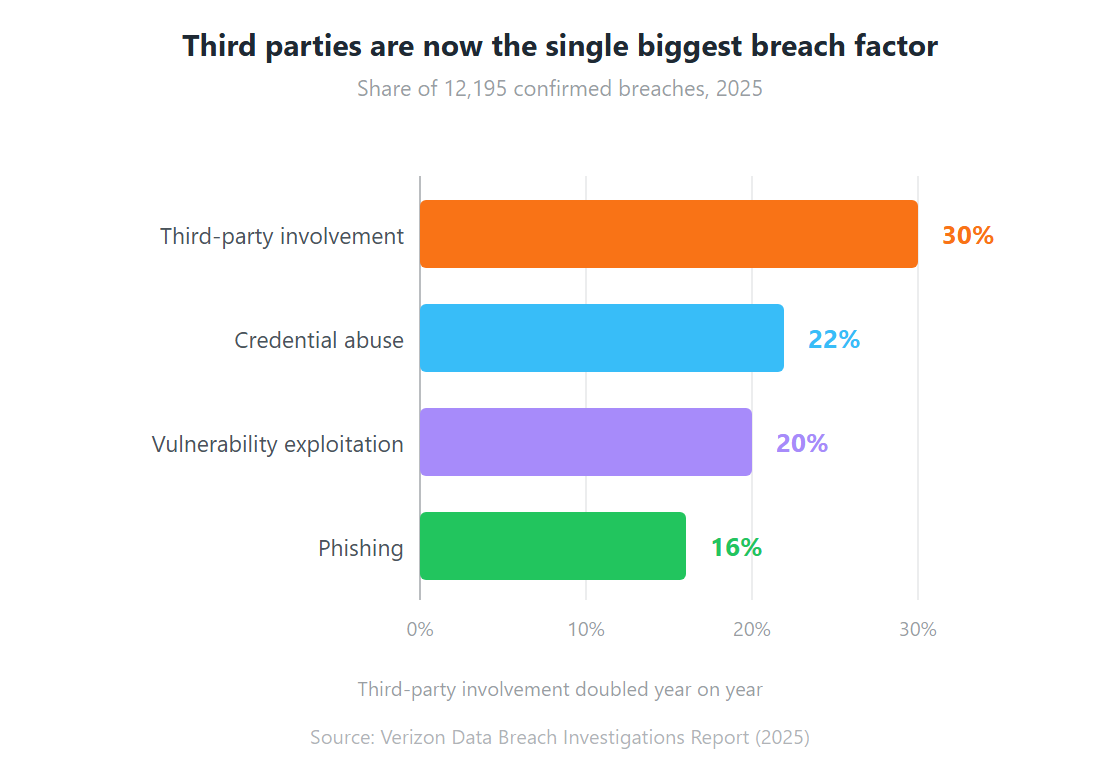
That last question is not theoretical. Verizon’s 2025 analysis of 12,195 confirmed breaches found the share involving a third party had doubled in a year, to 30% (Verizon, April 2025). Your MSP is a third party. Choosing one well is a security decision, not just a procurement one.

This guide covers what an MSP is, how the business model works, how MSPs differ from MSSPs and from resellers, what they cost, and how to evaluate one before signing. If you want the wider model rather than the provider, start with what managed services covers and come back here.

Key Takeaways

An MSP runs a defined slice of your IT for a recurring fee, under an SLA, continuously rather than on call.

MSP and MSSP are not synonyms. An MSSP runs a SOC and hunts threats; a general MSP mostly keeps things running.

Third-party involvement in breaches doubled to 30% in a year, so your provider is part of your attack surface.

The flat-fee model only aligns incentives if the contract is flat-fee. Hourly billing pays the provider for your outages.

Vet the provider’s own security posture before you vet their service catalogue.

What Is a Managed Service Provider?

A managed service provider is a third-party company that takes operational ownership of defined IT functions for a client, delivered continuously under a Service Level Agreement and billed on a recurring basis rather than per incident. The distinguishing feature is not the work itself but the timing: an MSP is contracted to prevent problems, and a break-fix vendor is contracted to arrive after one. That distinction has a measurable price attached, since ITIC found an hour of unplanned downtime costs more than USD 300,000 for 91% of mid-sized and large enterprises (ITIC).

Two pieces of tooling make the model possible, and it’s worth knowing their names because every provider will use them in a pitch.

Remote Monitoring and Management (RMM) is the agent software deployed across your endpoints and servers. It reports health, performance, patch status, and anomalies back to the provider continuously. This is what lets an engineer replace a failing disk on Thursday rather than rebuild a dead array on Saturday.

Professional Services Automation (PSA) is the provider’s own operating system: ticketing, SLA timers, asset records, billing. If an MSP cannot show you how PSA and RMM are wired together, their reporting is probably manual, and manual reporting tends to be optimistic.

A provider that meets the definition will offer all four of the following. Anything less is a support contract with a subscription attached.

  • Continuous monitoring, not scheduled check-ins
  • Recurring fixed pricing, not hourly billing
  • Contractual service levels with defined consequences
  • Named accountability for outcomes, not just for effort

How Does the MSP Business Model Actually Work?

The economics explain the behaviour, and they’re simpler than most buyers assume. Under a fixed monthly fee, every incident an MSP resolves costs it money, so its margin improves when your environment is stable. Under hourly billing the reverse holds. That inversion is the single most useful thing to understand before reading any proposal, because it predicts how a provider will behave once the honeymoon period ends.

An MSP makes money three ways. It spreads specialist salaries across many clients, so you rent a fraction of a cloud architect instead of employing one. It automates repetitive work, so an engineer who once handled 40 endpoints handles 400. And it buys tooling and licences at volume you cannot reach alone.

This is also why provider quality varies so widely at similar price points. Two MSPs can charge the same and deliver very different outcomes depending on how much of their delivery is automated versus how much is a person reading a dashboard. When you ask about automation depth later in the evaluation, this is the number you’re actually probing, and the mechanics of how that automation works are covered in our piece on AIOps in managed services operations.

What Does an MSP Do Day to Day?

Most engagements resolve into four repeating workstreams, and the reason they matter is speed of detection. IBM’s 2025 research put the global mean time to identify and contain a breach at 241 days, a nine-year low driven mainly by faster detection (IBM, 2025). Every one of the four workstreams below exists to pull that number down.

Service desk. L1 to L3 user support, ticket triage, and request fulfilment. This is the visible layer and the one your staff will judge the provider on, fairly or not.

Monitoring and alerting. Agents watch infrastructure and endpoints around the clock. Automation clears routine alerts. Engineers handle anything requiring judgement. Where this is delivered off-site rather than from your premises, it is usually sold as remote infrastructure management.

Maintenance. Patch cycles, firmware, backups, capacity planning, and lifecycle management. Unglamorous, and the first thing an under-resourced provider quietly lets slip.

Reporting and review. Monthly SLA reporting and quarterly business reviews. If you are chasing your provider for these, you have already learned something about them.

Backup and disaster recovery usually sits alongside these rather than inside them, and it’s worth confirming which. Plenty of contracts monitor a backup job’s completion without ever testing a restore.

MSP vs MSSP: What Is the Difference?

An MSP keeps IT running; an MSSP defends it. The gap between those two jobs is wider than most buyers expect, and getting it wrong is expensive: Verizon found ransomware present in 44% of all breaches analysed, rising to 88% of breaches at small and medium businesses (Verizon, 2025). A general MSP with antivirus and a patch schedule is not staffed to answer that.

Dimension MSP MSSP
Primary objective Availability, performance, user productivity Threat detection, containment, compliance
Core facility Network operations centre (NOC) Security operations centre (SOC), staffed 24/7
Typical tooling RMM, PSA, backup, patch management SIEM, EDR/XDR, MDR, threat intelligence feeds
Measured on Uptime, ticket resolution time, SLA adherence Mean time to detect, mean time to respond, dwell time
Trade-off accepted Will favour user convenience Will accept user friction to reduce risk
Regulatory role Supports audits with operational evidence Owns control implementation and evidence generation

Some providers deliver both under one contract, typically pairing general operations with a dedicated managed cybersecurity practice. Many advertise both and staff only one. The question that settles it: ask whether the SOC is theirs, and if so, how many analysts are on shift at 3am on a Sunday. A provider subcontracting its SOC is not disqualified, but you should know before signing, not after an incident.

Regulated sectors rarely have a choice here. Banking under RBI supervision, insurers under IRDAI, and any organisation handling personal data under the DPDP Act need the evidence trail an MSSP produces as a matter of course.

MSP vs VAR vs System Integrator: Who Does What

These three get used interchangeably in Indian enterprise procurement and they describe genuinely different businesses. The distinction matters because the commercial model determines whose interests the vendor serves after the sale.

Managed Service Provider Value-Added Reseller (VAR) System Integrator (SI)
What you buy Ongoing operation of your IT Hardware and software, plus advice A designed and built solution
Revenue model Recurring subscription Product margin, transaction based Project fees, fixed or time and materials
Engagement shape Continuous, multi-year Transactional, repeat purchases Finite, ends at handover
Incentive after delivery Keep it stable, margin depends on it Sell the next refresh cycle Win the next project
Who runs it afterwards The provider You You, or an MSP you appoint

Many Indian vendors are two or three of these at once, which is fine as long as you know which hat is being worn in which conversation. The failure mode is buying an integration project from a company you assumed would also operate the result.

Is Your MSP a Security Risk? The Third-Party Problem

Yes, and the data is unambiguous about it. Verizon’s 2025 report found third-party involvement in breaches had doubled year on year to 30% of all confirmed breaches (Verizon, 2025). An MSP holds privileged credentials across your estate, which makes it one of the highest-value targets an attacker can reach through you, and one of the highest-value routes to you that an attacker can reach through someone else.

third parties are now single biggest breach factor

So ask the provider about their own posture before you ask about yours. Specifically:

  • How privileged access to client environments is segmented, and can one compromised engineer account reach more than one client?
  • Is MFA enforced on every administrative account, including the RMM console?
  • What happened the last time they had a security incident, and what changed afterwards?
  • Who holds ISO 27001 certification, the group entity or the delivery unit that will actually serve you?

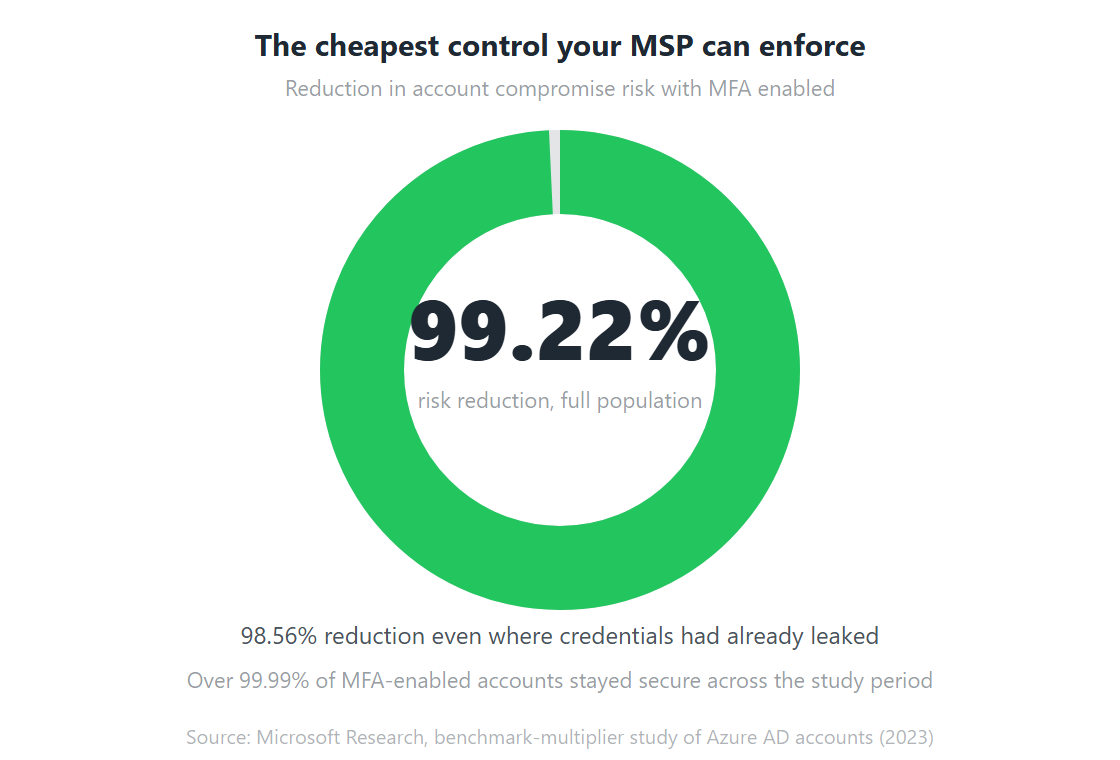
The MFA question is not a box-ticking exercise. Microsoft’s study of Azure Active Directory accounts showing suspicious activity found MFA reduced the risk of compromise by 99.22% across the population, and by 98.56% even where credentials had already leaked (Microsoft Research, 2023). A provider that has not enforced it on its own admin consoles is telling you how it will run yours.

the cheapest control your MSP can enforce

How Are MSPs Staffed and Certified?

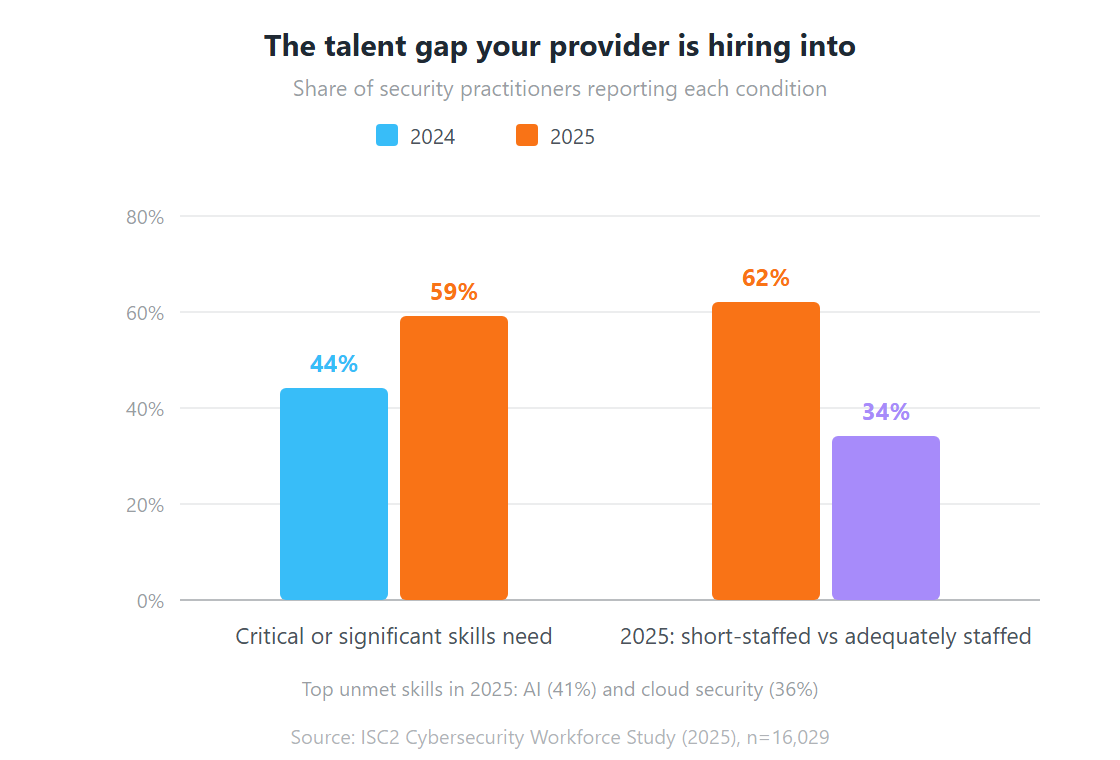
An MSP is a people business wearing a technology business’s clothes, and the labour market it hires from is tight. ISC2’s 2025 study of 16,029 practitioners found only 34% of security teams reported appropriate staffing, while 62% reported shortages, and 59% cited critical or significant skills gaps, up from 44% a year earlier (ISC2, December 2025). Every provider you evaluate is competing for the same scarce engineers you are.

The talent gap your provider is hiring into

What to look for on the people side:

Certification depth, not certification presence. One certified architect on a slide deck is marketing. Ask how many engineers hold the relevant certification and how many will be assigned to your account.

Named versus pooled resourcing. Will you get a named account engineer who learns your environment, or a rotating pool? Both models work. Pooled is cheaper and only works if documentation is genuinely good.

Attrition. Ask for engineering attrition over the last two years. High churn in a pooled model means your environment knowledge keeps walking out of the building.

Where the work is done. For 24/7 coverage, ask which centre covers which hours. A single delivery location covering “24/7” usually means a thin night shift. The same question applies to physical facilities if the scope includes colocation and data centre operations, where a night shift on site is not optional.

What Does an MSP Cost?

Pricing follows one of four shapes: per user, per device, all-inclusive flat fee, or a tiered baseline with add-ons. Which one fits depends on whether your complexity comes from people or from infrastructure. A manufacturer with a large plant floor and few office users is a per-device business; a professional services firm where everyone carries three devices is a per-user business.

The full breakdown of each model, including where costs creep, is in the managed services pricing section of our main guide. Two points specific to provider selection are worth making here.

First, check what “unlimited support” excludes. On-site visits, after-hours escalation, project work, and onboarding are the four things most commonly carved out of an unlimited contract.

Second, a lower monthly rate frequently signals thinner monitoring, and thinner monitoring shows up later as incidents. Given ITIC’s finding that 44% of enterprises put a single hour of downtime above USD 1 million, the difference between two quotes is rarely the largest number in the decision.

The 5 Mistakes Businesses Make When Choosing an MSP

These come up repeatedly in provider evaluations and each one is avoidable.

  1. Choosing on price alone. The cheapest quote usually buys the least monitoring. You pay the difference back in downtime, on a schedule you do not control.
  2. Treating the SLA as the whole contract. An SLA without defined penalties, an independent measurement source, and an escalation path is a statement of intent. Ask who adjudicates a missed target.
  3. Ignoring scalability. A provider sized for your current estate may not absorb a 300-person acquisition or a new site. Ask what the largest client they onboarded last year looked like.
  4. Overlooking automation maturity. Two providers at the same price deliver very differently depending on how much resolution is automated. Ask what percentage of standard incidents close without human intervention.
  5. Buying a provider instead of an operating model. The bigger decision is how IT gets run: fully outsourced, hybrid with an internal team, or co-managed. Settle that first, then shortlist providers who are genuinely good at that shape.

How Do You Evaluate an MSP Before Signing?

Run the commercial evaluation and the security evaluation as two separate exercises, because they fail for different reasons. The security one is the harder of the two, and given that a third of breaches now involve a third party, it deserves at least equal weight.

Work through these in order:

  1. Define the operating model first. Fully outsourced, co-managed, or augmentation. Write the RACI before you take a single sales call.
  2. Write your own SLA targets. Uptime, response and resolution by priority, reporting cadence. Then compare providers against your document rather than theirs.
  3. Audit their security posture. Privileged access segmentation, MFA on admin consoles, ISO 27001 scope, incident history.
  4. Probe automation depth. What share of tickets close without a human, and which tools produce that.
  5. Check delivery geography. Which centre covers which hours, and what the continuity plan is if one goes dark.
  6. Take references at your size and in your sector. Ask referees what went wrong once and how it was handled.
  7. Read the exit clause before the service catalogue. Notice period, data return format, transition assistance, and who owns the documentation. Contracts are easiest to leave when you negotiated the exit while they still wanted your signature.

That last point is the one buyers skip and later regret. Documentation ownership in particular decides whether switching providers takes six weeks or six months.

The Bottom Line on Managed Service Providers

An MSP is worth buying when your IT is business critical, your internal team is stretched, and you would rather pay a predictable fee than absorb unpredictable failure. It is worth buying carefully because the same contract that gives a provider the access to help gives them the access to hurt, and third-party involvement in breaches is now running at 30% and rising.

The providers worth shortlisting will answer the awkward questions directly: how their own admin access is segmented, what their engineering attrition looks like, what their last incident was. The ones to avoid will redirect to the service catalogue.

Team Computers operates managed services across infrastructure, cloud, digital workplace, and security for enterprises and GCCs in India. If you want to test any provider against the seven checks above, that list works on us too.

Frequently Asked Questions about MSPs

What does MSP stand for?

MSP stands for managed service provider. It describes a company that operates defined IT functions for a client on an ongoing basis, under a service level agreement, for a recurring fee. The term is used across infrastructure, cloud, end-user computing, and application support. When the same model is applied specifically to security, the provider is usually called an MSSP, a managed security service provider.

What is the difference between an MSP and an MSSP?

An MSP is measured on availability and user productivity; an MSSP is measured on threat detection and response. The MSP runs a network operations centre using RMM and patch tooling. The MSSP runs a security operations centre using SIEM, EDR or XDR, and threat intelligence, staffed around the clock by analysts. Some providers offer both. Many advertise both and only staff one, so ask specifically whether the SOC is theirs and how many analysts are on shift overnight.

Is an MSP the same as IT outsourcing?

No. Outsourcing usually transfers a whole function, sometimes including the staff who ran it. An MSP model is modular: you define which functions are in scope, the provider operates them under an SLA, and you keep governance. MSP delivery also leans much harder on monitoring tooling and automation, where traditional outsourcing is predominantly labour based.

Does hiring an MSP transfer my compliance liability?

No. Under frameworks such as India's DPDP Act, accountability stays with you as the data fiduciary regardless of who operates the systems. What a competent provider changes is your ability to evidence compliance: documented patch cycles, maintained access controls, and audit-ready incident logs. Read the liability and indemnity clauses closely, because an SLA credit is compensation for poor service, not cover for a regulatory penalty.

How do I check whether an MSP is secure enough to trust?

Ask four questions before the service catalogue. How is privileged access to client environments segmented, and can one compromised engineer account reach multiple clients? Is MFA enforced on every administrative account including the RMM console? What was their most recent security incident and what changed after it? And does the ISO 27001 certificate cover the specific delivery unit that will serve you, or only the group entity? Verizon put third-party involvement at 30% of confirmed breaches in 2025, so these are proportionate questions.

How long does onboarding with an MSP take?

Typically 4 to 12 weeks from signature to steady state, driven by scope and environment complexity. A single-site service desk can be live in 2 to 4 weeks. Full infrastructure and security coverage across multiple locations usually needs 8 to 12 weeks, because discovery, agent deployment, documentation, and knowledge transfer all have to finish before the SLA can start. Ask for a written onboarding plan with named milestones.

Can a small business use an MSP, or is it enterprise only?

Small businesses are well served by the model, usually starting with service desk and endpoint management on per-user pricing. The relevant question is whether the provider has packages built for your size or whether their minimum engagement is designed for enterprises. Ask about their smallest active client. Verizon's 2025 data found ransomware present in 88% of breaches at small and medium businesses, so the risk case for smaller organisations is if anything sharper than for large ones.

What Are IT Managed Services? The Complete Guide for Businesses in 2026

Every year, Indian enterprises lose thousands of productive hours to IT failures nobody saw coming. A server drops mid-shift. A security patch gets missed. A laptop dies on the morning of a board presentation. The break-fix cycle, wait for something to break and then scramble, has quietly become one of the most expensive habits in corporate India.

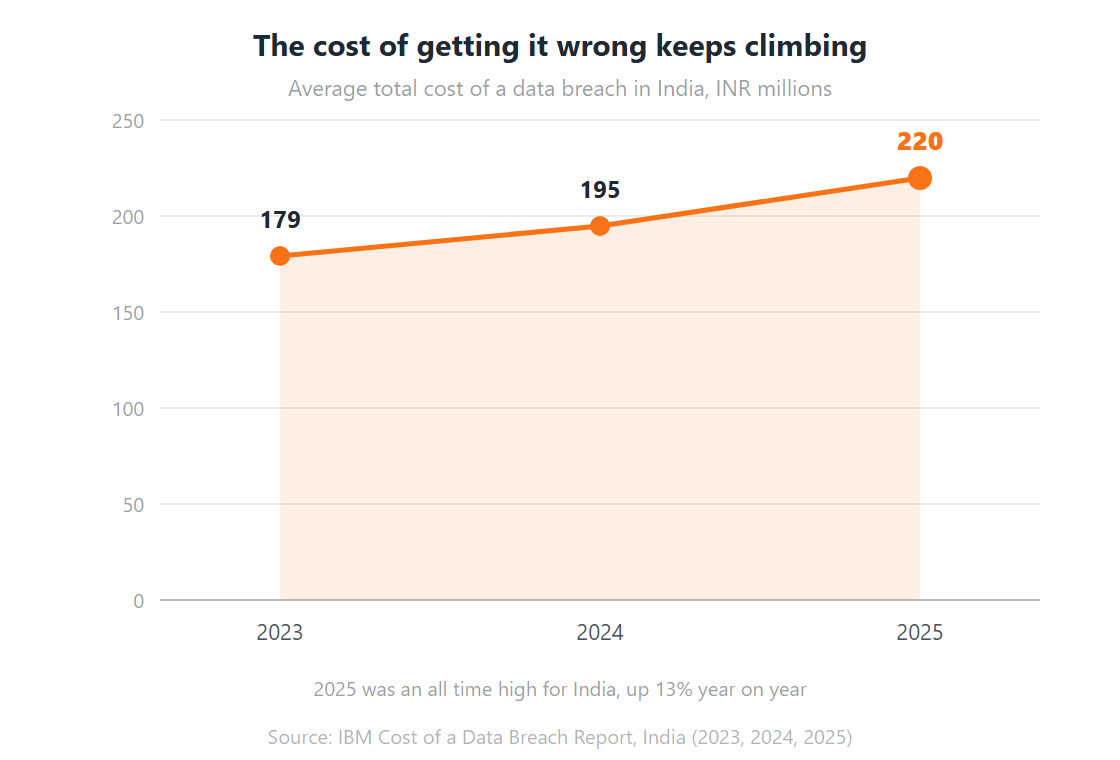
The numbers back that up. IBM found the average data breach in India cost INR 220 million in 2025, an all time high and 13% up on the year before (IBM, 2025). Separately, ITIC’s downtime research puts a single hour of unplanned downtime above USD 300,000 for 91% of mid-sized and large enterprises (ITIC, 2022). Reactive IT is not cheap. It just hides its cost in places the IT budget does not show.

Managed services exist to break that cycle. Not by adding IT headcount, but by changing how IT gets delivered in the first place, which is why the model has become the backbone of enterprise IT strategy rather than a line item under support.

This guide covers what managed services are, how they work, what types exist, what they cost, and how they compare to running IT in house. It’s written for IT managers, CIOs, and business leaders who want a straight answer rather than a brochure.

Key Takeaways

Managed services means a provider runs a defined slice of your IT under an SLA, continuously, rather than fixing things after they break.

The business case is risk, not just cost: the average Indian data breach hit INR 220 million in 2025.

Talent is the other driver. Only 34% of security teams say they’re appropriately staffed.

Four pricing models dominate: per user, per device, all inclusive flat fee, and tiered. The cheapest headline rate is rarely the lowest total cost.

Managed services and in-house IT are not either/or. Most mature setups run both, split by a clear RACI.

What Are Managed Services?

Managed services is a delivery model where a third party provider, a Managed Service Provider or MSP, takes ownership of a defined set of IT functions under a subscription-based Service Level Agreement. Gartner sizes the wider category that contains it at more than USD 1.87 trillion in 2026, the largest single slice of a USD 6.31 trillion global IT spend (Gartner, April 2026). Instead of reacting to problems after they surface, the MSP monitors, maintains, and tunes your environment continuously.

The term gets used loosely. People swap it with “IT outsourcing” and “IT support” as though the three are interchangeable. They’re related. They are not the same, and the difference matters once you start comparing quotes.

Traditional IT outsourcing usually means handing over a whole function, sometimes including the staff who run it, to an external vendor. Managed IT services for modern enterprises is more modular. You pick the scope: network security only, cloud infrastructure only, or the full stack. The MSP operates inside that boundary against agreed metrics that define what “good” actually means.

The second difference is temporal. A traditional support contract means somebody fixes things when they break. A managed services contract means the environment is watched around the clock, so most failures get intercepted before they land. That single shift, reactive to proactive, is where the value sits.

Worth naming the adjacent roles too, because buyers confuse them. A managed service provider (MSP) handles general IT operations. An MSSP is the security specialist variant, running a SOC and threat response. Some vendors do both under one contract. Many do not, and finding that out after signing is an expensive way to learn.

How Do Managed Services Work?

The mechanics vary by provider, but nearly every engagement moves through the same six stages, and the whole model rests on shortening detection time. IBM’s 2025 research found the global mean time to identify and contain a breach fell to 241 days, a nine year low, with faster detection doing most of the work (IBM, 2025). Continuous monitoring is how an MSP attacks that number on your behalf.

Step 1: Environment Assessment and Onboarding

Before anything goes live, the MSP audits your current environment: infrastructure, software and licensing, security posture, and any SLAs or vendor contracts already in place. The purpose is to establish what exists, what’s exposed, and what falls inside scope.

This stage matters more than most buyers realise. An MSP that skips a proper assessment, or rushes one, is setting itself up to miss things. Ask for the written output before you sign anything.

Step 2: SLA Definition

Once scope is agreed, you negotiate the Service Level Agreement. It defines what the MSP owns, what response and resolution times apply per incident class, what uptime is guaranteed, and what happens when a target is missed.

The terms worth arguing over: incident classification (P1/P2/P3), response commitments per priority, escalation paths, reporting cadence, and the credits or penalties that apply on breach.

Step 3: Continuous Monitoring

Monitoring tools go across the environment and run 24/7, collecting data on performance, security events, network traffic, and user activity. Anomalies raise alerts. Scripts handle routine responses. Engineers handle anything needing judgement.

The design goal is shift left: move detection as early in the cycle as possible, before users are affected. In practice that means an MSP’s value shows up as incidents that never happened, which is uncomfortable to put on a dashboard but real all the same.

Also read: Remote Infrastructure Management for Modern Enterprises

Step 4: Proactive Maintenance

Monitoring catches problems. Maintenance prevents them. Patch cycles, firmware updates, capacity planning, performance tuning, scheduled health checks. This is the unglamorous work that keeps an environment stable across years, and it’s the first thing in-house teams drop when they’re busy firefighting.

Step 5: Incident Response and Resolution

When something does break, and eventually something always does, the MSP responds against the agreed SLA. P1 incidents such as full outages and security breaches get immediate attention. Lower priorities queue and clear inside agreed windows. Every incident is logged, tracked, and reported.

Step 6: Reporting and Review

Good providers send performance reports monthly, covering SLA adherence, incident volume and trend, availability, and any risks coming down the road. Quarterly business reviews give both sides a structured chance to reset scope as the business changes.

If your MSP isn’t proactively sharing performance data, that’s a red flag. You should never have to chase for a status update on your own infrastructure.

Also read: AIOps in Managed Services: Transforming IT Operations

Types of Managed Services: What You Can Actually Buy

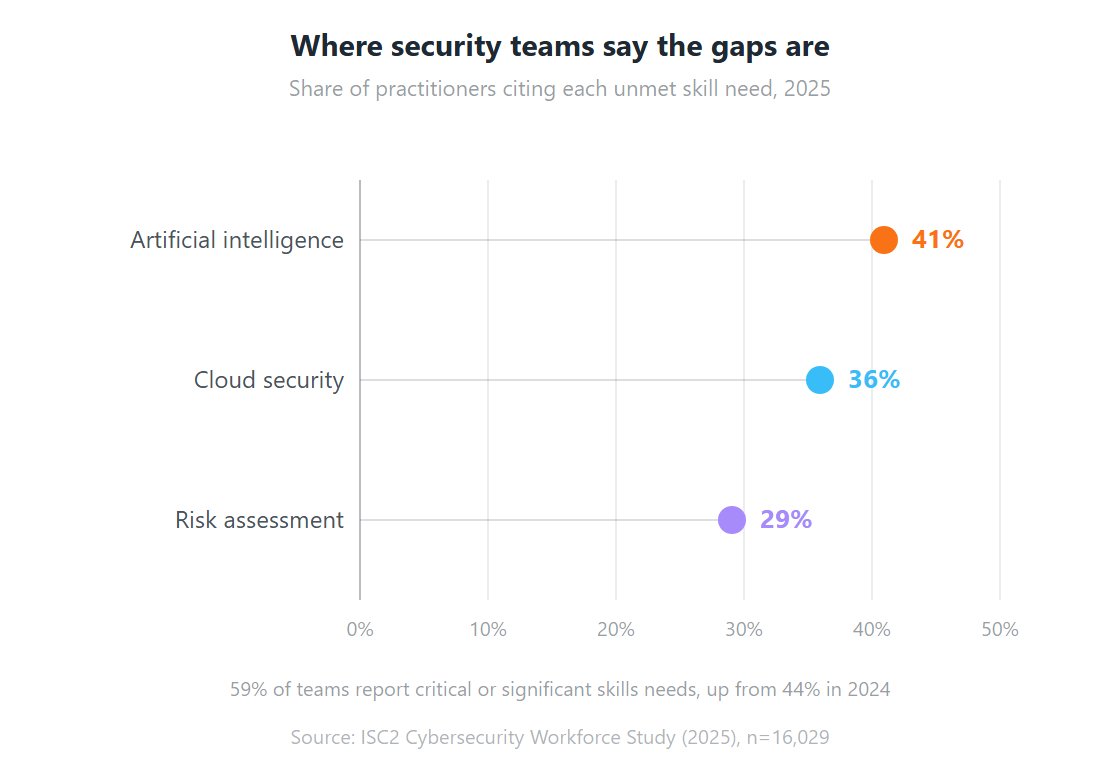
Managed services is not one product. It’s a delivery model that can wrap almost any area of IT, and the fastest growing slice of it is security, driven by a talent gap that shows no sign of closing. ISC2’s 2025 study of 16,029 practitioners found 59% reporting critical or significant skills needs, up sharply from 44% a year earlier (ISC2, December 2025). The categories below cover what most Indian enterprises actually buy.

Service Type What It Covers Typical Reason for Buying
Managed IT Infrastructure Servers, storage, data centre equipment, hardware lifecycle, performance monitoring Ageing hardware; no internal depth in infrastructure management
Managed Network and Security Firewall management, VPN, network monitoring, endpoint protection, DDoS mitigation Complex multi-site networks; growing threat surface
Managed Cloud Services AWS, Azure and GCP management; migration; hybrid cloud operations; cost optimisation Cloud sprawl, uncontrolled spend, no cloud-native expertise in house
Managed Digital Workplace End-user computing, device management (MDM/UEM), M365 and Google Workspace, VDI Large distributed workforces; BYOD complexity; hybrid work support
Managed Application Services ERP support, application monitoring, performance tuning, release management Business-critical apps needing specialist support beyond internal capability
Managed Cybersecurity (MSSP) SOC-as-a-service, SIEM, threat detection and response (MDR), vulnerability management ISO 27001, DPDP Act and GDPR obligations; attacks getting more sophisticated
Managed Help Desk / Service Desk L1/L2/L3 user support, ticket management, ITSM tooling, knowledge base High request volume; 24/7 coverage without building a round-the-clock team
Managed Data Centre Operations Co-location management, power and cooling, physical infrastructure, DR readiness You own a data centre but lack the headcount to run it efficiently

Most enterprises don’t buy all eight at once. The common entry point is managed help desk plus infrastructure monitoring, because that’s where reactive support costs are highest and most visible to finance. Scope expands from there as trust builds.

Where security teams say the gaps are

Managed Services vs In-House IT vs Break-Fix: Which Model Fits?

Break-fix is the model that quietly costs the most, because its price tag lands as downtime rather than invoices, and ITIC found a single hour of downtime exceeds USD 300,000 for 91% of mid-sized and large enterprises, with 44% saying one hour can cost over USD 1 million (ITIC, 2022). Each of the three models works. Each suits a different situation.

Factor Managed Services In-House IT Team Break-Fix Support
Cost model Fixed monthly subscription, predictable Salaries, benefits, tools, training. Predictable but high Pay per incident. Low baseline, high variance
Coverage hours 24/7 monitoring and support as standard Business hours unless you staff shifts Business hours, or emergency rates
Depth of expertise Specialist teams across security, cloud, networking in one contract Broad generalists. Deep expertise needs expensive hires Whoever is available, often a single generalist
Scalability Add or remove services via contractual change Hiring and offboarding is slow and costly No scaling. Same model regardless of growth
Proactive vs reactive Proactive. Issues detected before users notice Varies with team discipline and tooling investment Entirely reactive. Nothing happens until something breaks
Risk and accountability SLA defines accountability, with credits or penalties Internal accountability only, culture dependent No accountability structure
Technology currency Provider continuously invests in tooling and certifications Requires ongoing training budget and internal initiative No incentive for technology investment
Best suited for Businesses wanting predictable IT cost and proactive management without large internal teams Large enterprises with complex proprietary systems needing deep internal ownership Very small businesses with minimal IT and low risk exposure

One correction to a common assumption: managed services and in-house IT are not mutually exclusive. Plenty of organisations run both, using an MSP to extend coverage into areas where building internal capability costs more than it’s worth. Treat it as a resource allocation decision, not a binary one.

What Are the Real Benefits of Managed Services?

The case is usually made on cost, and the cost argument is real. But the sharper argument in 2026 is exposure. IBM’s data shows Indian organisations making extensive use of AI and security automation paid substantially less per breach than those with none, and that automation depth is exactly what an MSP contract buys you without a hiring cycle (IBM, 2025).

The cost of getting it wrong keeps climbing

1. Cost Predictability

Budgets built around break-fix are structurally unpredictable. One hardware failure, one ransomware incident, or one unplanned scaling event can each generate a six figure month. A managed services contract replaces that variance with a fixed fee, converting a lumpy capital expense into an operating cost finance can actually plan against.

Also read: Why Businesses Need IT Managed Services in 2026

2. Access to Specialist Expertise

Hiring a cloud architect, a security engineer, a network specialist, and a service desk lead is slow and expensive. It’s also getting harder: only 34% of security teams report appropriate staffing levels, while 62% report significant or slight shortages (ISC2, 2025). An MSP contract gives you those skills without carrying the headcount.

This matters most in security and cloud. The technology moves fast, certifications carry weight, and a knowledge gap gets expensive quickly. Few mid-sized businesses can justify certified experts in every domain. An MSP spreads that expertise across its client base, which is the only reason the economics work.

3. Proactive Problem Prevention

This benefit takes the longest to appreciate and usually ends up the most valued. Under continuous monitoring, most problems get intercepted before they cause visible disruption. A storage array nearing capacity gets flagged. A server showing early failure signatures gets replaced. A suspicious authentication pattern gets investigated before it becomes an incident.

The absence of incidents is hard to celebrate. But organisations that move off break-fix consistently report spending far less time in crisis mode.

4. Scalability Without Hiring

Growing businesses hit the same wall repeatedly: they need more support, hiring takes a quarter, and the need is immediate. Managed services absorbs growth through scope change instead of recruitment. A new office, 200 new joiners, or a cloud migration all get handled inside the existing relationship with an amended SLA rather than a three month hiring cycle.

5. Compliance and Security Assurance

Regulatory pressure on Indian enterprises keeps building. ISO 27001, the DPDP Act, GDPR obligations for anyone touching EU data, RBI guidelines for financial institutions, and sector rules in healthcare and government all demand ongoing operational discipline rather than an annual audit sprint.

A capable MSP builds compliance into its standard operating model. Patch cycles documented. Access controls maintained. Incident logs kept audit ready. For regulated businesses, that alone can carry the cost case.

6. Freeing Internal Teams to Focus on Strategy

In-house teams at growing companies burn most of their week on tickets, device provisioning, and maintenance. That’s time not spent on internal tooling, product support, or transformation work.

When an MSP owns the operational layer, internal talent moves up the value chain. This is especially relevant for GCCs, where internal teams are typically doing high value engineering that shouldn’t be interrupted by L1 tickets.

Also read: How Managed IT Services Keep Your Business Up to Date

7. 24/7 Coverage Without 24/7 Staffing

Running follow-the-sun support internally means multiple shifts, real staffing cost, and constant roster management. Most businesses can’t justify it. Managed services ships 24/7 monitoring and response as a baseline feature, so the environment stays watched when the office is dark.

How Much Do Managed Services Cost?

Pricing depends on scope, scale, and SLA terms, so no honest guide quotes a single number. What you can pin down is the shape of the four models, and which one aligns the provider’s incentives with yours. For context on the scale of spend involved, IT services including managed services is forecast to pass USD 1.87 trillion globally in 2026 (Gartner, April 2026).

Per-User Pricing

The most straightforward model. A monthly fee per user covers that person’s devices, support, and any in-scope services. It fits best when end-user support and digital workplace management are your primary need. Easy to budget, and it scales cleanly with headcount.

Per-Device Pricing

A fee per managed device: server, workstation, or network device. This suits businesses whose complexity comes from infrastructure rather than user count. A manufacturer with a large plant floor and few office users will usually find per-device pricing more rational than per-user.

All-Inclusive Flat Fee

One monthly fee covers everything in scope regardless of incident volume, user count, or device count. It gives maximum budget predictability, and it’s the only model that structurally aligns the provider with you: the fewer incidents they resolve, the better their margin. That’s a genuine incentive for proactive management rather than a promise of one.

Tiered or A La Carte Pricing

You take a baseline package and add components as separate line items: 24/7 SOC, cloud management, dedicated helpdesk. Flexible, but it needs active scope governance. Cost creeps when nobody is tracking what got added over eighteen months.

A lower monthly fee is not automatically cheaper. A provider with a low headline rate and thin monitoring will cost you more in incident resolution, downtime, and lost productivity. Given ITIC’s finding that 44% of enterprises put a single downtime hour above USD 1 million, the invoice line is rarely where the real money is decided.

Which Industries Need Managed Services Most?

Managed services is not sector specific. It applies anywhere IT is business critical and failure is expensive, which is now most places. What changes by sector is the primary driver, and financial services carries the sharpest version of it: IBM found financial services recorded the highest average breach cost in India of any sector (IBM, 2025).

Banking and Financial Services (BFSI)

BFSI faces three pressures at once: strict regulation under RBI, SEBI and IRDAI, near zero tolerance for downtime, and an attack surface that widens with every new digital channel. Fifteen minutes of core banking unavailability carries both customer and compliance consequences.

For BFSI, managed security and managed infrastructure are the usual entry points. 24/7 SOC coverage, incident response, and audit-ready compliance documentation are what resonate with CIOs here.

Healthcare

Healthcare IT sits between two non-negotiables. Systems must be available, because clinical decisions depend on them. Patient data must be protected to a standard equivalent to HIPAA. The cost of a breach, reputational and regulatory as much as operational, is severe.

Healthcare engagements typically cover endpoint management, since the volume of clinical devices is difficult to manage internally, plus network security and application support for hospital management systems and EMRs.

Manufacturing

Manufacturers are managing the convergence of operational technology and IT networks. Factory floor systems connecting to enterprise networks creates a security exposure most plant managers are not equipped to handle. At the same time, ERP systems running production planning and inventory are business critical and need specialist support.

Managed OT/IT security and managed ERP support are the highest priority categories for this sector.

Retail and E-Commerce

Retail has a peak problem. Infrastructure sized for average load falls over during Diwali sales, Big Billion Days, or end of season promotions. Building internal capacity for peaks means paying for headroom that sits idle for ten months of the year.

Managed cloud with elastic scaling, plus intensified monitoring during peak windows, is the standard entry point for retail and e-commerce.

Global Capability Centres (GCCs) and MNCs in India

India now hosts 2,117 GCCs operating across 3,728 individual units, employing 2.36 million people and generating USD 98.4 billion in revenue in FY2026 (Zinnov and Nasscom, 2026). These organisations scale fast, from 50 to 500 people inside a year is not unusual, and they need enterprise grade IT from day one without the lead time to build an internal team.

Who is actually running GCCs in India

For GCCs, managed services usually starts with infrastructure setup and end-user computing, then expands into IT staffing augmentation and managed security as the centre matures.

How Do You Choose the Right Managed Service Provider?

The market is large and unevenly mature. There’s a wide gap between a provider watching dashboards and one anticipating problems, investing in automation, and treating the engagement as a partnership. Automation depth is the clearest separator: IBM’s India data shows organisations with extensive AI and security automation paid roughly a third less per breach than those with none (IBM, 2025). The seven checks below sort one type of provider from the other.

Related: How to choose the best IT managed service provider

1. Define Your Own Requirements First

Before evaluating anyone, know what you need. Which functions are in scope? What does “good” mean numerically: what uptime, what response times, what reporting? Walk into an evaluation without a defined scope and you’ll buy whatever the sales team sells best, which is rarely what you needed.

2. Scrutinise the SLA Terms

An SLA is only as good as its enforcement mechanism. Ask what the priority classifications are and the commitments attached to each. Ask what credits or penalties apply on a miss. Ask who adjudicates whether a target was met, the provider’s own reporting or an independent measure. A provider reluctant to commit to measurable terms has told you something useful.

3. Check Certifications and Compliance Posture

ISO 27001 is the baseline for most enterprise buyers in India. Depending on sector, add GDPR readiness, SOC 2 attestation, NIST alignment, DPDP Act readiness, or RBI and SEBI experience. Certifications don’t guarantee quality. Their absence is still meaningful.

4. Ask About Monitoring and Automation Depth

Which monitoring tools are deployed? Are incidents detected by systems or reported by users? What share of standard incidents resolve through automation with no human touch? Given the breach cost differential IBM records between automated and non-automated security operations, this is not a technical curiosity. It’s a pricing question in disguise.

5. Verify Global Delivery Capability

If you operate across time zones, ask precisely how 24/7 coverage is delivered. A single delivery centre will have blind spots at certain hours. Ask for the BCP and DR strategy covering the provider’s own operations, not just yours. Continuity risk inside your MSP is continuity risk inside your business.

6. Request References and Case Studies

Any credible provider can produce references. Ask for ones in your industry and at your scale. Case studies describing problem, solution, and measurable outcome beat testimonials every time. A provider who can’t point to documented outcomes in comparable engagements should be asked why.

7. Confirm Pricing Transparency

Ask what’s included and what triggers additional charges. The usual gotchas: per-incident fees above a monthly threshold, after-hours escalation charges, and costs for users or devices beyond base scope. An itemised structure signals a provider planning a long relationship rather than one hiding margin in the small print.

The Bottom Line on Managed Services

Managed services is not a product you buy once and forget. It’s a working relationship that has to evolve as the business does. Scope should change when needs change. The SLA should tighten as the provider learns your environment. Reporting should give you real visibility rather than a monthly PDF nobody opens.

Organisations that get the most from the model treat it as a strategic decision rather than a cost reduction exercise. The cost savings are real. But the more durable return is what internal teams do with the hours they stop spending on reactive support, in a market where the average Indian breach now costs INR 220 million and 62% of security teams are already short staffed.

If you’re evaluating whether the model fits, start with an honest audit of where your current IT setup costs you most, in time, money, or risk. That answer usually determines the scope, and the scope determines everything else.

Team Computers runs managed services engagements across infrastructure, cloud, digital workplace, and security for enterprises and GCCs in India. If you want that audit conversation, start there.

Frequently Asked Questions About Managed Services

What is the difference between managed services and outsourcing?

Outsourcing typically transfers an entire business function, including staff and processes, to a third party. Managed services is more targeted: you define a specific scope of IT functions, the MSP delivers them under an SLA, and you retain governance. Managed services also leans harder on monitoring tools and automation, whereas traditional outsourcing is mostly labour based. The models overlap. They are not interchangeable.

Are managed services suitable for small businesses?

Yes, with narrower scope. Businesses with 20 to 100 employees usually start with managed helpdesk and endpoint management, covering end-user support without hiring a full-time IT person. Per-user pricing scales down effectively. The real question is whether the provider has packages built for your size, or whether their minimum engagement is designed for enterprises. Ask about their smallest active client to calibrate.

What is the difference between managed services and break-fix IT support?

Break-fix is reactive: something breaks, you call, they fix, you pay per incident or hour. No ongoing monitoring, no proactive maintenance, no SLA governing response. Managed services is continuous: the environment is monitored around the clock, issues are often resolved before users notice, and the agreement defines exactly what you get and how fast. With ITIC putting an hour of downtime above USD 300,000 for 91% of mid-sized and large enterprises, the gap in outcomes is measurable.

How long does it take to onboard with a managed service provider?

Most engagements run 4 to 12 weeks from signature to steady state, and the range is driven almost entirely by scope and environment complexity. A managed helpdesk for a single site can go live in 2 to 4 weeks. Full infrastructure and security coverage across multiple locations typically needs 8 to 12 weeks, because discovery, tooling deployment, documentation, and knowledge transfer all have to complete before the SLA can start. Ask any prospective provider for a written onboarding plan with named milestones. A provider promising full coverage in under two weeks is either skipping the assessment or has not read your environment properly.

What security certifications should an MSP hold?

ISO 27001 is the baseline, demonstrating a formal information security management system. SOC 2 Type II attestation increasingly matters for anyone handling sensitive data. Sector specifics count too: healthcare buyers should probe HIPAA-equivalent controls, financial services buyers should ask about RBI circular compliance, and every Indian buyer should now ask about DPDP Act readiness. Beyond certificates, ask about the provider's own security posture. An MSP with weak internal practices is a supply chain risk you inherit.

Can managed services work alongside an existing in-house IT team?

This is one of the most common deployment models and it works well when boundaries are explicit. In-house teams usually keep strategic decisions, internal development, and vendor relationships. The MSP takes operational functions: monitoring, helpdesk, infrastructure management, security operations. The thing that makes or breaks it is a clear RACI matrix agreed at the outset. Ambiguous ownership produces gaps and conflicts, reliably.

Do managed services reduce cyber risk or just transfer it?

They reduce it when the contract is written correctly, and transfer nothing legally. Regulatory accountability under frameworks like the DPDP Act stays with you as the data fiduciary regardless of who operates the systems. What a good MSP changes is detection speed and remediation discipline. IBM's 2025 data shows the global mean time to identify and contain a breach fell to 241 days, driven mainly by faster detection, and continuous monitoring is the mechanism behind that. Read the liability clauses carefully: an SLA credit is not indemnity.

What tools and frameworks are most helpful for preparing a cybersecurity audit in a mid-size organization?

In today’s digital landscape, cybersecurity is a top priority for organizations of all sizes. Mid-size organizations, in particular, face unique challenges. They must balance robust security measures with limited resources.

Cybersecurity audits are essential for identifying vulnerabilities and ensuring compliance. They help organizations protect sensitive data and maintain trust with stakeholders.

Choosing the right tools and frameworks is crucial for a successful audit. These tools streamline processes and provide valuable insights into an organization’s security posture.

From audit software solutions to vulnerability scanning tools, the options are vast. Each tool offers distinct features and benefits.

Understanding these tools can enhance your organization’s cybersecurity strategy. It ensures you are prepared for potential threats.

This guide explores the most effective tools and frameworks for mid-size organizations. It aims to simplify the complex world of cybersecurity audits.

Understanding Cybersecurity Audits in Mid-Size Organizations

Cybersecurity audits evaluate an organization’s security measures and protocols. For mid-size organizations, these audits are both a necessity and a challenge. Limited resources can hinder comprehensive audits, but the stakes remain high.

Mid-size organizations must assess both internal and external threats. This includes everything from data breaches to compliance with regulations like GDPR and HIPAA. Ignoring these can lead to severe consequences and financial losses.

An effective audit identifies gaps in security and suggests improvements. It ensures that the organization aligns with industry standards and best practices. Regular audits help maintain a secure environment by detecting vulnerabilities early.

Key activities in a cybersecurity audit include:

  • Evaluating existing security policies and their effectiveness
  • Identifying potential security threats and weaknesses
  • Ensuring compliance with relevant laws and standards

A clear understanding of these activities empowers organizations. It enables them to protect their assets effectively and respond to new threats swiftly. By using the right audit tools and frameworks, organizations can mitigate risks and enhance their cybersecurity posture.

Key Frameworks for Cybersecurity Audits

Frameworks provide a structured approach to conducting cybersecurity audits. They serve as roadmaps, guiding organizations through the complex audit process. For mid-size organizations, choosing the right framework is crucial.

One widely recognized framework is the NIST Cybersecurity Framework. It offers guidelines to manage and reduce cybersecurity risk. Another popular option is ISO 27001, focused on information security management systems.

CIS Controls, a set of best practices, provides actionable measures for strengthening cybersecurity. These frameworks help organizations prioritize their security investments effectively. They focus on identifying and managing risks, a core aspect of a successful audit.

Key cybersecurity frameworks include:

  • NIST Cybersecurity Framework
  • ISO 27001
  • CIS Controls

Utilizing these frameworks ensures alignment with global security standards. They streamline the audit process and enhance the reliability of audit results. With effective frameworks, organizations can address both current and emerging threats competently. This paves the way for a robust cybersecurity program that adapts to evolving challenges.

Essential Categories of Cybersecurity Audit Tools

Cybersecurity audit tools come in various categories, each serving distinct purposes. Understanding these categories helps organizations select the right tools for their needs.

Firstly, security assessment tools evaluate the effectiveness of existing security measures. They pinpoint areas that need improvement. These tools are essential for maintaining an organization’s security posture.

Next are risk assessment tools. These identify and analyze potential threats and vulnerabilities. They allow organizations to prioritize and address risks effectively. Implementing these tools can prevent significant security incidents.

Lastly, compliance audit tools ensure organizations meet regulatory requirements. They facilitate audits of industry standards like GDPR and HIPAA. Compliance tools are crucial for avoiding legal issues and fines.

Key categories include:

  • Security assessment tools
  • Risk assessment tools
  • Compliance audit tools

Investing in diverse cybersecurity audit tools strengthens an organization’s defenses. They empower IT teams to address challenges proactively. Selecting tools aligned with organizational goals enhances the overall security program.

Top Audit Software Solutions for Mid-Size Organizations

Selecting the right audit software is crucial for mid-size organizations. The right tools streamline the cybersecurity audit process. These solutions automate data collection and provide insightful analysis, saving time and resources.

Effective audit software solutions come equipped with robust features. They offer user-friendly interfaces and customizable reports. Mid-size organizations need tools that present data in an easily digestible format. This simplifies identifying key security issues and compliance gaps.

Cloud-based solutions offer added flexibility and scalability. They allow organizations to adapt as they grow. Cloud solutions also provide real-time insights, which are vital for responding to threats quickly.

Many software solutions integrate well with existing systems. This compatibility ensures a seamless transition and enhances functionality. Look for software that supports multi-platform environments to cater to diverse IT infrastructures.

Popular audit software solutions include:

  • SolarWinds Security Event Manager
  • Netwrix Auditor
  • ManageEngine Log360

The choice of software should align with the organization’s specific needs and budget. Feedback from other users in similar organizations can provide valuable insights. Ultimately, the right solution will contribute to a more secure and compliant organizational environment.

Security Assessment and Risk Assessment Tools

Security assessment tools are vital in measuring an organization’s security posture. They evaluate existing security measures and identify weaknesses. Effective tools should provide clear and actionable insights.

Risk assessment tools, on the other hand, focus on identifying potential threats and vulnerabilities. They help prioritize security efforts by highlighting the most significant risks. Prioritization ensures resources are efficiently allocated to mitigate potential threats.

For mid-size organizations, combining these tools enhances overall security management. Tools that merge both functionalities offer a comprehensive view. This holistic approach aids in formulating more effective cybersecurity strategies.

Popular tools in these categories include:

  • Nessus for vulnerability assessments
  • Qualys for continuous monitoring
  • Rapid7 InsightVM for risk prioritization

These tools often integrate with broader security systems. Such integration is crucial for streamlining risk management and ensuring seamless operations. Their ability to provide real-time data ensures that organizations can swiftly adapt to emerging threats. Selecting the right tools will significantly bolster a mid-size organization’s security framework.

Vulnerability Scanning and Penetration Testing Tools

Vulnerability scanning tools are essential for detecting security flaws in a network. These tools scan systems to identify weaknesses that could be exploited. Regular scans help organizations address vulnerabilities before they turn into serious threats.

Penetration testing tools go a step further. They simulate real-world cyber-attacks to test system defenses. This allows organizations to understand how resilient their infrastructure is against genuine threats. Insights from these tests can guide security improvements.

Effective usage of these tools involves periodic and strategic testing. Regular penetration tests should be part of a cybersecurity plan. They unveil critical gaps that need immediate remediation.

Some renowned tools in this category include:

  • Nmap for network discovery
  • Metasploit for penetration testing
  • OpenVAS for vulnerability assessment

Choosing suitable tools depends on an organization’s specific needs and environment. Integration and ease of use are key factors. These tools should align with the overall security strategy. They play a pivotal role in maintaining robust security measures.

Compliance Audit Tools and Regulatory Alignment

Compliance audit tools ensure that organizations meet necessary legal and industry standards. These tools are crucial for aligning security practices with regulations such as GDPR or HIPAA. They help avoid hefty fines and enhance credibility.

These tools automate the tracking of compliance requirements. They provide detailed reports that highlight areas of non-compliance. This makes it easier for organizations to address specific regulatory gaps.

Selecting the right compliance tools involves considering specific industry needs. Key features to look for include:

  • Automated compliance checks
  • Real-time monitoring and alerts
  • Comprehensive reporting capabilities

Successful regulatory alignment requires continuous monitoring and updates. This ensures that an organization’s security practices remain current. Compliance audit tools thus play an integral role in maintaining lawful and ethical business operations.

Integration, Usability, and Scalability Considerations

Integration capabilities are crucial when selecting cybersecurity audit tools. Ensure the tools can seamlessly work with existing systems. This reduces disruption and maximizes efficiency.

Usability impacts the effectiveness of cybersecurity tools. Opt for solutions with user-friendly interfaces. Clear dashboards and intuitive navigation help even non-technical users operate tools efficiently.

Scalability ensures that tools grow with your organization. As your needs evolve, tools should accommodate increased loads. Prioritize tools that offer:

  • Flexible licensing options
  • Support for expanding user bases
  • Adaptability to new technologies

Choosing tools that integrate well, are easy to use, and can scale effectively leads to lasting value. They enhance the security posture of a mid-size organization by providing comprehensive, adaptable solutions.

Best Practices for Selecting and Implementing Cybersecurity Audit Tools

Selecting the right cybersecurity audit tools requires careful consideration. First, assess your organization’s specific needs and resources. This helps in tailoring solutions to fit your unique challenges.

Implementation success hinges on understanding tool features and integration capabilities. Ensure your team is trained in using new tools effectively. Continuous support from vendors can facilitate smooth transitions.

Consider the following best practices:

  • Evaluate compatibility with current IT infrastructure
  • Prioritize tools that offer comprehensive support
  • Regularly review and update tools to meet changing demands

Staying informed about emerging threats and technologies is also essential. It ensures your cybersecurity framework remains robust and adaptive. Such measures bolster your organization’s security integrity.

Conclusion: Building a Robust Cybersecurity Audit Process

Constructing an effective cybersecurity audit process is a strategic endeavor. It involves choosing the right mix of tools and frameworks. Align them with your organization’s unique requirements to achieve optimal security.

A strong audit process is dynamic and adaptable. Regular reviews and updates ensure it evolves with emerging cyber threats. By doing so, your organization can maintain a resilient security posture.

Collaboration plays a key role in building a comprehensive audit strategy. Engaging cross-functional teams fosters a holistic approach to cybersecurity. This collaborative effort strengthens your ability to mitigate risks effectively, enhancing overall security resilience.

Designed for Focus: How Apple Is Reducing Digital Noise at Work

Work today looks very different from what it did just a few years ago. Employees are constantly navigating between emails, meetings, chats, notifications, and multiple applications — all competing for attention at the same time. The challenge is no longer just getting work done. It’s staying focused long enough to do meaningful work.

In this environment, digital noise has become one of the biggest barriers to productivity.

That’s where Apple at work brings a different approach — one built around clarity, simplicity, and focus. Instead of overwhelming users with complexity, Apple designs its devices and software to create an experience where distractions are minimized and attention is prioritized.

With its clean interface, intuitive navigation, and seamless performance, Apple devices help professionals stay in control of their workday. Whether it’s managing tasks, working on documents, or collaborating with teams, everything feels streamlined and intentional — allowing employees to focus on what truly matters.

Work Without Constant Interruptions

In most work environments, interruptions are unavoidable. Notifications from multiple apps, background updates, and system slowdowns often break concentration and reduce efficiency.

Apple devices are designed to reduce these interruptions. With features that allow users to manage notifications and prioritize tasks, professionals can create a work environment that aligns with their needs. Instead of reacting to every alert, employees can choose when and how they engage with distractions.

This shift from reactive work to intentional work makes a significant difference. It allows individuals to stay in their flow longer, complete tasks faster, and produce higher-quality outcomes. Over time, this ability to control attention becomes a key driver of workplace productivity.

A Clean and Intuitive User Experience

Another major factor that contributes to digital noise is complexity. When systems are difficult to navigate or require constant adjustments, users spend more time managing tools than actually working.

Apple simplifies this experience. From the moment a user logs in, everything feels familiar and easy to use. Applications are organized, navigation is straightforward, and the overall interface is designed to reduce cognitive load.

This simplicity allows employees to get started quickly without extensive training or support. It also minimizes errors and reduces time spent troubleshooting everyday issues. For organizations, this means faster onboarding and a smoother work experience across teams.

Performance That Supports Deep Work

Focus is not just about reducing distractions — it’s also about ensuring that devices can keep up with the pace of work. Slow systems, lagging applications, and unexpected crashes can disrupt even the most focused workflows.

Apple devices are built to eliminate these challenges by delivering consistent and reliable performance. Whether employees are multitasking, working on complex files, or switching between applications, the experience remains smooth and responsive. This reliability ensures that professionals can stay immersed in their work without interruptions caused by technology.

Simplifying Apple Adoption with Team Computers

While Apple devices are designed to enhance focus, organizations need the right strategy to deploy and manage them effectively at scale. This is where Team Computers enables seamless Apple adoption through its Smart EPP (Employee Purchase Programme).

Team Computers supports enterprises across every stage of their Apple journey:

  • Device procurement aligned with business requirements
  • Streamlined deployment across teams and locations
  • Integration with existing IT systems and management platforms
  • Ongoing support for security, updates, and device lifecycle

This ensures that employees receive devices that are ready to use from day one, while organizations maintain full control over security and operations. With the right support, businesses can create a distraction-free digital environment that empowers teams to perform at their best.

The Future of Work Requires Focus

As work becomes more complex and fast-paced, the ability to focus will become one of the most valuable skills in the workplace. Technology should support that focus — not compete for it.

Apple is helping organizations move in that direction by creating devices that reduce digital noise and enable deeper, more meaningful work. By combining Apple’s design philosophy with the enterprise expertise of Team Computers, businesses can build a workplace where productivity is driven by clarity, not chaos.

Ready to create a more focused work environment? Discover how Team Computers Smart EPP helps enterprises deploy and manage Apple devices with ease — so your teams can do their best work, every day.

From Cost Concern to Smart Investment: Rethinking Apple at Work

What if the real cost of technology isn’t what you spend upfront — but what it slows down over time?

For years, Apple at work was viewed through a narrow lens. The conversation often focused on the initial decision, and for many organizations, that was where it paused. Despite clear advantages in performance and experience, adoption was often limited — not because of capability, but because of how value was being measured.

Today, that measurement is evolving.

A New Way to Measure Technology Value

Organizations are beginning to look beyond the immediate and evaluate technology in terms of long-term impact. It’s no longer just about what a device costs on day one, but how it performs over months and years — how it supports teams, how it reduces friction, and how it contributes to overall productivity.

This shift in thinking is redefining how Apple is viewed in the enterprise.

Performance That Doesn’t Fade Over Time

Mac is designed to deliver performance that doesn’t fade with time. It handles complex workflows with consistency, maintains stability across updates, and avoids the gradual decline that often disrupts productivity in other systems. For teams, this means fewer interruptions and a more reliable work experience that continues well beyond deployment.

Over time, this consistency becomes a measurable advantage.

Durability That Reduces Operational Disruption

There’s also the aspect of durability — often overlooked, but deeply impactful. Devices that last longer reduce the need for frequent replacements, minimizing disruption across teams. When organizations aren’t constantly cycling through hardware upgrades or dealing with performance-related inefficiencies, the operational flow becomes smoother and more predictable.

Efficiency That Compounds Across Teams

Mac simplifies everyday interactions. Its intuitive interface and seamless ecosystem reduce the time employees spend navigating systems or resolving minor issues. Instead, they can focus on their work with fewer interruptions. These small, consistent efficiencies build into meaningful productivity gains across teams.

For IT teams, the benefits are equally significant. A stable and secure ecosystem translates into fewer support requests, reduced maintenance overhead, and more time to focus on strategic priorities. Instead of reacting to issues, IT teams can proactively support growth and innovation.

From Cost Assumption to Long-Term Return

All of this leads to a broader realization: value is not always immediate, but it becomes undeniable over time. Organizations are moving from questioning the cost of Apple at work to recognizing its long-term return. It’s no longer seen as a premium choice reserved for a few, but as a strategic investment that supports performance, reliability, and employee experience at scale.

Making the Shift with Team Computers

Translating this mindset into action requires the right approach — and this is where Team Computers plays a key role. By enabling organizations to adopt Apple in a structured and scalable way, Team Computers helps businesses move forward with clarity. From simplifying procurement to ensuring seamless deployment and ongoing support, they remove the friction that often holds organizations back from making the shift.

With solutions like Smart EPP, the transition becomes even more practical — allowing companies to extend Apple across teams while staying aligned with operational goals. It creates a framework where long-term value and accessibility go hand in hand.

What This Means for Every Part of the Organization

As the hesitation that once defined Apple adoption begins to fade, a more informed and forward-looking approach takes its place — one that prioritizes outcomes over assumptions.

  • For leadership: Decisions driven by long-term value, not just upfront considerations
  • For IT teams: An ecosystem that is more efficient, secure, and easier to support day to day
  • For employees: Devices that enable them to perform at their best, consistently

The conversation has evolved. Apple at work is no longer about cost. It’s about what that investment unlocks over time.

Ready to rethink Apple at work for your organization? Discover how Team Computers helps enterprises adopt, deploy, and scale Apple — with the structure, support, and long-term strategy your business needs.

The New Workplace Standard: Why Teams Are Choosing Mac

Workplace expectations have quietly but fundamentally shifted.

Not long ago, organizations defined their technology choices based on standardization alone — what was widely used, easy to deploy, and familiar across teams. But today, that definition of “standard” is being re-evaluated. It’s no longer just about uniformity. It’s about enabling performance, supporting modern workflows, and creating an environment where teams can do their best work without friction.

In this shift, one trend is becoming increasingly clear: more organizations are choosing Mac as their new workplace standard.

How Work Has Changed the Device Conversation

This evolution isn’t accidental. It reflects how work itself has changed. Teams today operate in a fast-paced, always-connected environment. They move between tasks, collaborate across tools, and rely on systems that can keep up without slowing them down.

Whether it’s a developer compiling code, a designer working on high-resolution assets, or a marketing team managing multiple campaigns simultaneously, the demand for consistent performance is universal. Mac meets this demand with a level of efficiency that feels seamless in everyday use.

Performance That Doesn’t Interrupt Momentum

From quick startups to smooth multitasking, Mac creates a workflow that doesn’t break momentum. Applications run reliably, system updates are streamlined, and performance remains stable even under demanding conditions.

Over time, this consistency reduces the small but frequent disruptions that tend to accumulate and quietly erode overall productivity across teams.

An Experience Built for Modern Teams

But performance alone isn’t what’s driving this shift. The experience of using Mac plays an equally important role. The interface is intuitive, the ecosystem is cohesive, and the integration across devices allows employees to move effortlessly between tasks.

Features like AirDrop, Handoff, and continuity across Apple devices make collaboration feel natural rather than forced. For teams, this translates into less time spent navigating systems and more time focused on meaningful work.

The Impact on Employee Satisfaction and Retention

Organizations are also recognizing the impact Mac has on employee satisfaction. In a competitive talent landscape, the tools provided to employees matter more than ever. Devices are no longer just operational necessities — they are part of the overall work experience.

When employees are equipped with tools they enjoy using, it reflects in engagement, efficiency, and retention. Increasingly, professionals expect a workplace that mirrors the quality of technology they use in their personal lives — and Mac fits naturally into that expectation. This is one of the key reasons why businesses are beginning to standardize on Mac not as an exception, but as a default.

Making the Shift at Scale with Team Computers

Moving to a new workplace standard requires more than just intent. It requires the right approach, careful planning, and a partner who can make the transition smooth and sustainable.

This is where Team Computers plays a critical role. By enabling organizations to adopt Apple in a structured and scalable way, Team Computers helps bridge the gap between aspiration and execution. From simplifying procurement to ensuring seamless deployment and ongoing support, they make it easier for businesses to bring Mac into their ecosystem without added complexity.

Programs like Smart EPP further strengthen this shift by making access more practical for organizations looking to extend Mac across teams. Instead of limiting adoption to select roles, businesses can now think bigger — standardizing on Mac in a way that aligns with both operational needs and long-term goals.

Simpler Device Management for IT Teams

With the right support system in place, device management becomes simpler, onboarding becomes faster, and day-to-day maintenance requires less effort. Team Computers ensures that organizations are not just adopting devices, but building a streamlined ecosystem around them — one that supports growth without creating additional friction for IT teams.

A Strategic Advantage for Leadership

For leadership, this opens up a new way of thinking. It’s no longer about balancing trade-offs between quality and scale. It’s about creating a consistent, high-performance environment where every team has access to the tools they need to succeed. Standardizing on Mac becomes less of a challenge and more of a strategic advantage.

Mac Across Every Function

Mac is no longer limited to specific roles or departments. It is becoming a natural choice across functions — powering developers, enabling creatives, supporting business teams, and enhancing productivity at every level.

When people are equipped with tools that support their pace, the impact shows across the entire organization. Tasks feel smoother, collaboration becomes more fluid, and overall engagement improves.

This is what defines the new workplace standard. It’s not just about what works — it’s about what works better, for everyone.

Organizations today are not just adopting Mac. They are building a better workplace around it. And with Team Computers helping drive that transformation, the new standard is already taking shape.

Ready to make Mac your organization’s new workplace standard? Discover how Team Computers helps enterprises adopt, deploy, and scale Apple — simply, strategically, and at the right pace for your business.

Apple for Teams: Premium, Finally Within Reach

For years, Apple in the workplace has been associated with aspiration. It was the device you admired — the one often seen on leadership desks or within highly specialized teams. While its performance and experience were rarely questioned, its accessibility across entire organizations often was. For many businesses, equipping teams with Apple felt like an ideal scenario, just not always a practical one.

But the workplace has evolved — and so has the way organizations think about technology.

The New Standard for Workplace Technology

Today, work is no longer confined to desks, fixed hours, or linear processes. Teams collaborate across locations, switch between tasks rapidly, and rely heavily on tools that can keep up without interruptions. In this environment, the expectation from devices has fundamentally changed. It’s no longer just about getting the job done — it’s about how efficiently, seamlessly, and consistently it can be done.

This is where Apple for teams begins to stand out in a much more meaningful way.

Performance That Reduces Everyday Friction

Mac is designed to deliver performance that stays consistent over time. Whether it’s handling demanding workflows, running multiple applications, or supporting creative and technical tasks simultaneously, it offers a level of reliability that reduces everyday friction.

Teams don’t have to deal with frequent slowdowns, system crashes, or constant maintenance interruptions. Instead, they experience a workflow that feels uninterrupted — something that directly impacts productivity in ways that are often underestimated.

An Experience That Lets Teams Focus on Work

Beyond performance, there’s also the experience. The intuitive interface, seamless integration across devices, and the stability of macOS create an environment where employees can focus on their work instead of figuring out their tools.

For organizations, this translates into less dependency on IT support for routine issues and more time spent on strategic initiatives. Over time, this ease of use becomes a silent but powerful driver of efficiency across the business.

Value That Compounds Over Time

There’s a growing realization among businesses that value isn’t defined solely by upfront cost — it’s shaped over time. Devices that last longer, require fewer interventions, and deliver consistent performance tend to contribute more meaningfully to overall business outcomes.

When teams are equipped with tools that don’t slow them down, the cumulative impact on productivity, morale, and output becomes significant. This shift in perspective is encouraging organizations to move beyond short-term thinking and focus on what truly enables their teams to perform at their best.

Smart EPP: Making Apple Accessible at Scale

With Smart EPP by Team Computers, bringing Apple for teams is no longer a complex or restrictive decision. Organizations now have access to structured programs that make adoption simpler, more scalable, and aligned with business needs.

It removes the traditional barriers and replaces them with a more practical, well-supported approach — one that allows companies to extend Apple beyond just a select few roles. This change is not just about access. It’s about inclusion.

When more employees get to experience the same level of performance and usability, it creates a more uniform work environment. Teams collaborate better when they are on similar systems, workflows become smoother, and there is a shared sense of enablement across the organization.

From Selective Access to Broader Empowerment

For decision-makers, this opens up new possibilities. They no longer have to choose between equipping a few with premium tools or many with standard ones. They can now think at scale — bringing high-quality devices to a wider audience while still maintaining control and structure. It’s a shift from limitation to enablement.

And for employees, the impact is immediate. Working on devices that are fast, reliable, and thoughtfully designed creates a sense of ease that reflects in everyday output. Tasks feel smoother, transitions feel quicker, and overall engagement improves. When people enjoy the tools they work on, it naturally influences how they approach their work.

A Viable, Forward-Looking Choice

Apple for teams is no longer an aspiration that sits in the background of enterprise decision-making. It has become a viable, forward-looking choice — one that aligns with how modern organizations operate and grow.

And with the right partner guiding that journey, the transition becomes not just easier — but smarter.

Ready to bring Apple to your entire team? Discover how Smart EPP by Team Computers makes scaling Apple across your workforce structured, accessible, and built for the way modern businesses work.